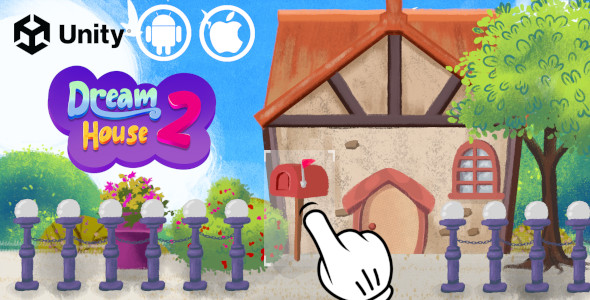
Every child has a vision of their perfect home—a place where imagination shapes the walls, the roof, and the garden. Dream House 2 – Unity Game transforms that imagination into an interactive, digital reality. Designed specifically for young creators, this Unity-based game provides an intuitive sandbox where kids can assemble a house piece by piece, using a rich library of items and tools. More than just a game, it is a creative outlet that combines the joy of construction with the satisfaction of a completed, personalized masterpiece. For parents seeking productive screen time and for developers looking for a polished, kid-friendly asset, Dream House 2 offers a compelling blend of entertainment and educational value. Whether the goal is to inspire a future architect or simply to provide hours of engaging play, this game turns a casual idea into a tangible digital creation that can be shared with pride.
Key Features
Dream House 2 is packed with features that make it a standout choice for both end-users and developers. The following list highlights the core attributes that define this creative experience:
- Unity Engine Foundation: Built on the robust and versatile Unity engine, this game ensures high performance, smooth graphics, and reliable functionality across a wide range of devices. This technical backbone guarantees that the game runs seamlessly, whether on a high-end tablet or a standard smartphone. You can rely on the stability that Unity brings to mobile game development.
- Cross-Platform Accessibility: The game is fully compatible with Android, iOS, and WebGL. This means that whether you are playing on a phone, a tablet, or directly in a web browser, the experience is consistent and accessible. This cross-platform support ensures that no matter the device a family or user has, the game is likely to work without a hitch.
- Extensive Item Library: With 7 distinct categories of items and dozens of unique objects, the customization options are vast. Children can choose from different types of windows, doors, roofs, and decorative elements, ensuring that no two houses will ever look the same. This deep library is the core of the game’s replayability, allowing for endless combinations and creative variations.
- Dedicated Screenshot Feature: Once the dream house is complete, the built-in screenshot feature allows kids to capture their creation from any angle. This function is crucial for sharing accomplishments with family and friends. It turns the digital creation into a memorable keepsake that can be saved and shared instantly, adding a layer of social interaction to the gameplay.
- Designed for Young Users: The interface is simple, intuitive, and tailored for children. Navigation between menus and item placement is a straightforward process, minimizing frustration and maximizing the fun. The game is deliberately designed to be suitable for kids, with large buttons and clear visual feedback to guide young players. This user-friendly approach makes it an excellent first gaming experience. Furthermore, the controls are fully optimized for mobile touch screens, making it accessible for all skill levels.
- Engaging Visual Themes: The game features a dynamic day and night background system. This allows kids to see their house in different lighting conditions, adding a touch of realism and magic to the experience. Watching the sun set behind their creation is a delightful detail that enhances visual appeal and keeps the gameplay fresh and exciting.
- Easy for Developers to Customize: For creators and developers, the asset is designed to be easy to customize and modify. A comprehensive documentation file is included, offering instructions for editing assets, reskinning the interface, and altering features. This makes it an excellent starting point for developers who want to build their own house-building game without starting from scratch.
Who Is This For? Use Cases
While targeted at children, the appeal of this game extends to several different groups, each finding unique value in the experience.
Parents and Families Seeking Creative Play
For parents, finding interactive content that is both safe and constructive is a priority. Dream House 2 serves as an excellent alternative to passive video streaming. It actively engages a child’s brain, encouraging spatial reasoning, color coordination, and planning. It provides a quiet-time activity that promotes focus and creativity. Families can even make it a group activity, where everyone contributes ideas to build a collective dream home. The screenshot feature also allows parents to send the finished product to relatives, showcasing their child’s imagination in a tangible way.
Independent Game Developers and Asset Integrators
For budding developers and independent studios, this Unity project is a goldmine. Instead of spending weeks building the mechanics for object placement and 3D asset management, developers can purchase this asset to use as a functional framework. It offers a complete, working game environment that can be used as a learning tool or as a base for a commercial kids’ game. The included documentation helps developers understand how to swap in new 3D models, altering the theme from a house to a castle, a spaceship, or a store, thereby creating a completely new game with minimal additional code.
Educators and Child Therapists
In educational settings, this game can be a tool for exploring concepts of home and shelter. Teachers can use it in art classes to complement lessons on architecture or community. In therapy, building a house can be a calming, achievable task that helps build confidence in young children. The act of choosing items, placing them in a 3D space, and then photographing the result provides a sense of control and accomplishment that is beneficial in various developmental and therapeutic contexts.
Technical Details & Compatibility
Understanding the technical requirements is essential for ensuring a smooth experience. The game requires Unity 3D version 2021.3.18 or higher to load the project files. If you are a developer, you should install this specific version (or a newer one) to access the full functionality of the asset. The game is not just limited to a single ecosystem; its cross-platform nature allows for deployment on iOS and Android devices, as well as integration into websites via WebGL.
The physics and object placement are optimized to run efficiently on mobile hardware, ensuring that the frame rate remains stable, which is crucial for a user-friendly experience. For players, no heavy setup is required—simply install the app or load the WebGL demo. The contrast between the day and night cycles shows the games dynamic lighting capabilities, proving that visual quality was a priority in the development cycle.
Pros and Cons
To provide a balanced view, here are the strengths and potential drawbacks of this asset based on the provided information.
Pros
- High engagement for kids: The combination of building and decorating is inherently satisfying, providing a deep level of engagement that keeps children entertained for long periods.
- Zero language barriers: Since it is primarily visual and interaction-based, it is accessible to non-English speaking children without complex tutorials.
- Perfect for developers: The project is well-structured and documented, offering a clean base for further development rather than a messy code pile found in many other assets.
- Visual appeal: The Cartoon graphics style is charming and universally appealing to the target age group, avoiding the uncanny valley of realistic rendering.
- Diverse customization: The 7 categories of items ensure a wide variety of choices, preventing boredom and encouraging intricate designs.
Cons
- Specific Unity Version Required: The need for Unity 2021.3.18 or higher means developers with older LTS versions will need to upgrade their editor, which can sometimes be a time-consuming process.
- Limited Content Depth: While there are dozens of items, the selection is finite. Children who play for very long periods may eventually see the same items repeatedly, though the unique placement keeps it fresh.
- No Multiplayer Functionality: As listed, it seems to be a single-player experience. Kids cannot collaborate in real-time, which is a missed feature for siblings or friends playing together.
Frequently Asked Questions
Is this asset compatible with the latest mobile devices?
Yes. Because it is built on Unity 2021.3.18 (or higher), it utilizes the latest mobile rendering technologies and performance optimizations. The game is designed to be compatible with a broad range of mobile devices, including older models, due to the efficient nature of the asset design. As long as the operating system supports Unity 3D (which covers virtually all current Android and iOS devices), the game will run smoothly.
Can developers easily replace the 3D models in the game to create a new theme?
Absolutely. The included documentation specifically covers reskinning and editing assets. Developers can import their own 3D models into the Unity project and swap them out. Because the item category system is relational, you would simply need to assign new assets to the existing categories to change the theme to something like a “Future City” or “Fairytale Castle.” This makes the asset incredibly versatile for developers wanting to create spin-off products.
Does the screenshot feature require internet connectivity to work?
No. The screenshot feature works entirely offline. When a player captures a screenshot, the image is rendered and saved directly to the device’s local storage (such as the Camera Roll or Gallery). This ensures that children can save their creations even if they are playing in airplane mode or in an area without a Wi-Fi connection. They can later share the photo using their device’s standard sharing options.
Final Verdict
In a sea of endless runner games and basic puzzle apps, Dream House 2 – Unity Game stands out as a constructive, wholesome, and genuinely fun interactive experience. It successfully bridges the gap between play and creation, offering children a digital LEGO-like set that is easy to grasp but hard to put down. The inclusion of a screenshot feature is a simple yet brilliant touch that adds significant value, allowing the creators to show off their work. For developers, the clean Unity structure, easy customization, and clear documentation make it a wise investment for building a portfolio piece or launching a new brand of kid-friendly games.
The asset successfully delivers on the promise of letting kids “design and build the dream house that they had in mind for years.” Whether it is a summer afternoon activity or an educational tool, it provides a return on investment through pure joy and creative output. If you are looking for a game that offers more substance than passive tapping, or a codebase that allows for creative iteration, look no further. Take the plunge, download the demo, and watch as the architects of tomorrow get their digital start today. Try Dream House 2 and start building your creation now.