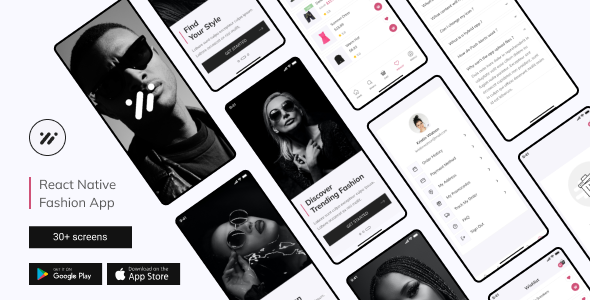
Evelin – React Native Fashion Store App | Expo SDK 45.0.0
Elevate your online fashion business with Evelin, a comprehensive mobile app template built with React Native and Expo. Designed for both Android and iOS, Evelin delivers a polished, high‑performance shopping experience that lets you launch your brand quickly and effortlessly.
Why Choose Evelin?
- Fully integrated React Native Expo SDK 45.0.0 for faster development and smoother OTA updates.
- All core e‑commerce features pre‑built: product catalog, shopping cart, wishlist, reviews, and secure checkout.
- Responsive UI that adapts seamlessly to every device size.
- Ready‑to‑use navigation, state management, and UI libraries, so you can focus on your brand, not boilerplate code.
- Open‑source project with a clean, well‑structured component architecture.
Core Features
- Built on React Native CLI 0.70.6 and modern functional components with React Hooks.
- Fully SVG‑based icon set for crisp, scalable graphics.
- Intuitive cart management: add, remove, and review items.
- Favorites system – users can star their preferred products.
- Comprehensive onboarding flow with multi‑step welcome screens.
- Secure authentication: sign‑in, sign‑up, password reset, and phone verification.
- Detailed product pages with reviews and the ability to leave feedback.
- Robust profile management: edit profile, address book, payment methods, and promo codes.
- Order history, tracking, and confirmation screens with real‑time status updates.
- FAQ section to reduce support friction.
Dependency Ecosystem
@react-navigation/native– navigation core@react-navigation/native-stack,@react-navigation/stack– stack navigators@reduxjs/toolkit– efficient state managementreact-native-collapsible,react-native-flash-message,react-native-modal– UI enhancementsreact-native-keyboard-aware-scroll-view– smooth form experiencereact-native-safe-area-context– device safe area handlingreact-native-svg– scalable icons and illustration support- React 18 and React Native 0.70.6 – the latest stable libraries
Screen Overview
- Welcome & Onboarding (screens 01‑04)
- Authentication flows: Sign‑in, sign‑up, password reset (screens 05‑10)
- Phone verification & confirmation code (screens 11‑12)
- Core shopping experience: Home, Categories, Shop, Product, Favorites, Filter, Cart (screens 13‑20)
- User profile: Edit Profile, Payment Methods, Address Book, Promo Codes (screens 21‑30)
- Order & Checkout journey: Order overview, Checkout, Success & Failure screens (screens 32‑36)
- Support: FAQ, Add a new address (screens 37‑39)
Typography & Assets
- Font: “Mulish” – clean, modern, and highly legible.
- High‑quality source images and icons from Freepik, Depositphotos, Unsplash, Flaticon.
About Our Team
We excel in full‑stack mobile and web development, paired with award‑winning UI/UX design. Whether you bring your own design or need a fresh concept, our creative experts will bring your vision to life with agility and precision.
Need Assistance?
Feel free to reach out on Telegram or WhatsApp for a quick chat or to discuss your project’s requirements. Visit our website for more resources and portfolio examples.