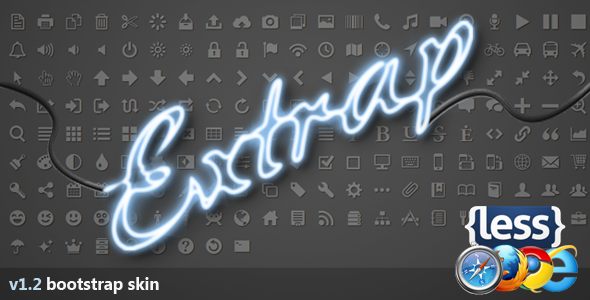
For developers and designers who appreciate the clean, structural power of the Bootstrap framework but crave a departure from the ubiquitous white and light-gray interfaces, Extrap delivers a distinctive visual overhaul. This isn’t just a color swap; it is a meticulously crafted Bootstrap Skin that inverts the traditional aesthetic, producing a sophisticated, darker palette that feels both modern and grounded. By focusing on a gray-scale inverse theme with carefully managed contrast and reduced corner radii, Extrap transforms standard Bootstrap components into a cohesive, production-ready design language. Whether you are building a game portal, a software documentation hub, or a sleek business dashboard, this skin provides the visual foundation to make your project stand out without requiring a complete custom CSS rebuild.
Key Features
Extrap is engineered to be more than just a simple theme override. Its features are designed to ensure consistency, performance, and a unique user experience that retains the utility of Bootstrap while dramatically altering its visual impact. Below are the core elements that define this skin:
- Inverted Gray Color Scheme: The primary feature of Extrap is its complete inverse color palette. Instead of light backgrounds with dark text, Extrap sandwiches a clean, readable foreground against a spectrum of dark gray backgrounds. This reduces eye strain for users in low-light environments and immediately distinguishes your site from the crowd.
- Curated Foreground Palette: A common pitfall with dark themes is poor text contrast. Extrap solves this with a pretty foreground color palette that ensures buttons, links, and active states remain vibrant and legible against the darker canvas, maintaining accessibility without sacrificing the moody aesthetic.
- Reduced Corner Rounding: The design language of Extrap leans towards a more professional and crisp appearance by utilizing less rounded corners on buttons, input fields, and panels. This subtle shift gives the UI a sharper, more modern edge that is often preferred for enterprise or tech-centric applications.
- Animated Progress Bars: Visual feedback is crucial in web design. Extrap refines the standard progress bar component, ensuring the bar moves forward smoothly, providing a satisfying and clear visual indication of loading states, upload progress, or skill levels.
- Fully Customized Components: This skin goes beyond basic buttons and tables. Almost every component available in Bootstrap, including modals, sliders (carousels), popovers, tooltips, and badges, has been restyled to fit the gray theme. This ensures a seamless user experience with no jarring “default” elements breaking the immersion.
- Included Iconic Font (Ligature Symbols): Instead of relying solely on generic glyphs, the skin integrates a custom iconic web font known as Ligature Symbols. This provides a wide array of scalable vector icons that match the aesthetic of the skin, eliminating the need for separate image files and improving load times.
- Development Files (LESS): For advanced users, the skin includes the original LESS (Leaner Style Sheets) source files. This is invaluable for developers who wish to tweak variables, adjust the exact hex codes of the grays, or customize the border radii further without having to hack the compiled CSS.
- Production-Ready Output: While you have the LESS files for customization, the download also includes the compiled and minified CSS. This means you can plug Extrap directly into your project and get a production-ready dark UI immediately.
Who Is This For? Use Cases
While dark themes have a general appeal, Extrap is specifically tailored to meet the needs of certain industries and project types. Its distinct styling provides an immediate thematic fit for content that benefits from a serious, tech-forward, or immersive atmosphere. Here are the primary scenarios where this skin excels.
Game and Entertainment Portals
Gaming websites often rely on dark interfaces to enhance the vibrancy of screenshots, videos, and art. The dark gray background provided by Extrap acts as a neutral backdrop that makes neon colors and high-detail graphics “pop.” If you are building a game review site, a community hub, or a dashboard for a gaming application, the inverse Bootstrap theme reduces glare and creates the expected “gamer” aesthetic that the audience finds familiar and comfortable.
Software and SaaS Dashboards
For admin panels, SaaS analytics, or developer tools, clarity and data readability are paramount. Extrap’s gray palette helps reduce visual noise, allowing data visualizations and code snippets to take center stage. The less rounded corners and crisp borders convey a sense of precision and reliability, which is essential for enterprise software where users expect a streamlined, powerful tool rather than a playful consumer app.
Creative Portfolios and Business Sites
Contrary to popular belief, dark themes can be incredibly elegant for business and portfolio sites. The sophisticated gray gradients of Extrap offer a premium feel that can elevate a photographer’s portfolio, an architect’s project gallery, or a startup’s landing page. By using the Ligature Symbols font for service icons and call-to-action buttons, you can maintain a professional look that engages visitors and encourages them to explore content without the harsh brightness of a standard white theme.
Technical Details & Compatibility
Understanding the technical underpinnings is crucial to ensure a smooth integration. Extrap is built upon the robust foundations of the Bootstrap framework, ensuring that you are not locking yourself into a proprietary system. The current iteration of the product is Version 1.2, which includes significant bug fixes and enhancements over its predecessors.
The skin is designed for compatibility with Bootstrap 2.0 and higher, making it a versatile tool for updating older projects to a new look or for theming newer builds. The package includes comprehensive demo files that showcase the popover, modal, slider, and progress components in action, allowing you to preview the exact behavior before you even upload the files to your server. Furthermore, the inclusion of the LESS build cycle (less, build, demo) demonstrates a commitment to developer-friendly practices. This allows for efficient workflow integration, enabling you to compile your customized skin via your preferred build tools (like Grunt or Gulp) rather than manually editing thousands of lines of CSS. The addition of the web font for icons ensures that UI elements remain crisp on high-resolution (Retina) displays, as they are vector-based rather than pixel-based.
Pros and Cons
To provide a balanced perspective and help you make an informed decision, here is a breakdown of the advantages and potential drawbacks of utilizing the Extrap Bootstrap skin.
Pros
- Aesthetic Differentiation: Instantly separates your product from the millions of default “white and blue” Bootstrap sites.
- Reduced Eye Strain: The dark gray palette is film-friendly and comfortable to view in dark rooms, ideal for long usage sessions.
- Excellent Customization Control: The inclusion of LESS files means you can easily tweak the exact shades of gray or corner radii to match your brand identity perfectly.
- Comprehensive Component Coverage: You won’t have to hunt down third-party plugins to fix the look of default sliders or popovers; they are all restyled out of the box.
- Integrated Icon Set: Saves time and server requests by including a unified vector icon font rather than requiring separate icon libraries.
Cons
- Specific Aesthetic: The inverse theme is a stylistic choice; it may not be suitable for conservative clients or websites with heavy text content that require maximum readability in bright environments.
- Legacy Bootstrap Compatibility: Since it is suited for Bootstrap 2.0 and up, users on the very latest Bootstrap versions (like Bootstrap 5) might need to check for specific structural changes in the grid or components, although the skin has been updated to handle grid bugs noted in the changelog.
- Print Unfriendly: Dark themes generally consume more ink when pages are printed, though this is rarely a concern for the types of web apps this skin targets.
Frequently Asked Questions
Before making a purchase, users often have specific queries regarding implementation and functionality. Here are answers to the most common questions regarding the Extrap skin.
Is Extrap compatible with the latest version of Bootstrap (Bootstrap 5)?
The developer specifies compatibility with Bootstrap 2.0 and higher. While the CSS and LESS files are structured to overwrite the core styles, Bootstrap 5 introduced some significant changes to utility classes and JavaScript components compared to earlier versions. You may need to adjust the markup for certain components like the carousel or modal if you are using a very recent Bootstrap release. However, for the vast majority of use cases on versions 3 and 4, it acts as a seamless drop-in skin. We recommend checking the demo on the latest infrastructure or asking the author for specific notes if you plan to use it with the bleeding edge of Bootstrap 5.
Does the Extrap skin include support for icons or do I need to install them separately?
Extrap includes an exclusive set of icons derived from the “Ligature Symbols” font. This iconic font is bundled within the download package. This means you do not need to subscribe to FontAwesome or Glyphicons separately to get vector icons that match the theme’s weight and style. The font files (.eot, .woff, .ttf, .svg) are provided, and the CSS classes are pre-defined so you can use the icons immediately after installation.
Can I use Extrap to create a WooCommerce shop or WordPress theme?
Technically, yes. Because this is a CSS/LESS skin designed to override Bootstrap classes, it can be used inside a WordPress theme that is built on the Bootstrap framework (such as many themes sold on ThemeForest). However, WooCommerce has its own extensive set of CSS selectors for product grids, cart tables, and checkout forms. While Extrap will beautifully style the general framework elements like buttons and modals, you will likely need to write a few custom CSS rules to ensure that WooCommerce-specific elements (like product stars or sale badges) match the dark gray aesthetics perfectly. The skill to do this is often present in users who choose to buy a skin rather than a full theme.
Final Verdict
In a sea of generic, lightweight themes, Extrap stands out as a highly specialized tool for developers who value the efficiency of Bootstrap but refuse to compromise on visual identity. It successfully tackles the difficult task of creating a dark theme that is both aesthetically pleasing and highly functional. The attention to detail—from the animation of the progress bars to the toning down of corner rounding—shows a deep understanding of UI/UX principles for tech-centric audiences. The inclusion of the LESS files is a major plus, signaling confidence in the codebase and offering a lifeline for those who need precise brand adjustments.
With its bug-fixed grid and an extended demo included in Version 1.2, you are purchasing a stable and polished product. If you are managing a software dashboard, a game directory, or simply want your business website to embody a serious, high-tech aura, this skin offers the fastest route to achieving that goal without starting from scratch. The author’s commitment is evident through their offer of support for fixes and further development, adding a layer of security to your purchase. Don’t settle for the default look. Give your Bootstrap project the sophisticated, edgy presence it deserves.
Ready to transform your interface? Purchase Extrap today and drastically cut your development time while elevating the aesthetic quality of your project. The reverse color scheme is waiting to make your content shine.