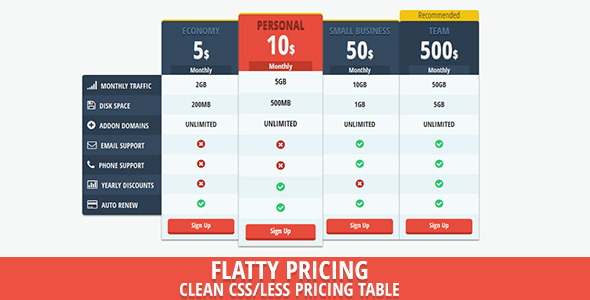
Pricing pages are often where a sale is won or lost. If your pricing structure is confusing, visually dated, or fails to guide the eye to the most valuable plan, you are leaving revenue on the table. Flat Price – Flat UI Pricing Table is a specialized, lightweight plugin designed to solve this exact problem. Built for developers and site owners who need a polished, conversion-focused layout without writing a single line of CSS, this tool leverages the principles of Flat Design to create clean, distraction-free pricing tables that load instantly and work seamlessly with Bootstrap. Whether you are a freelancer showcasing your service tiers or an e-commerce manager launching a SaaS product, this component gives you the structure to present your offers with clarity and professional polish.
Key Features
This isn’t just a generic table; it’s a purpose-built UI kit with a focus on usability and aesthetic consistency. Here is what you get out of the box:
- 10 Preset Color Sets: Match your brand immediately. Whether you need a subtle, corporate blue or a vibrant, conversion-driving green, the predefined swatches eliminate the guesswork of color theory and ensure your pricing table complements your existing website design without constant tweaking.
- Clean Flat Design Aesthetic: The absence of heavy shadows, gradients, and 3D effects isn’t just a stylistic choice; it is a performance and usability tactic. This design language reduces visual noise, making your pricing tiers and call-to-action buttons the undisputed focal points of the page section.
- Valid HTML5 Markup: Clean code is the backbone of a good WordPress theme or plugin. Using strict, valid HTML5 ensures that your content is parsed correctly by all modern browsers and, crucially, is accessible to screen readers and search engine crawlers, which helps with your overall SEO health.
- Bootstrap Compatible: Built to integrate flawlessly with the most popular front-end framework in the world. This means the grid system, responsive breakpoints, and typography scales are already aligned, so the tables will stack and scale perfectly on mobile devices without breaking your layout.
- Well Documented: You shouldn’t need a developer to figure out how to swap out a price or change a button link. The included documentation provides clear, step-by-step instructions that get you up and running in minutes, not hours.
- LESS File Included: For developers who like to maintain design tokens and variables, the inclusion of the LESS source file is a godsend. You can modify the padding, border-radius, or font sizes globally via variables rather than hunting through compiled CSS, allowing for rapid customization and a more maintainable codebase.
Who Is This For? Use Cases
The versatility of this plugin means it fits a wide range of digital products and business models. If you are looking to visually differentiate your service levels, this is your tool.
Freelancers and Digital Agencies
When you are selling web design, copywriting, or marketing retainers, the “Three Tier” model (Basic, Standard, Premium) is standard practice. This plugin allows you to present those tiers with a high perceived value. You can highlight the middle or top package as the “Most Popular” option by utilizing the preset color schema to draw the eye, subtly nudging clients toward the higher-priced package. It helps to legitimize your consultancy and removes the friction of a client having to scroll through a messy spreadsheet or email copy to understand your rates.
SaaS and Subscription Box Owners
If you are using WooCommerce or a membership plugin to handle recurring payments, the landing page still needs to do the heavy lifting. While this plugin manages the visual layout, it pairs perfectly with your backend setup to display monthly vs. yearly billing logic. By using a clean, grid-based layout, you can clearly delineate what features are included in a “Starter” plan versus an “Enterprise” plan, reducing the likelihood of support tickets generated by users who purchased the wrong tier because the features were illegible.
Startups Launching a Landing Page
Speed to market is critical. Instead of coding a pricing section from scratch, which can take a full day including QA testing for responsive mobile behavior, you can drop this table into your HTML structure immediately. Because it is self-contained and independent of server-side logic, it allows your designer to focus on the hero image and copy while this component handles the conversion architecture.
Technical Details & Compatibility
Understanding the technical underpinnings is crucial for developers who need to ensure this fits within their existing stack. This is a static UI resource, meaning it is not a standalone “app” but a set of markup, CSS, and LESS files that you integrate into your project.
The plugin is built to be cross-browser compatible, functioning reliably across modern versions of Chrome, Firefox, Safari, and Edge. As it relies on standard CSS and HTML5, there is no need for jQuery or other JavaScript libraries to render the core layout. This is a significant advantage for performance, as it ensures your pricing page does not suffer from render-blocking scripts. The inclusion of the font Open Sans Condensed via Google Fonts gives the typography a distinct, space-efficient look, though you can easily override this with your own font-family stack in the CSS to align with brand guidelines. The structure is built on a fluid grid, ensuring that whether viewed on a 27-inch monitor or a 5-inch smartphone, the columns collapse gracefully into a stacked, readable format. It is fully compatible with Bootstrap versions 3 and 4, providing flexibility for legacy and modern projects.
Pros and Cons
We believe in transparency regarding the capabilities and limitations of any digital asset. Here is a balanced look at what this pricing table offers.
Pros
- Exceptional Loading Speed: Since it is purely CSS and HTML, there is virtually no performance overhead. This is critical for SEO rankings, as page speed is a confirmed ranking factor for Google.
- Visual Hierarchy: The flat design with distinct color options creates a clean visual separation between plans, making it easy for users to scan and compare features quickly.
- Easy to Customize: The LESS files allow for granular control. If you know how to change a variable like
@primary-color, you can instantly change the entire look of the table to fit your brand. - Responsive Design: It is engineered to be mobile-first, ensuring that the “Buy Now” button is just as thumb-friendly on a tablet as it is on a desktop with a mouse.
Cons
- Static Content: This is not a “drag-and-drop” plugin that connects directly to your WordPress admin panel for editing. If you want to change a price, you must edit the HTML file. It requires a basic understanding of markup to update the text.
- No Built-in Payment Gateway Integration: This handles the display of the plan, but the actual payment processing must be linked to your e-commerce system or a third-party button URL.
- Limited Animation: While the design is crisp, there are no fancy hover animations or parallax effects included. It relies on the effectiveness of flat design aesthetics rather than motion graphics.
Frequently Asked Questions
Is Flat Price compatible with WooCommerce?
Yes, but with a slight caveat. The plugin itself is a static HTML/CSS resource, so it will not automatically sync prices with your WooCommerce inventory. However, you can easily set the “Buy Now” button on each tier to link to the specific WooCommerce product or add-to-cart URL. This is actually a great solution for pre-sales pages, as you can display the value proposition clearly before directing the user to the secure checkout page.
Do I need to know how to code to use this pricing table?
You do not need to be a developer, but basic HTML knowledge is recommended. If you can edit a text file and change a number or a URL inside a link tag, you can operate this item. The process involves copying the provided HTML structure into your project and replacing the placeholder text with your plan names and features. The well-documented instructions guide you through this process step-by-step, making it accessible even to beginners who have a basic understanding of web design.
Does this item include regular updates and support?
As a premium ThemeForest/CodeCanyon asset, you are entitled to six months of support from the author for any bugs or issues related to the item’s core code. More importantly, because this is based on standard HTML5 and CSS, it does not become obsolete with WordPress core updates. You can use it on old WordPress websites and new ones alike without worrying about “version compatibility” breaking your pricing table.
Final Verdict
In a crowded marketplace, Flat Price – Flat UI Pricing Table stands out for its simplicity and effectiveness. We have cut through the complexity often associated with page builders to deliver a lean, focused solution that does exactly what it promises: presents your offers beautifully. If you are a developer looking for a reliable building block for your clients or a business owner who values speed and clarity, this is a sound investment. It eliminates the hours of CSS debugging and “pixel-pushing” that eats into your workday.
The item boasts a solid reputation among the Envato community for its quality code and clean aesthetic. When you consider the cost-per-use—essentially pennies compared to the hours of development time it saves—the value proposition is undeniable. We invite you to integrate this into your next project. Click the link below to download the item, rate it if you find it helpful, and get those pricing tiers live today. Your users will appreciate the clarity, and your conversion rate will thank you.