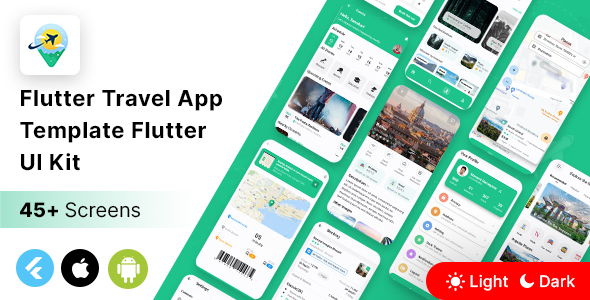
Flutter Travel App Template is a $29 UI kit sold on ThemeForest that provides more than 45 pre-built screens for a travel booking app, covering hotels, flights, trains, buses, cars and experiences. It is built with Google’s Flutter SDK, so a single codebase targets both Android and iOS, and it ships with light and dark themes, Google Maps integration and placeholder-ready screens for API connection. It suits Flutter developers and agencies who need a polished travel interface quickly, rather than teams looking for a finished, backend-connected product.
What the Flutter Travel App Template Actually Includes
The package is best understood as a screen library rather than an application. The vendor lists 45-plus screens, each kept in its own file with components separated out, which matters more than it sounds: a developer can lift the hotel booking flow without dragging the flight search screens along with it. For agencies building a single travel product with several verticals, that modularity shortens the assembly phase considerably.
Navigation and layout patterns are already solved. The kit uses a sliver app bar for collapsing headers, a tab view for switching between booking categories, a carousel slider for promotional content, and a persistent bottom bar for primary destinations. These are the structural decisions that eat days on a from-scratch build, and having them pre-assembled in idiomatic Flutter widgets means the codebase starts on familiar ground rather than with custom scaffolding.
Theming is handled at the framework level. Both a light and a dark theme are included, so the app can respond to system appearance settings without a second design pass. Animated splash, login and registration screens are provided, along with alert dialogs, a notification page, a search page, a trip ideas page and account settings. Google Maps is integrated for location display.
Two claims deserve scrutiny. The listing says the template is “ready to integrate api,” which means the screens expect data but no backend, sample JSON or service layer is described. The vendor also states Android 11 and iOS 14 readiness, which reflects the December 2021 release date rather than current platform targets. Neither is a defect in a UI kit, but both set expectations about how much work remains after purchase.
Where a Flutter Travel App Template Fits in a Real Project
The strongest use case is a client project with a defined brand and a tight timeline. A freelancer who has won a hotel or multi-modal booking app contract can present a working, animated prototype within days, then spend the remaining budget on the booking engine, payment integration and inventory APIs — the parts that actually differentiate the product. The breadth of verticals (hotel, car, flight, train, bus, experiences) means one purchase can serve several client pitches in the same sector.
It also works well for internal prototypes and investor demos. Stakeholders respond to a navigable app far more readily than to wireframes, and the animated splash and carousel give a presentation enough polish to be taken seriously without pretending the backend exists.
Developers learning Flutter benefit too. Reading a coherent, multi-screen codebase with separated components teaches structure in a way that isolated tutorials rarely do, particularly around sliver layouts and tab navigation.
There are clear situations where this is the wrong purchase. A team that needs a production-ready booking app with authentication, payments and live inventory will find the kit covers perhaps a fifth of the total work and may prefer a full application script with a backend. A project with a fully custom design system will spend more time stripping out the template’s visual language than building fresh. And anyone requiring current Flutter and platform versions should confirm compatibility with the vendor before buying, since the listing documents only an initial December 2021 release.
Strengths and Limitations of This Flutter Travel UI Kit
Strengths
- Genuine cross-platform coverage. One Flutter codebase serves Android and iOS, so there is no parallel design or development track.
- Breadth of booking verticals. Hotels, flights, trains, buses, cars and experiences are all represented, which is unusual for a template at this price.
- Component separation. Individual files per page and component make selective reuse practical rather than all-or-nothing.
- Dual themes out of the box. Light and dark modes are built in, removing a task that is often deferred indefinitely.
- Low entry cost. At $29 the kit pays for itself if it saves even a day of layout work.
- Established author. The item is published on ThemeForest, a marketplace with a review process and buyer protection, which reduces the risk of an abandoned code drop.
Limitations
- No backend, no sample data layer. The listing promises API readiness but does not describe any service architecture, mock data or state management approach, so integration is entirely the buyer’s responsibility.
- Dated platform claims. Android 11 and iOS 14 targets point to a 2021 codebase; the vendor does not state compatibility with newer Flutter releases or current Android and iOS versions.
- Single documented release. The update history shows only the initial December 2021 release, with no evidence of ongoing maintenance.
- No disclosed sales figures or ratings. There is no independent purchase history to gauge reliability or community support.
- Design language is fixed. The visual style is opinionated, and heavy rebranding across 45 screens is real work.
- Documentation is not described. The listing mentions clean, easy-to-understand code but does not detail setup instructions or support terms.
How This Travel App Template Compares With the Wider Category
Travel UI kits on marketplaces generally fall into three tiers. The first is single-purpose kits covering one vertical, usually hotels or flights, with a dozen or so screens. The second is multi-vertical kits like this one, where breadth is the selling point. The third is complete application scripts with a backend, admin panel and payment processing, typically priced an order of magnitude higher.
Against the first tier, the Flutter Travel App Template wins on scope. A developer evaluating a hotel-only kit gets one flow; here the same purchase covers five transport and accommodation types plus experiences, which matters for anyone pitching to clients across the sector. Against the third tier, it loses decisively on completeness — but that comparison is unfair, because the two solve different problems. A backend-included script constrains the developer to its architecture; a UI kit leaves every technical decision open.
The more useful comparison is with building from scratch or from open-source screen collections. Open-source Flutter travel UIs exist, but they vary wildly in code quality and rarely include dark themes, animated onboarding and this many screens in a coherent system. Building from scratch gives total control at the cost of weeks. The template sits in the middle: faster than scratch, more coherent than scattered open-source snippets, and cheaper than a full script.
Frequently Asked Questions
Is the Flutter Travel App Template a complete app or just a UI kit?
It is a UI kit, not a functioning booking application. The 45-plus screens provide layouts, navigation and animations, but there is no backend, database, payment processing or authentication service included. Buyers receive the interface layer and are expected to connect their own APIs and business logic before the app can take a real booking.
Does this template work with the latest version of Flutter?
The vendor does not state current Flutter compatibility. The listing documents Android 11 and iOS 14 readiness and a single initial release in December 2021, which suggests the code targets an older Flutter version. Prospective buyers should ask the author directly about supported Flutter and Dart versions, and expect to resolve deprecation warnings during migration.
Can the Flutter Travel App Template be rebranded for a client project?
Yes, the structure supports rebranding, but the effort scales with how far the design departs from the original. Colours, typography and theme values are centralised through Flutter’s theming, so a moderate rebrand is straightforward. Replacing the layout language across 45 screens is closer to a redesign and should be budgeted as such.
What skills are needed to use this Flutter UI kit effectively?
Comfortable Flutter and Dart development is the baseline. The kit assumes familiarity with widget composition, state management and REST API consumption, since none of those are provided. Developers new to Flutter can learn from the codebase, but shipping a commercial product with it requires enough experience to architect the data layer independently.
Verdict: Who Should Buy the Flutter Travel App Template
This Flutter Travel App Template is a sensible purchase for Flutter developers, freelancers and small agencies who need a broad, well-organised travel interface quickly and intend to build the backend themselves. The $29 price is easily justified by the screen count and the multi-vertical coverage, and the component separation makes selective reuse realistic. It is a poor fit for anyone expecting a working booking product, for teams that need confirmed compatibility with current Flutter and platform versions, or for projects with a design system too far from the template’s own. Buyers should verify maintenance status and Flutter version support with the author before committing, because the listing is silent on both.