Key Features
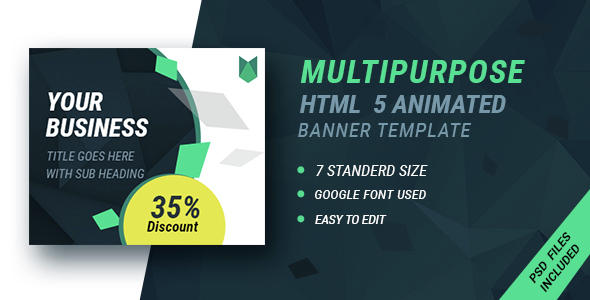
This Business | HTML5 Google Banner Ad 16 template pack is engineered for speed, scalability, and cross-platform consistency. Below are the standout capabilities that set it apart from static image alternatives.
- Seven Standard IAB Sizes Included: The bundle ships with 160×600 (skyscraper), 300×250 (medium rectangle), 728×90 (leaderboard), 300×600 (half page), 468×60 (banner), 250×250 (square), and 336×280 (large rectangle). This breadth means you can deploy a cohesive campaign across Google Display Network, AdSense, social media, and programmatic ad exchanges without resizing manually.
- HTML5 & CSS3 Animations: Instead of static GIFs or outdated Flash files, these templates leverage modern HTML5 and CSS3 transitions. Elements like call-to-action buttons, logos, and taglines can fade, slide, or pulse, increasing click-through rates by drawing the eye naturally.
- Google Web Fonts Integration: The typography uses Google Web Fonts, ensuring your brand’s typeface renders crisply on every device, from high-density Retina displays to older monitors. No font licensing issues or missing glyphs.
- Fully Editable in Google Web Designer: Every layer, timeline, and event is accessible within the free Google Web Designer tool. You do not need advanced coding knowledge to change colors, swap images, or adjust animation timings. The file structure is project-ready, not a bundle of loose code.
- Complimentary PSD Source Files: Seven layered PSD files are included for free. These allow professional designers to tweak backgrounds, gradients, or complex overlays inside Adobe Photoshop before exporting assets into the HTML5 templates.
- Comprehensive Documentation: A well-structured PDF guide walks you through installation, font swapping, image replacement, and publishing. This reduces onboarding time to under fifteen minutes even if you are new to Google Web Designer.
Who Is This For? Use Cases
These templates are purpose-built for marketing teams, freelance designers, small business owners, and agencies who need production-ready ad creatives that comply with Google’s strict HTML5 certification standards.
Digital Marketing Agencies
Agencies managing multiple client accounts can use this pack to standardize their creative output. Instead of building banners from scratch for each campaign, you can duplicate a template, swap the client’s logo and tagline, and export all seven sizes in under an hour. The CSS3 effects ensure that even non-animated banners retain a polished, premium look that justifies higher retainer fees.
E-commerce Store Owners
If you run a Shopify, WooCommerce, or Magento store and run Google Shopping Ads combined with display campaigns, these banners can retarget users with product-specific messaging. The 300×250 and 728×90 sizes are particularly effective for Facebook and Instagram placements. The PSD files allow you to overlay discount badges, countdown timers, or “Free Shipping” stickers without pixelation.
SaaS & Tech Startups
Tech companies often launch multiple A/B tests for ad copy and color schemes. Because these templates are built in Google Web Designer, you can quickly duplicate projects, change the hero text, and test variations on the Google Display Network. The HTML5 output is lightweight, so landing pages load faster even when ads are embedded via Google Tag Manager.
Freelance Designers & Creative Agencies
Instead of billing hourly for custom ad builds, experienced freelancers can purchase this bundle, customize each template with client branding, and resell the final HTML5 ads as part of a larger web design package. The included documentation ensures you can hand off the editable files to clients who want to make future updates themselves.
Technical Details & Compatibility
The Business | HTML5 Google Banner Ad 16 templates are authored with Google Web Designer version 12.0 or later. They are compatible with all major desktop browsers (Chrome, Firefox, Safari, Edge) and mobile browsers on iOS and Android. Because the animations rely on CSS3 and standard JavaScript without external libraries, they pass Google’s ad review process reliably.
The templates do not require a content management system, database, or server-side scripting. They are static HTML5 files that function equally well on a local hard drive, a shared hosting server, or a CDN. The PSD files are compatible with Adobe Photoshop CS6 and above, including Photoshop 2024. Fonts are sourced from Google Fonts, so no additional font file uploads are necessary.
The banner dimensions adhere to IAB (Interactive Advertising Bureau) standard sizes, ensuring they fit seamlessly into Google Ad Manager, AdSense, and third-party ad exchanges. No custom CSS media queries are needed for responsive behavior because the canvases are fixed-size and scale proportionally when embedded.
Pros and Cons
Pros
- Time-to-deploy is extremely low. You can have a branded, animated campaign live on your network within an hour of purchase.
- Seven sizes cover the most common ad slots. This eliminates the need to purchase separate templates for leaderboard and skyscraper placements.
- Free PSD files offer a fallback. If you prefer to design static layers in Photoshop before importing them, the included PSDs give you complete control over raster graphics.
- No recurring subscription. This is a one-time purchase, not a monthly license. You own the templates indefinitely.
- Well-suited for non-coders. Anyone who can use drag-and-drop tools can edit these banners. The Google Web Designer interface is intuitive for beginners.
Cons
- Requires free software download. You must install Google Web Designer to edit the templates. The tool is not cloud-based, so you need a Windows or macOS computer.
- Limited animation complexity. The templates use entry-level CSS3 effects. If you need intricate timeline-based animations with multiple bezier curves or video overlays, you may outgrow these templates quickly.
- No pre-built analytics tracking. Click-tracking code is not embedded. You will need to add your own Google Ads conversion tracking or Google Analytics event parameters manually.
- PSD files are flat. While useful, the PSD files are not smart objects; changing a background color requires selecting pixels manually rather than adjusting a live style layer.
Frequently Asked Questions
Do I need coding skills to edit these HTML5 banner ads?
No. The templates are built for the free Google Web Designer tool, which offers a visual interface with drag-and-drop functionality. You can change text, colors, fonts, and images without writing a single line of HTML or JavaScript. However, if you want to customize advanced interactions like custom click events or complex animation curves, basic knowledge of CSS and JavaScript will help, but it is not required for standard edits.
Can I use these banners on social media platforms like Facebook and Instagram?
Yes. While the templates are optimized for the Google Display Network, the standard IAB sizes—especially 300×250, 728×90, and 250×250—are widely supported by Facebook Ads Manager, Instagram, LinkedIn, and Twitter. You need to export the final HTML5 files and upload them as HTML5 ad creatives. Facebook accepts HTML5 ZIP files for custom ad formats, and these templates comply with those requirements.
Is there a money-back guarantee or support included with this purchase?
Yes. This product is sold on ThemeForest and CodeCanyon, which offer a 30-day money-back guarantee if the item is found to be “not as described.” Support is provided by the author directly via the item’s support platform. The author typically responds within 24 hours for questions related to template editing, file corruption, or missing assets. Extended customization requests may be outside the scope of free support.
Final Verdict
The Business | HTML5 Google Banner Ad 16 template pack delivers exactly what busy marketers and designers need: a reliable, seven-size system of HTML5 ad creatives that look professional, load instantly, and comply with Google’s ad policies. The inclusion of PSD source files and detailed documentation removes the typical friction points of template customization. With a solid sales history on ThemeForest and an author reputation for consistent updates, this pack is a low-risk, high-ROI investment for anyone running display advertising campaigns.
If you are tired of cobbling together banners from scratch or paying expensive agencies for basic retargeting creatives, this bundle will pay for itself in saved hours on the very first campaign. Click the purchase button, download the files, and have your first banner set ready for upload in less than an hour.