Key Features
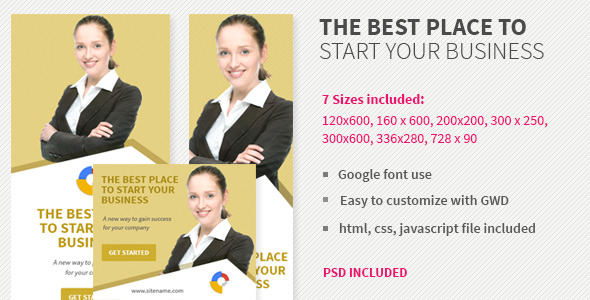
This Corporate or Business Services Provider Ad Banner is built for marketing professionals, agency owners, and business teams who need high-performing visual assets fast. It was designed using Google Web Designer (GWD), which gives you the ability to create rich, interactive HTML5 ads without deep coding skills. The banner pack includes the four most frequently used display ad sizes in the market: 160×600 (skyscraper), 300×250 (medium rectangle), 728×90 (leaderboard), and 180×150 (small rectangle). This ensures immediate compatibility with major ad networks like Google AdWords (now Google Ads), programmatic platforms, and social media ad placements.
- Google AdWords Compatible & HTML5 Ready: Every banner size is coded in clean HTML5 and fully compliant with Google’s display ad standards. You can upload these directly to Google Ads, Display & Video 360, or any third-party ad server without compatibility issues.
- Four Standard Commercial Sizes: The pack covers 160×600 (vertical skyscraper for sidebars), 300×250 (standard rectangle for content blocks), 728×90 (leaderboard for headers/footers), and 180×150 (small rectangle for tight placements). This range solves the problem of needing to resize or reformat for different campaigns.
- Trendy & Modern Visual Design: The layout uses contemporary design trends including clean typography, balanced negative space, subtle gradients, and dynamic elements that catch user attention without being aggressive. This design language works for corporate services, B2B offers, SaaS promotions, and professional service announcements.
- Fully Editable in Google Web Designer: All source files are included, allowing you to open the banners in Google Web Designer (free software from Google) and change text, colors, images, or animations. The structure is simple enough for beginners yet flexible enough for advanced customization.
- Multipurpose Business Suitability: The design is intentionally neutral and professional, making it appropriate for financial services, legal firms, consulting agencies, software companies, healthcare providers, real estate, logistics, and any corporate product or service offer.
- Easy Content Modification: You do not need to touch code to update the banner. Google Web Designer provides a visual stage where you can double-click text layers, swap background images, and adjust call-to-action buttons in minutes. All layers are logically named and grouped.
Who Is This For? Use Cases
Digital Marketing Agencies & Freelance Ad Buyers
If you manage multiple clients across different industries, this banner pack saves you hours of production time. Instead of designing from scratch for every campaign, you have a proven, professional template that you can rebrand in under 30 minutes. The four sizes mean you can launch a full display campaign across the Google Display Network, social media, and partner sites with one purchase. The HTML5 format ensures animations play smoothly across all modern browsers and devices, including mobile and tablet.
Corporate Marketing Teams & In-House Designers
For internal teams responsible for quarterly product launches, service promotions, or brand awareness campaigns, this banner offers consistency across all digital touchpoints. The clean corporate look aligns with established brand guidelines, and the editable files allow you to follow your company’s style guide precisely. You can produce ads for newsletters, blog sidebars, landing page headers, and retargeting campaigns from one source file.
Startups & Small Business Owners
If you are bootstrapping your marketing and cannot afford a full-time designer, this template gives you professional-level assets at a fraction of the cost. You do not need to learn complex animation software or hire a freelancer. With Google Web Designer (free), you can update the banner every time you run a new promotion or seasonal sale. The Google AdWords compatibility means you can upload and start driving traffic immediately.
E-commerce & Service Providers
Businesses offering professional services—such as accounting, legal advice, IT support, property management, or business consulting—will find the design suitable for establishing credibility. The banner conveys trust and competence without being flashy or distracting. It works well for both lead generation campaigns and direct response offers, especially when paired with a clear call-to-action like “Get a Quote” or “Learn More.”
Technical Details & Compatibility
This banner pack was created using Google Web Designer, version 1.x or later. All files are provided in the GWD project format, ensuring you can open and edit them with the free software available from Google. The output is HTML5, which is the industry standard for modern display advertising. The banners are fully compatible with Google Ads (formerly AdWords), Display & Video 360, Sizmek, Flashtalking, and most major ad servers. They render correctly in Chrome, Firefox, Safari, Edge, and mobile browsers on iOS and Android. The design does not rely on Flash or outdated plugins, so there will be no playback issues. The file sizes are optimized for fast loading, which helps with ad server latency and user experience. Stock images are not included in the purchase; the preview images were sourced from PhotoDune (Envato’s stock photography marketplace). You can purchase separate royalty-free images or use your own. The four sizes included are exactly 160×600, 300×250, 728×90, and 180×150 pixels. No other dimensions are provided in this pack, though you can resize the GWD file yourself if needed.
Pros and Cons
Pros
- Full compatibility with Google Ads: Upload directly without reformatting or code edits.
- Four most requested sizes: Covers skyscraper, rectangle, leaderboard, and small rectangle for comprehensive campaign coverage.
- Google Web Designer source files included: Complete control over every visual element, from fonts to animation timing.
- Trendy yet professional design: Works for a wide range of corporate and business service industries.
- Easy for non-developers: The visual editor interface is accessible if you are comfortable with basic design software.
- Fast production time: You can have a campaign-ready banner in under an hour.
- Single purchase, no subscription: One-time fee, use it on unlimited projects for yourself or your clients.
Cons
- Stock images not included: You need to provide or purchase your own photography, which adds cost and time.
- Only four sizes: If you need unusual dimensions like 970×250 or 300×600, you will need to manually resize the GWD file.
- Requires Google Web Designer software: You must download and install the free tool to edit, which may be an extra step for some users.
- No separate PSD or AI files: Edits are done exclusively within Google Web Designer, not Photoshop or Illustrator.
- Basic animation complexity: The animations are clean but not highly complex. If you need advanced motion graphics or intricate interactions, this may be too simple.
Frequently Asked Questions
Do I need coding experience to edit this Corporate or Business Services Provider Ad Banner?
No. The banner is built in Google Web Designer, which uses a drag-and-drop visual interface. You can edit text, change colors, replace images, and adjust button positions without writing any HTML, CSS, or JavaScript. All layers are clearly labeled, and the file structure is intuitive. If you have basic computer skills and experience using any design software, you can modify this banner.
Is this banner compatible with Facebook Ads or other social media platforms?
Yes, it is compatible with social media ad platforms that accept HTML5 or standard image uploads. For Facebook, you can export the banner as a static image or use the HTML5 asset if the platform supports it (some social platforms require specific formats). The 300×250 and 728×90 sizes are commonly used in Facebook’s Audience Network and Instagram’s ad placements. For best results, follow each platform’s specific upload guidelines.
Does this product include support or updates?
This item is sold through CodeCanyon, which includes standard support from the author for issues related to the product’s functionality. You can contact the seller directly through the Envato marketplace if you encounter bugs or need clarification on how to edit specific elements. However, customization services (such as changing the design or adding new sizes) are not included in the standard purchase. The author has a reputation for being responsive, as indicated by the product’s positive feedback and sales history.
Final Verdict
The Corporate or Business Services Provider Ad Banner is a smart investment for anyone who regularly creates display advertising. It solves the core pain point of starting from scratch for every campaign. Instead of designing one-off banners that may not be compatible across ad networks, you get four professional, Google-approved sizes that are ready to go. The fact that it is built in Google Web Designer means you have total creative control without needing a developer. The design is current, clean, and versatile enough to represent a law firm, a tech startup, or a logistics company with equal credibility. The author has a strong portfolio of ad templates on CodeCanyon, including popular items for travel, retail, and finance, which speaks to their experience in creating functional marketing assets. If you value speed, compatibility, and a polished corporate aesthetic, this banner pack will serve you well. Purchase it once and you will have a reliable template for your next campaign, your next client project, or your next seasonal promotion. With the files in hand, you can stop spending hours on design and start focusing on what matters: getting your ads in front of the right audience and converting them into customers. Give your business the visual edge it needs with this practical, high-quality ad banner solution.