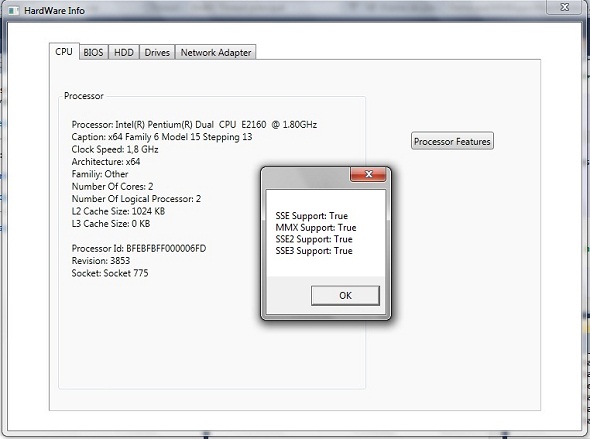
For developers working on system utilities, diagnostics, or hardware inventory management, extracting reliable hardware information can be a significant hurdle. The complexity of querying system components like the motherboard, CPU, or graphics card often requires deep knowledge of Windows Management Instrumentation (WMI) and low-level APIs. HardwareLib simplifies this entire process, providing a robust .NET Library that delivers comprehensive hardware data through an intuitive and clean interface. This library is purpose-built for developers who need to access manufacturer details, serial numbers, model names, and more across a wide range of devices, transforming hours of tedious coding into a few method calls. With the release of Version 1.2, including bug fixes and a dedicated GPU demo, this library has become an even more reliable asset for any .NET developer building performance or system-level applications.
Key Features
HardwareLib is engineered to reduce development time and increase accuracy when interfacing with system hardware. Below are its core features that make it a powerful addition to your development toolkit:
- Comprehensive Hardware Coverage: The library provides dedicated classes for all major system components, including the CPU, Motherboard, RAM (Logical Memory), Graphics Card (GPU), Network Adapters, CD/DVD Drives, and Hard Drives (HDD). This ensures a single source for all your hardware data needs.
- Simple API with WMI Abstraction: Under the hood, HardwareLib uses WMI (Windows Management Instrumentation) to gather data. However, it abstracts away the complex queries and connection strings, allowing you to retrieve information like the processor name or hard drive serial number with just a few lines of C# code.
- Detailed Device Properties: Each hardware class exposes essential properties such as Manufacturer, Model, Serial Number, and Name. For storage devices, the library also provides access to logical disk partitions through a separate LogicalDisk class, giving you a complete view of the storage topology.
- CPU Feature Detection: A standout feature is the ability to check for specific processor capabilities. The library includes dedicated functions like IsProcessorFeaturePresent(), IsMMXSupported(), Is3DNowSupported(), IsSSE3Supported(), IsSSE2Supported(), and IsSSESupported(). This is invaluable for software optimization and compatibility checks.
- Lightweight and Focused: As a .NET Library, it is easy to integrate into any Windows Forms, WPF, or ASP.NET application without adding significant overhead. It is designed for ease of use, allowing you to enumerate device lists and select specific devices by their ID.
Who Is This For? Use Cases
This library is not for end-users but for professional developers and enthusiasts who build applications that need to interact with the physical hardware of a Windows machine.
System Utility and Diagnostic Developers
If you are building a system information tool, a hardware monitor, or a diagnostic application similar to Speccy or CPU-Z, HardwareLib provides the foundational data layer. With the isolated GPU class demo released in version 1.2, you can now confidently integrate Graphics Card data retrieval, displaying key metrics and model information to your users.
Enterprise Asset Management and Inventory Developers
For IT professionals creating internal tools to inventory company workstations or servers, this library simplifies the process. You can quickly iterate over all network adapters, hard drives, and RAM modules to log serial numbers and manufacturers for asset tracking. The ability to query CD/DVD drives and Network Adapters ensures you have a complete picture of the machine’s configuration.
Software Optimization and Game Developers
Game developers or creators of high-performance applications can use the CPU feature detection functions (SSE, MMX, 3DNow!) to determine which instruction sets are available on the user’s processor. This allows you to write optimized code paths, ensuring compatibility with older hardware while leveraging speed on modern CPUs. The CPU class makes this check trivial.
Technical Details & Compatibility
HardwareLib is a specialized .NET Library designed exclusively for the Windows operating system, as it relies on WMI. Compatibility is a key strength of the library:
- Framework Support: The library is built for the .NET Framework, making it compatible with older Windows desktop applications and services.
- Windows Compatibility: It works across a wide range of Windows versions, including Windows 7, Windows 8, Windows 10, and Windows 11, as well as Windows Server editions where WMI is available.
- Version Updates: The active development history shows a commitment to improvement. Update 27/04/2012 (Version 1.2) fixed bugs and added a demo for the GPU class. Update 6/03/2011 introduced the powerful CPU feature detection functions, showing that the library has evolved based on developer feedback.
Pros and Cons
To provide a balanced perspective, we have analyzed the library’s strengths and limitations based on its feature set and technical architecture.
Pros
- High Efficiency for WMI Access: Saves significant development time by eliminating the need to manually write and debug complex WMI queries.
- Broad Hardware Support: Covers all major internal components from CPU to optical drives, reducing the need for multiple third-party libraries.
- Detailed Partition Data: The inclusion of the LogicalDisk class is a smart addition, allowing developers to map physical drives to their logical volumes.
- Essential CPU Checks: The built-in functions for checking SSE, MMX, and 3DNow! support are unique and highly useful for performance-critical applications.
- Clean and Simple API: The example code shows a very flat learning curve. Creating a CPU or HDD object and calling a method is intuitive for .NET developers.
Cons
- Windows Only: Since it relies on WMI, this library cannot be used for cross-platform .NET Core or MAUI applications targeting Linux or macOS.
- Requires Administrative Privileges (Potential): While not always the case, querying certain WMI namespaces (like serial numbers for hard drives or BIOS) may require the application to run with elevated administrator rights.
- Performance Profile: Depending on the system, WMI queries can have a small but noticeable latency compared to direct DMI or BIOS calls. This is generally negligible for inventory tools but may be a consideration for real-time monitors.
- Limited Support for Modern Hardware Interfaces (Inferred): Based on the last update dates, the library may not natively support the latest NVMe drive health properties or modern GPU sensor data, focusing instead on basic identification and model reporting.
Frequently Asked Questions
Can I use HardwareLib in an ASP.NET web application?
Yes, HardwareLib can be used in ASP.NET applications, but with a critical caveat. Since it relies on WMI to gather hardware information, the web application must be running on a Windows server. Furthermore, the application pool identity must have the necessary permissions to query WMI on the host machine. It is commonly used for server-side inventory scripts or admin panels hosted on Windows IIS.
Does HardwareLib support 64-bit and 32-bit systems equally?
Absolutely. HardwareLib works seamlessly on both 32-bit (x86) and 64-bit (x64) versions of Windows. The .NET Framework and WMI are fully compatible with both architectures. The library handles the underlying WMI calls in a way that is transparent to the application, ensuring that hardware data is returned accurately regardless of the system’s operating system bitness.
Does this library include support or documentation?
As a standard CodeCanyon or ThemeForest asset, HardwareLib typically includes basic code examples and documentation (such as the usage shown for CPU and HDD classes). The purchase usually grants you access to the item’s support forum or ticket system for bug reports or feature requests. The Version 1.2 update, which included a GPU demo, shows that the author is responsive to improvements.
Final Verdict
HardwareLib delivers exactly what it promises: a straightforward, effective way for .NET developers to unlock Windows hardware information without the typical pain of WMI. Its strength lies in its simplicity and the depth of its hardware coverage, from basic CPU names to logical disk partitions and processor feature flags. For developers creating system diagnostics, inventory tools, or performance-optimized software, this library removes a significant technical obstacle. The author’s history of updates, including the bug fixes in version 1.2 and the addition of CPU feature detection, demonstrates a commitment to code quality and developer needs. If you are spending valuable time writing and debugging WMI queries, you are losing efficiency that could be spent on your application’s core logic. Stop wrestling with low-level system data and start building with HardwareLib. Get your copy today from CodeCanyon and streamline your next .NET project.