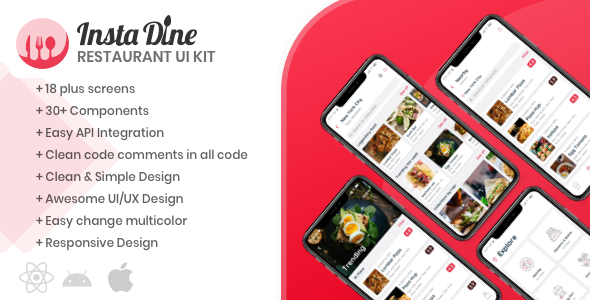
InstaDine is a comprehensive React Native UI Kit Template designed specifically for restaurant directory and food delivery applications. This ready-to-use solution offers developers and designers a significant head start by providing over 20 professionally designed screens and essential components that can be easily customized to create stunning restaurant apps.
Why Choose InstaDine for Your Restaurant App Development?
Building a restaurant directory or food delivery app from scratch requires extensive time and resources. InstaDine eliminates these challenges by offering:
- Time-saving development: Skip months of UI/UX design work with pre-built screens
- Professional aesthetics: Modern, clean designs optimized for user engagement
- Cross-platform compatibility: Works seamlessly on both iOS and Android
- Scalable architecture: Easy to extend with additional features as your app grows
Key Features of InstaDine UI Kit
Comprehensive Screen Collection
The template includes all essential screens for a complete restaurant directory experience:
- Homepage with featured restaurants
- Detailed restaurant profiles
- Menu browsing interface
- Food item details with customization options
- Search and filtering functionality
- User account management
- Order tracking system
Ready-to-Use Components
InstaDine comes packed with reusable UI elements that accelerate development:
- Customizable restaurant cards
- Interactive rating systems
- Location-based search components
- Food category filters
- Shopping cart interface
- Checkout flow screens
Technical Specifications
The template is built with modern development standards in mind:
- Framework: React Native 0.64+
- Navigation: React Navigation implementation
- State management: Redux integration ready
- Styling: Flexible styling with StyleSheet
- Compatibility: Supports both iOS and Android platforms
Live Demo and Preview
Experience the InstaDine UI Kit in action through our Expo demo:
The demo showcases the complete user flow from restaurant discovery to order placement, giving you a clear understanding of the template’s capabilities.
Implementation Guide
Getting Started
To begin using InstaDine in your project:
- Clone or download the template files
- Install required dependencies using npm or yarn
- Run the development server
- Start customizing screens to match your brand identity
Customization Options
The template is designed for easy modification:
- Change color schemes to match your brand
- Modify typography and spacing
- Add or remove components as needed
- Integrate with your backend API
Use Cases and Applications
InstaDine is versatile enough to power various types of food-related applications:
- Restaurant discovery apps: Help users find nearby dining options
- Food delivery platforms: Complete ordering system with tracking
- Cafe directories: Specialty coffee shop finders
- Hotel restaurant guides: For hospitality businesses
- Food review platforms: With rating and recommendation features
Credits and Resources
InstaDine utilizes high-quality resources to ensure professional results:
- Premium images from Unsplash
- Icons from TheNounProject
- Latest React Native components
- Community-vetted design patterns
Support and Community
Join our developer community for assistance and updates:

Our active Discord channel provides direct access to template updates, troubleshooting help, and networking opportunities with other developers implementing InstaDine in their projects.