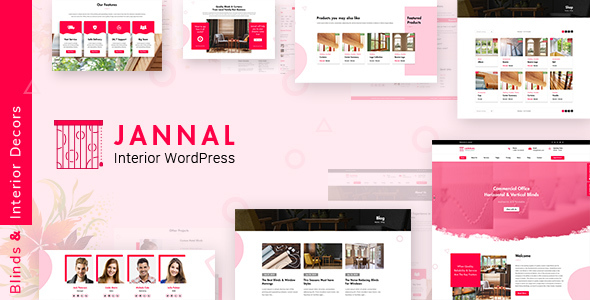
Jannal is a premium WordPress theme specifically designed for interior decoration businesses, home furnishing stores, and design professionals. This versatile theme offers a complete solution for showcasing window treatments, doors, furniture, and other home decor products with elegant layouts and powerful eCommerce functionality.
Key Features of Jannal WordPress Theme
The Jannal theme stands out with its specialized features tailored for interior design businesses:
- WooCommerce Integration: Fully compatible with the latest WooCommerce versions for seamless online sales of furniture, curtains, blinds, and home accessories
- 10 Pre-designed Pages: Professionally crafted templates including Home, About, Team, Services, FAQ, Pricing, History, Shop, and Contact pages
- Customizable Portfolio Layouts: Showcase your interior design projects with multiple gallery and portfolio display options
- Responsive Design: Perfectly adapts to all devices from desktops to mobile phones
- Visual Customization: Easy-to-use customization options for colors, fonts, and layouts without coding knowledge
Who Should Use Jannal Theme?
This theme is ideal for various professionals and businesses in the home decor industry:
- Interior Designers: Create stunning portfolios of residential and commercial projects
- Window Treatment Specialists: Showcase curtains, blinds, and shutters with beautiful product displays
- Furniture Retailers: Build an online store for contemporary and classic furniture pieces
- Home Decor Shops: Sell lighting, textiles, and decorative accessories with WooCommerce
- Architecture Firms: Present building designs with integrated portfolio features
Theme Customization and Flexibility
Jannal offers extensive customization capabilities to match your brand identity:
- Drag-and-Drop Page Builder: Create unique layouts without technical skills
- Typography Options: Choose from hundreds of Google Fonts to establish your visual style
- Header Variations: Multiple header styles including transparent, sticky, and classic options
- Color Schemes: Pre-designed palettes that can be easily modified to match your branding
- Custom Widgets: Specialized widgets for testimonials, recent projects, and product showcases
Technical Specifications
Jannal maintains high technical standards for performance and compatibility:
- WordPress Compatibility: Regularly updated for the latest WordPress versions (currently compatible with WP 6.5+)
- PHP Support: Works with PHP 8.2 and higher for optimal performance
- SEO Optimized: Clean code structure and schema markup for better search engine visibility
- Translation Ready: .po/.mo files included for multilingual websites
- Browser Compatibility: Tested across Chrome, Firefox, Safari, Edge, and mobile browsers
Theme Support and Documentation
Jannal comes with comprehensive support resources:
- Detailed Documentation: Step-by-step guides for installation and customization
- Dedicated Support Forum: Access to theme developers for technical assistance
- Regular Updates: Frequent compatibility updates and security patches
- Demo Content Import: One-click import of demo content to jumpstart your website
Recent Updates and Improvements
The development team continuously enhances Jannal with new features and optimizations:
- Version 3.0 (2025.02.15): Updated premium plugin sources and latest compatibility fixes
- Version 2.9 (2024.11.29): WordPress 6.4 compatibility and WooCommerce template updates
- Version 2.8 (2024.08.23): Improved importer and bulk plugin installation
- Version 2.7 (2023.11.07): WordPress 6.3.2 support and Unyson plugin updates
Getting Started with Jannal
To implement Jannal for your interior design business:
- Purchase and download the theme files
- Install the theme through WordPress admin
- Import demo content to replicate the preview layout
- Customize colors, fonts, and layouts to match your brand
- Add your products, services, and portfolio items
- Configure WooCommerce settings for your online store
For professional results, consider using high-quality product images and detailed service descriptions. The theme’s flexible design allows you to highlight your unique offerings whether you specialize in custom window treatments, luxury furniture, or complete interior design solutions.