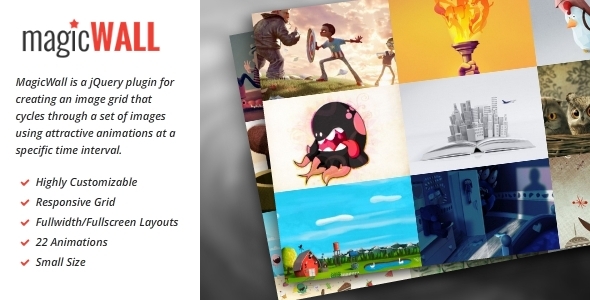
MagicWall is a powerful jQuery plugin that transforms ordinary image collections into dynamic, animated grids with professional visual effects. This responsive solution creates eye-catching displays for portfolios, galleries, or website backgrounds by automatically cycling through images with smooth transitions and customizable animations.
Why Choose MagicWall for Your Image Display Needs?
Modern websites demand visually engaging content presentation that adapts seamlessly across devices. MagicWall stands out with its:
- Responsive design that automatically adjusts to different screen sizes
- 22 unique animations for captivating transitions between images
- Social media integration with support for Flickr, 500px, and Instagram
- Hardware acceleration for smooth performance even with complex animations
- Lightweight footprint that won’t slow down your page load times
Key Features and Capabilities
Advanced Grid Customization
MagicWall offers precise control over your image grid layout with options to define:
- Exact number of rows and columns
- Minimum and maximum dimensions for grid items
- Responsive breakpoints for different device sizes
- Fullwidth or fullscreen display modes
Professional Animation Effects
The plugin includes a comprehensive animation library with:
- Slide, fade, and flip transitions
- 3D perspective effects
- Customizable easing functions
- Independent control over entry and exit animations
Practical Implementation Guide
Setting up MagicWall involves these simple steps:
- Include jQuery and MagicWall plugin files in your project
- Create a container element with your image list
- Initialize the plugin with your preferred configuration
- Customize the appearance through CSS or Sass variables
Version 2.0+ Enhancements
The latest major update introduced significant improvements:
New Functionality
- Ajax loading support for dynamic content
- Social media API integration
- Automatic resize handling
- Dynamic item management methods
Improved Configuration Options
The update refined several configuration parameters:
- Renamed options for better clarity (e.g., countX → columnsCount)
- Added new settings for cache control and preloading
- Enhanced breakpoint configuration flexibility
- Updated default values for smoother animations
Technical Specifications
MagicWall offers extensive customization through these configuration options:
Core Settings
- animations: Specify which animations to use (* for all)
- delay: Time between transitions (default: 1000ms)
- duration: Animation length (default: 600ms)
Layout Controls
- columnsCount/rowsCount: Define grid dimensions
- breakpoints: Responsive layout adjustments
- thumbSizing: Control image scaling behavior
Animation Parameters
Fine-tune specific animation types with dedicated duration and easing settings:
- Slide, roll, and flip effects
- Row and column transitions
- Fade animations
Best Practices for Implementation
To get the most from MagicWall:
- Optimize your images for web before loading
- Test different animation combinations for your content
- Use the pauseOnHover option for better user control
- Consider preloading images for smoother transitions
- Leverage Sass files for efficient styling
Common Use Cases
MagicWall excels in various scenarios:
- Portfolio showcases: Display creative work with visual flair
- Product galleries: Highlight items with engaging transitions
- Website backgrounds: Create dynamic, animated backdrops
- Social media displays: Integrate content from multiple platforms
Recent Updates and Bug Fixes
The development team actively maintains MagicWall with regular improvements:
- Version 2.0.4: Fixed switchItem API method
- Version 2.0.3: Animation plugin bug fixes
- Version 2.0.1: Additional animation refinements
For developers implementing MagicWall, note that version 2.0+ introduced breaking changes that may require configuration adjustments in existing implementations. Always review the updated documentation when upgrading.