Key Features
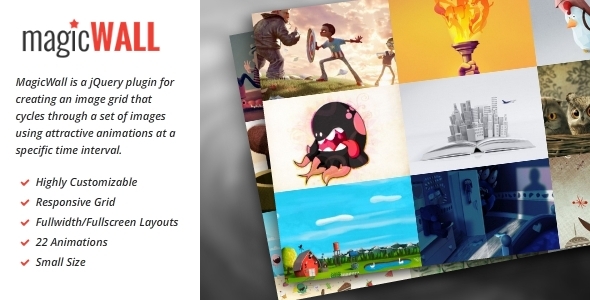
MagicWall is a powerful jQuery plugin that transforms a standard list of images into a dynamic, animated grid. It cycles through your images at a defined interval using visually appealing transitions, making it perfect for creating portfolio showcases, decorative website elements, or animated backgrounds. The core functionality converts any set of images into a configurable grid, with the remaining images appearing through randomized animations and delays for a captivating experience. This responsive image grid plugin gives you full control over layout, performance, and visual effects.
- Responsive & Adaptive Grid: Automatically adjusts the number of rows and columns based on screen width using customizable breakpoints. You can define custom grid settings (columns, rows, thumbnail sizing) for each device, ensuring a flawless responsive image grid across desktops, tablets, and mobile phones. The
autoUpdateOnResizefeature ensures the grid re-calculates dynamically when the window changes size. - 22 Unique Animations: Choose from a library of 22 hardware-accelerated CSS3 animations, including roll, flip, slide, fade, and more. Each axis (X, Y) and direction (in, out) can be individually customized with its own duration and easing function, giving you granular control over the visual experience. Exclude specific animations you don’t want to see via the
excludedAnimationsoption. - Social Network Integration: Load image galleries directly from popular social media platforms. Supports Flickr, 500px, and Instagram image sources. Connect your accounts via API keys and user IDs to automatically pull images into your dynamic grid, keeping your website content fresh without manual updates.
- AJAX & JSON Source Support: Load your image data dynamically from an external JSON file or an AJAX endpoint. This feature allows you to separate content from code, making it easy to maintain and update your gallery without editing the HTML. Combine this with the
useCacheoption to optimize loading speed for returning visitors. - Full-Width & Fullscreen Layouts: Configure the plugin to stretch across the entire viewport or create a fullscreen animated background. With the
maxItemWidthandmaxItemHeightoptions, you can control the size of individual grid items while maintaining a seamless, immersive visual experience. - Highly Customizable Options: Over 30 configurable options give developers complete control. Adjust timing with
delay(default 1000ms) andduration(default 600ms), set perspective for 3D effects, choose between different thumbnail sizing modes (thumbSizing), and enable thepauseOnHoverfeature to stop animations when users interact with the grid. - Hardware Accelerated & Lightweight: All animations are GPU-accelerated via CSS3 transforms, ensuring smooth performance even on lower-end devices. The plugin has a small file size, making it ideal for performance-focused websites that cannot sacrifice speed for visual flair.
- Sass Files Included: For developers who prefer pre-processing, the package includes Sass (SCSS) files, allowing easy theme customization and integration into existing build workflows.
Who Is This For? Use Cases
Creative Portfolio Websites
Photographers, graphic designers, and digital artists can use MagicWall as a dynamic portfolio showcase. Instead of a static grid, your work cycles through with smooth transitions, immediately impressing potential clients. The social media integration means your Instagram or Flickr feed can become an auto-updating portfolio. The fullscreen layout is particularly effective for creating a visually dominant, immersive gallery that puts your creative work front and center.
Marketing & Product Landing Pages
Marketing teams can deploy MagicWall as an animated image background to add visual interest to hero sections. Rotate through product shots, customer testimonials, or brand imagery without relying on a slider plugin. The responsive breakpoint system ensures the grid looks perfect on any screen, and the pauseOnHover feature prevents distractions when a user is focused on reading your call-to-action. The fullwidth layout is ideal for creating a modern, sprawling background effect that adapts to screen size.
Digital Agencies & Web Designers
Designers building high-end client websites can leverage MagicWall as a flexible decorative element. Use it as a background for a service section, a dynamic logo gallery for partners, or a mosaic-style display for team photos. The AJAX source support allows you to pull images from a CMS or database, making the solution scalable for larger projects. The ability to define complete option sets per breakpoint means you can deliver a pixel-perfect design across all devices without writing extra media queries.
E-commerce & Retail Sites
Online stores can use the plugin to display product lineups or feature best-sellers in an engaging way. The grid cycles through product images with animations, drawing attention to multiple items in a limited space. Combined with the fixedClass option, you can pin specific items (like a “Sale” badge image) to remain static while others animate around it, creating a dynamic yet structured product display.
Technical Details & Compatibility
MagicWall version 2.0.4 is a mature, well-maintained jQuery plugin. It requires jQuery (any modern version) and has been tested across all major browsers including Chrome, Firefox, Safari, Edge, and Internet Explorer 9+. The plugin supports touch devices and mobile browsers, making it fully compatible with iOS, Android, and Windows Phone. The included Sass files allow easy customization of default styles. The current version includes a breaking change from the legacy 1.x series, with updated option names for clarity (e.g., countX is now columnsCount, onHoverExclude is now pauseOnHover). The last update was released on October 28, 2014, confirming long-term stability. The plugin works as a drop-in solution for any WordPress, Joomla, or custom PHP site by simply including the CSS and JS files.
Pros and Cons
Pros
- Extremely customizable with over 30 options for fine-grained control over animations, timing, grid layout, and behavior across devices.
- Hardware-accelerated CSS3 animations deliver smooth, professional transitions without taxing the CPU.
- Social media integration provides a powerful auto-updating gallery feature that saves manual content management time.
- AJAX and JSON data sources make it easy to separate content from presentation and integrate with backend systems.
- Responsive by nature with full support for breakpoints, providing custom layouts per screen size without extra CSS.
- Small file size and lightweight footprint ensure minimal impact on page load speed.
- Includes Sass files for easy customization in modern development workflows.
Cons
- Version 2.0.0 is not backward compatible with earlier versions. Users upgrading from 1.x must reconfigure their option names and values.
- Last updated in 2014, meaning it may not leverage the newest JavaScript language features or build tools like ES6 modules or Webpack.
- Requires jQuery, which is an additional dependency for projects that have moved away from it in favor of vanilla JavaScript or smaller frameworks.
- Social media API changes (e.g., Instagram’s API), could break integration features if platforms update their authentication methods. The plugin does not appear to be actively maintained to handle such changes.
- Limited animation customization per axis is powerful, but the total of 22 animations may feel restrictive compared to CSS animation libraries that offer hundreds of variations.
Frequently Asked Questions
Is MagicWall compatible with WordPress?
Yes, MagicWall works perfectly with WordPress. You can include the plugin files in your theme’s functions.php using wp_enqueue_script and wp_enqueue_style. The plugin does not rely on any WordPress-specific functions, so it is compatible with any theme. The AJAX source feature is especially useful for pulling image URLs from WordPress custom fields or Advanced Custom Fields (ACF) repeaters. For non-developers, you can use a third-party plugin loader or manually add the scripts to your theme’s header/footer.
Does the plugin include customer support?
As a premium CodeCanyon item, MagicWall includes standard item support from the author. This typically covers pre-sale questions, bug fixes, and basic configuration help through the item’s comment section on CodeCanyon. Advanced customization beyond the option parameters is not covered. The product page should provide a Support tab with details on the type of support included and the expected response time.
Can I use MagicWall without social media accounts?
Absolutely. The social media integration (Flickr, 500px, Instagram) is an optional feature. By default, the plugin works with a standard list of images defined in your HTML markup or via an AJAX/JSON source. You do not need any API keys or social accounts to use the core grid and animation functionality. Simply pass your image URLs through the items array or list them in your HTML, and the plugin will handle the rest.
Final Verdict
MagicWall stands out as a robust, feature-rich jQuery plugin for creating animated image grids. Its extensive customization options, hardware-accelerated animations, and responsive breakpoints give developers the flexibility to build anything from a subtle animated background to a fullscreen interactive portfolio. The social media integration and AJAX source support are standout features that streamline content management, while the 22 animations ensure visual variety. While the plugin has not received updates since 2014, its stability and mature codebase are a testament to its quality. For designers and developers who want to add a dynamic, rotating grid to their website without building one from scratch, MagicWall offers an excellent balance of power and simplicity. The small file size and full Sass support make it a smart choice for performance-conscious projects. If you are looking to create an engaging, responsive image grid that cycles through images with professional-grade animations, MagicWall remains a solid and reliable solution worth the investment. You can purchase it directly from ThemeForest or CodeCanyon.