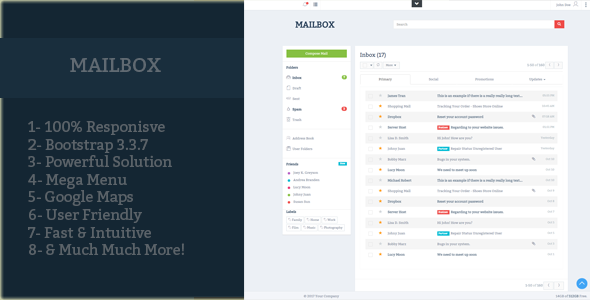
Mailbox is a static HTML5 email client template sold on ThemeForest for $7, built on Bootstrap with jQuery and Font Awesome iconography. It provides pre-built screens for an inbox, sent mail, spam, drafts and trash, aimed at developers and designers who need a convincing mail interface without building one from scratch. The Mailbox HTML5 package is a front-end template, not a working email application, and that distinction matters more than any single feature it ships with.
What the Mailbox HTML5 template actually delivers
The core of the package is five finished screens that mirror the folder structure of a conventional webmail service. An inbox view, a sent items view, a spam folder, a drafts folder and a trash view are all included as separate pages. For anyone prototyping a mail product, an internal dashboard, or a SaaS interface that needs a messaging panel, this removes the tedious part of the job: laying out message lists, avatars, timestamps, unread states and folder navigation in a way that looks credible on screen.
The layout is responsive, which in practice means the message list and reading pane reflow rather than breaking on narrow viewports. Because the build sits on Bootstrap, the grid and utility classes will be familiar to most front-end developers, and the components can be restyled through the framework’s variables rather than by rewriting CSS from scratch. jQuery handles the interactive behaviour, and Font Awesome supplies the icon set used throughout the folder navigation and toolbar areas.
Two smaller details are worth flagging because they affect day-to-day use. The code is described as fully commented and documented, with the vendor positioning it as editable by anyone with basic HTML knowledge. That is a realistic claim for a static template of this size — adjusting markup, swapping colours or adding a page does not require deep framework expertise. The vendor also states that support is handled directly, though no response times, support channels or SLA terms are disclosed in the listing.
What the listing does not include is equally important. There is no backend, no mail protocol integration, no authentication layer and no JavaScript framework version. Google Maps appears among the vendor tags, but the feature list gives no detail on where or how a map is used, so buyers should treat that as unverified until they inspect the live preview.
Where a static mail interface makes sense, and where it does not
The strongest fit is early-stage product work. A team building a webmail client, a helpdesk inbox, a CRM messaging module or a customer support console can drop these screens in as a visual reference and spend its time on the API layer instead of on list-item styling. Design agencies use this kind of asset to present concepts to clients quickly, and freelance developers use it to shorten the gap between a wireframe and something a stakeholder can click through.
It also suits internal tooling. An admin panel that needs a read-only message log, a notification centre styled as a mailbox, or a demo environment for a sales pitch can all be assembled from these pages with modest effort. Educational projects and portfolio pieces benefit too, since the finished result looks considerably more polished than a hand-rolled table of messages.
The wrong choice is any project that needs to send, receive, search or store real email. A static template cannot connect to IMAP or POP3, cannot authenticate a user, and cannot persist a draft between page loads. Teams expecting a functioning mail client will need to build or buy the entire application layer themselves. Similarly, projects already committed to a component framework such as React, Vue or Angular will find a Bootstrap-and-jQuery template awkward to integrate, because the markup would need rewriting into components rather than adapted.
Strengths and limitations of the Mailbox HTML5 package
Strengths
- Complete folder coverage. Inbox, sent, spam, drafts and trash are all present, so the template covers the full navigation model of a mail product rather than a single screen.
- Low price of entry. At $7 the cost is trivial against the hours saved on layout work, even if only two or three of the pages are used.
- Familiar technology stack. Bootstrap, jQuery and Font Awesome are widely understood, which keeps the learning curve shallow and the pool of developers who can modify it large.
- Responsive behaviour included. The layout adapts across screen sizes out of the box, which removes a common source of rework in dashboard projects.
- Readable, commented source. The vendor explicitly documents the code for HTML-level editing, which lowers the barrier for designers who are not full-time developers.
Limitations
- No functional email capability. Nothing in the package connects to a mail server, stores messages or handles authentication. Every piece of dynamic behaviour must be built separately.
- No sales or rating history disclosed. The listing shows no purchase count or customer rating, so there is no independent signal of quality or of how the template performs in real projects.
- Dated architectural assumptions. A jQuery-dependent, server-rendered template does not align with modern single-page application patterns, which limits reuse in contemporary stacks.
- Thin documentation on specifics. The vendor does not state browser support, accessibility conformance, or what the Google Maps tag refers to, all of which require verification before purchase.
- Single-purpose scope. The pages are mail screens only. There is no settings view, compose workflow detail, contact list or account management screen mentioned, so a complete product will need additional design work.
How it compares with other HTML email templates
The static HTML template category splits roughly into three groups: single-page UI kits, full multi-page admin themes, and specialised interface templates like this one. Multi-page admin themes usually bundle a mail screen alongside dozens of unrelated pages, which means more total value but a shallower treatment of the mail experience. The Mailbox HTML5 template takes the opposite approach, concentrating on five mail folders and nothing else. Buyers who need one polished interface rather than a broad kit will find the focus useful; buyers who need dashboards, charts and forms as well will need a second purchase.
Against component libraries and CSS frameworks, the trade-off is control versus flexibility. A framework gives reusable primitives but no finished screens; this template gives finished screens but expects the buyer to work within its markup. Against a custom design, the comparison is simply cost and time — a bespoke mail interface takes days of design and front-end work, while this costs $7 and an afternoon of integration. The honest positioning is that it is a starting point, not a solution, and it competes on speed rather than on depth.
Frequently Asked Questions
Is Mailbox a working email client or just a template?
It is a static HTML template, not a functioning email client. The pages display sample message layouts for inbox, sent, spam, drafts and trash, but there is no server code, no mail protocol connection and no data storage. A developer must build the entire backend and wire the markup to it before any real email can be sent or received.
Can the Mailbox HTML5 template be connected to Gmail or another mail service?
Not directly. The template contains no integration code, so connecting to Gmail, Outlook or any IMAP service requires building that layer independently, typically through a provider’s API and a server-side component. The Gmail reference in the vendor tags describes the visual style of the interface rather than any built-in connection to Google’s service.
Does the template work with React, Vue or Angular?
Only with significant rework. The package is built on Bootstrap and jQuery with server-rendered HTML, so using it inside a component framework means converting the markup into components and replacing the jQuery behaviour. Projects already committed to a modern JavaScript stack should weigh whether that conversion effort is worth more than building the interface natively.
Is the Mailbox HTML5 theme suitable for a beginner?
Yes, for basic edits. The vendor documents the code for people with foundational HTML knowledge, and Bootstrap classes are approachable for newcomers. Building a functioning application on top of it, however, requires backend and JavaScript skills well beyond the template itself, so beginners should treat it as a design starting point only.
Verdict on the Mailbox HTML5 email template
This package is worth buying for developers and agencies that need a credible mail interface quickly and already have the backend skills to make it work. The five folder screens, responsive layout and commented Bootstrap markup represent solid value at $7, particularly for prototypes, internal tools and client demonstrations. It is not the right purchase for anyone expecting a functioning inbox, for teams working in a modern component framework, or for projects that need accessibility guarantees the vendor does not document. The absence of any sales or rating history means buyers are relying on the live preview rather than on the experience of previous customers, which is a reasonable but not risk-free basis for a decision. Treated as a well-organised starting point rather than a finished product, the Mailbox HTML5 template earns its price.