MailChimper PRO Newsletters is a WordPress plugin that builds subscription forms and connects them to MailChimp or a range of other email marketing services. It combines a drag-and-drop visual form builder, popup and embedded display modes, and a statistics dashboard in a single $28 package. It suits site owners who want design control over their opt-in forms without paying a monthly form-building subscription, and it is a reasonable fit for freelancers and small agencies delivering list-building features to clients.
The plugin is sold on ThemeForest under the Newsletters category by an author whose listing presents it as a complete signup solution rather than a thin MailChimp API wrapper. That framing is largely accurate: the MailChimp integration is one part of a broader toolset that also covers alternative providers, manual notification workflows, and on-site analytics.
What MailChimper PRO Newsletters actually does well
The core workflow is straightforward. After installing the plugin, a default subscription form is already available; the site owner supplies a MailChimp list identifier or API credentials and the form begins collecting addresses. From there, the Visual Builder takes over. Forms are assembled on screen with a live preview, so the design being edited is the design visitors will see, rather than a shortcode whose output has to be checked on the front end after every change.
Design control is unusually granular for a plugin at this price point. The builder exposes more than 650 Google Font styles alongside controls for font size, colour, borders, and element-level animation. Two layers of motion are available: a main animation that governs how a popup enters the screen, and item effects that animate the individual elements inside it. Combining the two produces a large number of distinct results, and the vendor states the effects use CSS3 hardware acceleration, which matters because poorly implemented animation is one of the most common causes of janky popups on mobile.
Display logic is split between popup and embed modes. Popups can be restricted to specific pages rather than firing site-wide, which is the difference between a targeted campaign and an annoyance that drives people away from every article on the site. Embedded forms inherit the surrounding typography and layout, making them suitable for placing inside post content or a sidebar where a modal would feel intrusive.
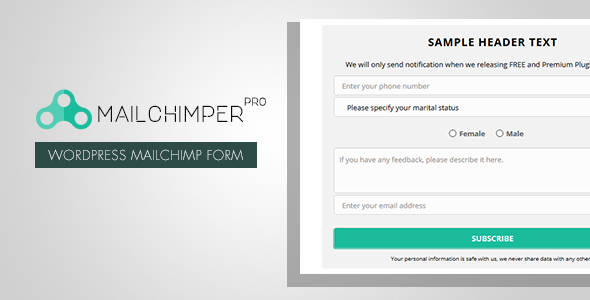
Field types go beyond the usual name-and-email pair. Text inputs, textareas, radio buttons, select boxes, and hidden fields are all available, so a form can capture preferences, segment subscribers at the point of signup, or pass tracking values through a hidden field. The vendor does not state a maximum field count, so complex multi-field forms should be tested before committing to the approach.
Provider support, video, and analytics
MailChimp is the headline integration, but the plugin also connects to Active Campaign, Benchmark, Campaign Monitor, Campayn, Constant Contact, Freshmail, GetResponse, MailPoet, MyMail, MadMimi, SimplyCast, and YMLP. Subscribers are passed to the chosen service automatically, with no confirmation step on the visitor’s side. For anyone running lists across more than one platform, or migrating between providers, that breadth reduces lock-in.
There is also a fallback for services the plugin does not integrate with directly. In that mode, each subscription triggers a notification email containing the subscriber’s address, which the site owner then adds to their list manually. It is a pragmatic workaround rather than an integration, and it does not scale past low volumes, but it keeps the plugin usable with a bespoke or in-house database.
Two features stand out as differentiators. The first is YouTube integration: a video can fill the popup, with the email field layered over the playing video and frame styling available for cases where covering the footage is undesirable. Video size, position, autoplay, and loop settings are configurable. The second is Google Analytics connectivity, which fires events for form views and unique entrances, connecting opt-in performance to the rest of a site’s analytics rather than leaving it in an isolated dashboard. The account can be disconnected at any time, and the vendor is explicit that this is a core feature rather than an add-on.
Reporting covers subscribers and form activity by date, link, or individual form, with a pie chart breaking down which form produced which subscribers. Results export to CSV, Excel, and PDF, and can be copied to the clipboard or opened in a print view. The tables are searchable and sortable with AJAX pagination. For anyone running several forms across a site, the per-form breakdown is the most useful part: it shows which placement and design are actually converting.
Where MailChimper PRO fits, and where it does not
The strongest fit is a content site or small business that wants a designed, animated opt-in form and does not want to pay a recurring fee for a hosted form builder. A blogger adding a first newsletter, a local service business collecting enquiries into a Constant Contact list, or a freelancer building a lead-capture form for a client site are all realistic users. Agencies delivering multiple small sites benefit from the template library, which shortens the setup time on each build.
It also suits sites that want video-led opt-ins. Placing a subscription field over a playing YouTube clip is a specific pattern that most general-purpose form plugins do not support, and it is the feature most likely to justify the purchase on its own.
The plugin is the wrong choice for a store or membership site that needs conditional logic, multi-step forms, file uploads, or payment collection. Nothing in the listing suggests those capabilities. It is also a poor fit for anyone who needs a hosted service with deliverability tooling, landing pages, and automation built in, because MailChimper PRO handles capture and reporting only; everything after the subscription happens inside the connected provider. Sites with strict performance budgets should also weigh the animation and font-loading overhead before deploying popups site-wide.
Strengths and limitations
Strengths
- Broad provider support covering thirteen named services plus a manual notification fallback, which limits dependence on any single platform.
- Genuinely deep design controls, including 650-plus Google Fonts and two independent layers of animation.
- Page-level targeting for popups, so forms can be kept away from pages where they would hurt more than help.
- Per-form statistics with Google Analytics event tracking and export to CSV, Excel, and PDF.
- YouTube video popups with configurable size, position, autoplay, and loop settings.
- Social signup pulls a validated address from Facebook or Google, reducing typos and friction.
Limitations
- The listing gives no sales figures, so there is no user base to gauge reliability, support responsiveness, or long-term maintenance against.
- Social signup relies on Facebook and Google Plus. Google Plus no longer exists, which raises a fair question about whether that button still functions and whether the feature has been maintained.
- The manual notification mode is an email-per-subscriber workflow. It is workable at low volume and unworkable at high volume, and the listing does not frame it as a limitation.
- No conditional logic, multi-step forms, or file upload fields are described, which rules the plugin out for anything beyond straightforward list building.
- Animation and multiple web fonts add page weight; the vendor does not publish performance guidance for sites with tight Core Web Vitals targets.
- All texts are translatable, but the listing does not state which translation format or tooling is used, so multilingual projects need verification before purchase.
How it compares with the wider category
Form plugins in this space generally fall into two groups. The first is the general-purpose builder, which handles contact forms, surveys, and payment forms as well as opt-ins, and charges accordingly in complexity. The second is the dedicated opt-in tool, which does one job and usually does the design and targeting side better.
MailChimper PRO Newsletters sits closer to the second group, but with an unusual emphasis on visual output. Compared with general-purpose form builders, it offers richer animation, a larger font library, and native video popups, while giving up the conditional logic and multi-purpose field handling those plugins provide. Compared with hosted opt-in services, it is a one-time purchase with no subscriber-based pricing, but it lacks the deliverability tooling, automation, and landing page features those services bundle in. The deciding factor is usually whether the requirement stops at capturing an address and reporting on it, or continues into what happens after the address is captured.
Frequently Asked Questions
Does MailChimper PRO work without a MailChimp account?
Yes. The plugin connects to thirteen other providers including GetResponse, Constant Contact, and MailPoet, and it also has a fallback mode that emails the site owner each subscription so addresses can be added to an unlisted service manually. MailChimp is the primary integration, not a requirement.
Can the signup popup be limited to certain pages?
Yes. Popup mode can be set to appear across the entire site or restricted to specified pages only, which gives control over which content triggers the form. Embedded forms are placed manually within content or widget areas, so their position is determined by the site owner rather than by display rules.
What kind of statistics does the plugin provide?
It reports on subscribers and form activity by date, link, or individual form, and shows a pie chart of subscribers attributed to each form. Google Analytics can be connected to track form views and unique entrances as events, and all results export to CSV, Excel, or PDF.
Is MailChimper PRO Newsletters suitable for a multilingual site?
The listing states that all form texts can be translated, so the visible strings are not hard-coded to English. However, the vendor does not specify which translation system is used or whether a ready-made translation file ships with the plugin, so multilingual projects should confirm this before buying.
Verdict
MailChimper PRO Newsletters is worth buying for site owners who want designed, animated opt-in forms, video popups, and per-form reporting without a recurring subscription, and who are comfortable that the plugin stops at capture and hands everything else to the connected email provider. Freelancers and agencies building list-building features into small client sites will get the most out of the template library and the breadth of provider support. It is not the right purchase for anyone needing conditional logic, multi-step forms, file uploads, or payment collection, and the absence of any disclosed sales history means buyers are taking a degree of risk on support and maintenance. The stale Google Plus reference is the clearest signal that the feature set deserves a close look before committing.