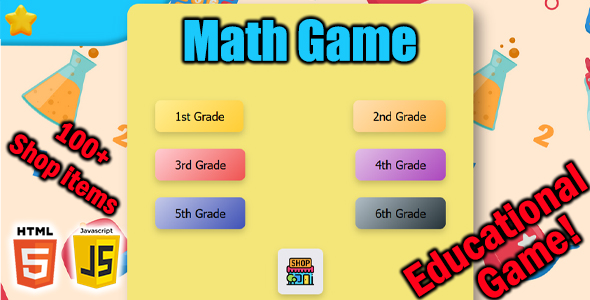
Math Game Games is a downloadable HTML5 and JavaScript package sold on ThemeForest for $29 that turns arithmetic practice into a browser-based activity for children in grades one through six. It ships as exported game files plus editable source code, so a site owner can upload it to a web host and have a working educational game without building anything from scratch. It suits freelancers, teachers and small site operators who want a ready-made maths practice tool they can rebrand or extend, rather than a custom development project.
What Math Game Games Actually Delivers
The core loop is deliberately simple, and that simplicity is the product’s main selling point. A player picks a grade level and a category — addition, subtraction, multiplication or division — then types an answer and submits it with the Check button or the Enter key. Correct answers pay out stars, and stars are spent in an in-game store on avatars, pets and backgrounds. That economy is what separates this from a plain worksheet generator: the reward layer gives children a reason to keep answering questions after the novelty of the first few sums wears off.
Grade differentiation is handled inside the game rather than by the buyer. The package covers first through sixth grade, with problem sets tailored to each level, and the vendor states that difficulty increases as players progress. For anyone running a tutoring site, a homeschool resource page or a classroom companion site, that spread means a single purchase covers a wide age range instead of forcing separate builds for younger and older children.
Customisation is where the source code matters. Because the grade levels, maths categories and store items are all editable, a buyer can rename categories, adjust the reward inventory or restrict the game to a single operation such as multiplication tables. The vendor describes this as low-effort modification, and the presence of separate HTML, CSS and JavaScript files supports that claim — there is no compiled bundle to reverse-engineer and no external library dependency to reconcile. Deployment is equally direct: the exported files are described as ready to upload, so the game can sit on shared hosting or inside an existing site’s directory structure without a build step.
Browser coverage is broad by design. The vendor lists Chrome, Firefox, Safari and Edge as supported, and the game is optimised for desktop and tablet rather than phones. Input is keyboard-driven — players type numbers and press Enter — which is a sensible match for a maths drill but also explains why touch-first phones are not the target surface.
Where Math Game Games Fits, and Where It Does Not
The strongest fit is a content site that already attracts parents, teachers or tutors and wants an interactive element without commissioning custom work. A freelancer building a school’s website could drop the game onto a resources page as a value-add. An agency producing a children’s education portal could use it as a starting point and restyle the interface to match a client’s branding, since the CSS is exposed. Independent developers who want a working reward-economy example to learn from will also find the source readable.
A second natural fit is the homeschool or supplementary-learning market, where a parent wants structured practice across several grade levels and is willing to host a small site to get it. The star-and-store loop is genuinely useful here because it substitutes for a parent standing over a child counting correct answers.
Where it is the wrong choice: anyone needing a mobile-first product. The vendor explicitly targets desktop and tablets, and the typed-answer interaction model does not translate comfortably to a phone keyboard in a small viewport. A buyer whose audience is predominantly on smartphones should look at a responsive-first alternative or budget for a redesign of the input layer. It is also a poor fit for anyone wanting adaptive difficulty driven by performance data — the vendor describes increasing difficulty but does not state that the game adjusts based on a player’s error rate, and no analytics or progress-reporting feature is mentioned. Teachers who need per-student tracking will find nothing here for that.
Strengths and Limitations
Strengths
- Source code is included, not just the exported build, so the game can be genuinely modified rather than merely rebranded.
- No external libraries, which keeps the footprint small and removes a common source of version conflicts on older hosting.
- Six grade levels and four operation categories give the single purchase a long shelf life across age groups.
- The star economy and unlockable avatars, pets and backgrounds provide an intrinsic motivation loop that a bare quiz lacks.
- Keyboard submission via Enter keeps the drill rhythm fast, which matters for arithmetic practice.
- Deployment is upload-and-go, with no build tooling or server-side component described.
Limitations
- No mobile-optimised experience is claimed. Desktop and tablet are the stated targets, so a phone-heavy audience is not served.
- There is no stated progress reporting, score history or teacher dashboard. Stars are spent in the store, not recorded for review.
- Adaptive difficulty is not confirmed. The listing says difficulty increases, but it does not say the game responds to individual performance.
- Question content is fixed to the four arithmetic operations. There is no mention of fractions, decimals, word problems or other curriculum areas.
- The vendor does not disclose sales figures, so there is no volume of buyer feedback to lean on when judging real-world reliability.
- Customisation, while possible, requires comfort with HTML, CSS and JavaScript. A non-technical buyer can deploy the game but cannot meaningfully change it.
How It Compares With Other Educational Game Scripts
The category splits roughly into three groups: hosted subscription platforms that handle accounts, progress tracking and curriculum alignment; drag-and-drop quiz builders that produce simple question-and-answer activities; and self-hosted HTML5 game packages like this one. Subscription platforms win on reporting and content breadth but carry recurring costs and put the operator’s data on someone else’s servers. Quiz builders are easier for non-coders but rarely include a reward economy or grade-tiered problem sets.
Math Game Games sits in the third group and competes on ownership and modifiability. A one-off $29 payment with source code in hand is a different proposition from an annual licence, and for a site owner who wants the game to live permanently on their own domain, that matters. Against other self-hosted HTML5 packages, the differentiators are the grade range and the store mechanic; against simpler quiz scripts, the differentiator is the source access. The trade-off is that this category generally lacks the analytics and accessibility tooling that institutional buyers expect, and nothing in the listing suggests this package is an exception.
Frequently Asked Questions
Do I need coding skills to use Math Game Games?
No coding is needed to publish the game. The exported HTML files can be uploaded to a web host and will run as-is. Coding knowledge only becomes necessary if the buyer wants to change grade levels, categories, store items or the visual design, since those edits happen in the HTML, CSS and JavaScript source.
Does Math Game Games work on phones?
It is not designed for phones. The vendor states the game is optimised for desktop and tablets, and play depends on typing answers and pressing Enter, which suits a physical or on-screen keyboard at tablet size or larger. Buyers targeting a mobile audience should plan for layout and input work.
What maths topics are covered?
Coverage is limited to the four basic arithmetic operations: addition, subtraction, multiplication and division. Problems are organised by grade level from first through sixth, with difficulty increasing as the player progresses. The listing does not mention fractions, decimals, geometry, word problems or any other curriculum area.
Can the game be rebranded for a client site?
Yes, within limits. The CSS and JavaScript are supplied, so colours, store items, category names and grade configuration can be altered. Because there is no external library dependency, restyling does not require untangling a framework. Buyers should expect to work directly in the source files rather than through an admin panel.
Verdict on Math Game Games
This package is worth buying for freelancers, agencies and site owners who need a self-hosted arithmetic practice game with a reward loop and are comfortable working with plain HTML, CSS and JavaScript. The combination of six grade levels, four operation categories, a star economy and full source access is a reasonable return on $29, and the absence of external dependencies keeps deployment simple. It is not the right purchase for anyone who needs mobile-first play, per-student progress tracking, or curriculum content beyond basic arithmetic — those requirements point to a hosted learning platform instead. Buyers should also note that the vendor does not publish sales figures, so there is no track record of buyer experience to draw on. The game is a solid foundation for a maths practice page, provided the audience and the technical skill to customise it are both present.