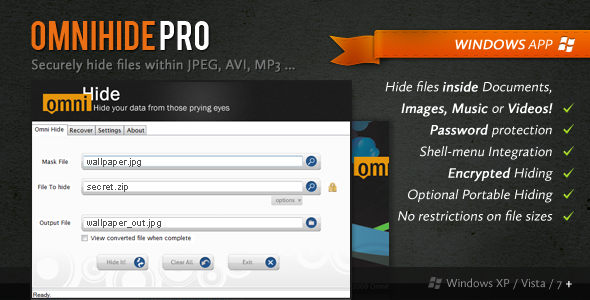
Data privacy is no longer a luxury—it is a necessity. For Windows users who need to protect sensitive files without relying on cloud storage or complex encryption software, OmniHide PRO (OHP) offers a unique and practical solution. This utility allows you to hide files within other common file types, such as images, music, and videos, producing output files that function perfectly normally. Whether you are a security-conscious professional, a journalist, or simply someone who values their privacy, OmniHide PRO provides a discreet layer of protection that goes beyond simple password locking. The hidden data can also be encrypted with an optional password, ensuring that even if the carrier file is discovered, your information remains secure. This is not just a steganography tool; it is a practical, day-to-day privacy utility that makes data hiding accessible to everyone.
Key Features
- Hide Data in Common File Types: Seamlessly embed sensitive files inside Photos (JPG, PNG, BMP), Music (MP3, WAV), Videos (AVI, MP4), Documents (PDF, DOC), and more. The carrier file remains fully usable and viewable.
- Password-Enabled Encryption: Add an extra layer of security by encrypting your hidden data with a password. This ensures that even if someone extracts the hidden file, they cannot read it without the correct key.
- Standalone Extractor Tool: A free, standalone extractor version is available for download from the official OmniHide website. This allows recipients of hidden files to retrieve the data without needing the full OmniHide PRO application installed, making it ideal for secure file sharing.
- Intuitive Drag-and-Drop Interface: The user-friendly interface simplifies the entire process. Drag your carrier file and your hidden file into the application, set your preferences, and execute the operation with a single click.
- Shell Menu Integration: Right-click any file in Windows Explorer to quickly hide or extract data. This feature integrates OmniHide PRO directly into your workflow, saving time and eliminating the need to open the application for routine tasks.
- No File Size Limit: There are no artificial restrictions on the size of the files you can hide, provided the carrier file is large enough to accommodate the hidden data.
Who Is This For? Use Cases
OmniHide PRO is designed for a wide range of users who need to move, store, or share data with an emphasis on discretion. Its versatility makes it a valuable tool across many scenarios.
Privacy-Conscious Individuals
For anyone who wants to keep personal documents, financial records, or private photos away from prying eyes, OmniHide PRO offers a simple steganography solution. By hiding these files inside ordinary-looking media, you can store them on your laptop, USB drive, or cloud account without fear of them being easily discovered.
Journalists and Whistleblowers
In sensitive professions where data must be transferred without detection, OmniHide PRO is a critical tool. A journalist can embed confidential documents or source files within a seemingly innocuous image file and upload it to a public server or email it past surveillance filters. The password protection ensures that only the intended recipient can access the information.
Corporate and Legal Professionals
Law firms, HR departments, and financial institutions often need to exchange confidential data. Using OmniHide PRO, they can embed contracts, legal briefs, or due diligence reports inside standard office documents or presentation files. This method is far less obvious than using a dedicated encrypted container, providing a layer of data obfuscation that complements traditional encryption.
Digital Creatives and Freelancers
Creative professionals who need to watermark or embed copyright information into their work can use OmniHide PRO to hide a text file with their contact details or license data inside their portfolio images or videos. This provides a hidden, non-destructive method of claiming ownership.
Technical Details & Compatibility
OmniHide PRO is a lightweight Windows application developed with a focus on performance and ease of use. It is compatible with Windows 7, 8, 10, and 11, running on both 32-bit and 64-bit operating systems. The application does not require a continuous internet connection to function, as all hiding and retrieving operations are performed locally on your machine. The output files—the “carrier” files with hidden data—maintain their original file extension and are fully compatible with any standard application capable of opening the original file type. This means a hidden JPG image will still open in any photo viewer, and a hidden MP3 file will still play in any music player. The core algorithm used for embedding has been stable and reliable, as indicated by its long-standing presence on CodeCanyon and a regular history of updates to ensure compatibility with new Windows versions and file format standards.
Pros and Cons
Pros
- Extremely easy to use with both a graphical interface and shell context menu.
- Output files remain fully functional and indistinguishable from originals.
- Supports a wide variety of carrier file formats, including images, audio, and video.
- Offers an additional layer of security through optional password encryption.
- Includes a free, standalone extractor for recipients without the software.
- No file size limits, offering great flexibility.
Cons
- Only available for Windows; no native macOS or Linux version is offered.
- Hiding data does increase the carrier file size, which may be noticeable for large hidden files.
- The interface, while intuitive, has a dated visual design compared to modern Windows apps.
- Does not support hiding entire folders in a single action; files must be processed individually or via script.
Frequently Asked Questions
Is OmniHide PRO compatible with Windows 11?
Yes, OmniHide PRO is fully compatible with Windows 11, as well as Windows 10, 8, and 7. The application has been consistently updated to ensure it works with the latest Microsoft operating systems and file format updates. The shell context menu integration also functions correctly on the latest versions of Windows Explorer.
Does OmniHide PRO include support and updates?
Yes, when you purchase OmniHide PRO from CodeCanyon, you receive six months of support from the author, which includes assistance with installation, operation, and bug fixes. You can also extend your support period. Furthermore, the license includes lifetime updates, meaning you will receive all future versions of the software at no additional cost, ensuring compatibility and access to new features.
Can the hidden data be detected by antivirus software or digital forensics?
OmniHide PRO uses steganographic techniques that do not trigger antivirus software, as the carrier file is not maliciously altered. However, it is important to understand that no steganography method is perfectly undetectable by advanced forensic tools that specifically analyze file statistics for hidden data. The password encryption feature ensures that even if the presence of hidden data is suspected, the content remains secure and unreadable without the password.
Final Verdict
OmniHide PRO stands out as a pragmatic tool for data privacy on the Windows platform. It successfully bridges the gap between raw technical steganography and consumer-friendly software, offering a feature set that addresses real-world needs for discretion. The ability to hide files inside media that remains perfectly functional, combined with the optional password encryption, makes it a powerful addition to any privacy toolkit. With a strong track record on CodeCanyon, consistent updates from the developer, and the inclusion of a free extractor for sharing, it is a reliable and valuable investment. If you are tired of clunky encryption suites or the vulnerability of simple password managers, and you need a practical way to make your data invisible, OmniHide PRO is the solution. Protect your files with the power of steganography—purchase OmniHide PRO today and take control of your digital privacy.