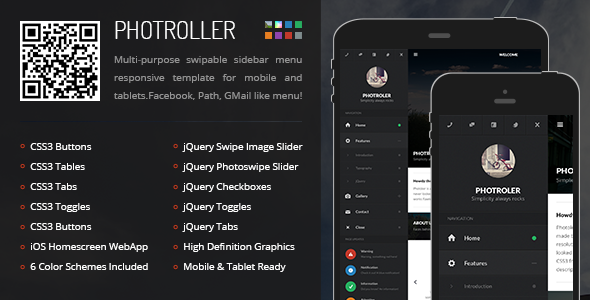
Photroller Mobile is a static HTML, CSS and JavaScript site template sold on ThemeForest for $10, aimed at developers who need a touch-first mobile or tablet interface rather than a WordPress theme or a finished app. It ships with a complete set of page layouts, a slide-out sidebar that carries social links and notifications, and compatibility with PhoneGap and Cordova for anyone who wants to wrap it into a native shell. The item has been purchased 451 times and was last updated by its developer, Enabled, in June 2019.
What Photroller Mobile Actually Delivers
The template’s centrepiece is its navigation model. Instead of a conventional top bar, Photroller Mobile uses a sidebar that opens with a single tap and carries more than menu links: social network entries, page notifications and update indicators live inside the same panel. For a brand site or a marketing microsite, that turns the menu into a persistent communication surface rather than a list of destinations.
Typography and layout options are unusually deep for a template at this price point. The package includes multi-column text, image and icon layouts, drop caps, pull quotes, highlight styles, tables, toggles, accordions, tabs and both large and small notification components. Form elements are covered too — fields, checkboxes, radio buttons and three button styles (3D, squared and rounded). Anyone building a content-heavy mobile page will find most of the standard presentation problems already solved.
Media handling is a genuine strength. Sliders, quote sliders, staff sliders and multiple gallery and portfolio variations are included, and images, videos and maps are all set up to hold their aspect ratio responsively. That last detail matters more than it sounds: fixed-ratio embeds are one of the most common sources of broken mobile layouts, and having it handled at the template level saves real debugging time.
Interaction is built on jQuery rather than a heavier framework. The listing names page preloading, device detection, CSS3-driven navigation, share-from-bottom pop-ups and a contact form with field validation. The contact form is offered in CSS3, PHP and Ajax variants, which gives some flexibility depending on whether the site is hosted on a PHP server or deployed as a static bundle.
Platform support is broad for the era: iOS 6 and above, Android 4.4 and above, Windows Mobile 8 and above, and RIM 7.1 and above. The package includes an icon set, eight colour schemes, retina-ready graphics, and the home screen icon and splash screen assets needed for iOS and Android. Fonts come from Google Fonts, so typography depends on an external request unless the developer self-hosts.
Where Photroller Mobile Fits, and Where It Does Not
This is a sensible choice for a freelancer or small agency building a promotional microsite, a product landing page, a restaurant or venue page, or a campaign site that needs to feel app-like on a phone without the overhead of a full CMS. It also suits developers prototyping a Cordova or PhoneGap build who want a working interface to test navigation and layout on real hardware before committing to a framework.
It is the wrong choice for anyone who wants a WordPress theme. The vendor states plainly that this is a site template and would need converting to a theme before it could run on WordPress. It is equally wrong for someone expecting a compiled, store-ready application — the listing is explicit that PhoneGap or Cordova conversion is a step the buyer performs, not something included.
There is also a licensing consideration that catches people out. If the resulting application is published to an app store as a paid app, or includes paid in-app features, the vendor states an extended license is required under Envato’s terms. The standard $10 purchase does not cover commercial app distribution, and the developer notes that failing to upgrade can result in a DMCA notice against the store listing.
Strengths and Limitations of Photroller Mobile
Strengths
- Breadth of included components — sliders, galleries, accordions, tabs, notifications and form elements are all present, so fewer third-party scripts are needed.
- Responsive aspect-ratio handling for images, video and maps, which removes a common class of mobile layout bugs.
- Genuine touch optimisation rather than a desktop layout squeezed onto a small screen, including ergonomic navigation and retina graphics.
- Eight colour schemes and a bundled icon pack reduce the amount of design work required before handover.
- Plain HTML, CSS and JavaScript with no exotic class naming, so the learning curve for an existing front-end developer is minimal.
- Documentation covers populating the template and using the included features step by step, and the developer states support tickets are answered including weekends.
Limitations
- The last vendor update was June 2019. That is a long gap for a front-end template, and it means the browser and OS support matrix reflects an older baseline than most projects now target.
- It is not a WordPress theme and not a compiled app. Both of those conversions are the buyer’s responsibility, and the vendor’s refund policy explicitly excludes purchases made under those mistaken assumptions.
- Paid app distribution requires an extended license, which materially changes the real cost for anyone building a commercial product.
- jQuery is a hard dependency. Projects standardised on modern component frameworks will be adding a library they otherwise would not ship.
- Google Fonts are loaded externally, so typography depends on a third-party request unless the developer self-hosts the files.
- The vendor does not state a browser support list beyond operating system versions, so desktop and modern mobile browser behaviour needs testing independently.
- The vendor also notes that emulator testing can produce misleading results, placing the burden of device testing on the buyer.
How Photroller Mobile Compares to the Wider Category
Mobile site templates generally fall into three groups: minimal starter shells with a handful of pages, framework-based templates built on Bootstrap or similar, and component-rich standalone templates like this one. Photroller Mobile sits firmly in the third group. Its advantage over a minimal shell is that far more of the interface is already designed and wired up; its advantage over framework-based templates is that it does not impose a grid system or a large CSS dependency on the project.
Against a WordPress theme, the comparison is not really about quality — it is about whether a CMS is needed at all. A static template is faster to deploy and cheaper to host, but every content change becomes a code change unless a CMS is added later. Buyers who need editors to update content regularly should treat that as a disqualifying factor rather than a minor inconvenience.
Against building from scratch, the value proposition is straightforward: $10 buys a tested component library and a coherent visual system. Whether that is worth it depends entirely on how much of the included feature set the project will actually use. A single-page campaign site will use perhaps a third of it; a multi-section brand site will use most.
Frequently Asked Questions
Is Photroller Mobile a WordPress theme?
No, it is a static HTML, CSS and JavaScript site template. The vendor states that converting it into a WordPress theme is required before it can run on WordPress, and that conversion is not included. Buyers who need a WordPress theme should look at theme categories directly rather than at site templates.
Can Photroller Mobile be turned into a mobile app?
Yes, but only through a conversion step the buyer performs. The template is compatible with PhoneGap and Cordova, which wrap HTML, CSS and JavaScript into native containers, provided the target device meets the stated operating system requirements. It does not ship as a compiled or store-ready application.
Does Photroller Mobile work on iOS and Android devices?
The vendor lists support for iOS 6 and above, Android 4.4 and above, Windows Mobile 8 and above, and RIM 7.1 and above. These figures reflect the template’s original release period and have not been revised since the June 2019 update, so testing on current device versions before committing is advisable.
Do I need an extended license to publish an app built with Photroller Mobile?
Yes, if the app is uploaded to a store as a paid application or includes paid in-app features. The vendor states that Envato’s terms require an extended license in those cases, and that publishing without one can result in a DMCA notice against the store listing. Free apps fall under the standard license.
Verdict on Photroller Mobile
Photroller Mobile is a well-stocked front-end template at a low price, and its 451 sales and Elite Author backing from Enabled suggest it has found a steady audience. The component depth is the main argument for buying it: sliders, galleries, form elements, notification styles and responsive media handling are all present, which removes a meaningful amount of build work.
It suits front-end developers and small studios producing static or Cordova-wrapped mobile sites who are comfortable working directly in HTML, CSS and JavaScript, and who will test on real devices rather than emulators. It does not suit anyone wanting a WordPress theme, a finished app, or a template kept current with the latest browser and OS releases — the 2019 update date is the single biggest caveat, and buyers should factor that into their decision alongside the extended license requirement for commercial app distribution.