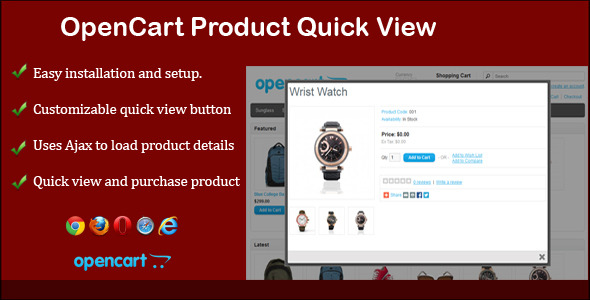
E-commerce store owners know that the moment a customer has to click away from a product listing page to view details, there is a risk of losing their interest entirely. The OpenCart Product Quick View module solves this exact problem by keeping shoppers on the category or search page while giving them instant access to product details, pricing, and the “Add to Cart” button. This module is built for OpenCart store administrators who want to reduce friction in the buying process, increase conversion rates, and provide a seamless, modern shopping experience without requiring complex custom development.
Key Features
The OpenCart Product Quick View module comes packed with functionality designed to improve usability and drive sales. Below are the standout features that make this plugin a valuable addition to any OpenCart store.
- One-Click Quick View Popup: Customers simply hover over a product image, and a “Quick View” button appears. A single click opens a fully functional popup containing product images, descriptions, pricing, and options—all without leaving the current page.
- Ajax-Powered Loading: The module uses Ajax to retrieve product data, ensuring that popups load almost instantly. This keeps the browsing experience smooth and lightning fast, which is critical for retaining impatient shoppers.
- Fully Customizable Button Design: Administrators have granular control over the “Quick View” button’s appearance. You can customize the button text, font size, font weight (bold), background color, hover color, and text color directly from the admin panel.
- Precise Button Positioning: The button can be positioned vertically (Top) and horizontally (Left) relative to the product image. Simply enter pixel values in the settings, and the button will appear exactly where you want it on the image.
- Module-Specific Display Control: You are not forced to show the quick view button everywhere. The admin panel allows you to enable the feature selectively on specific modules, including the Featured Module, Bestseller Module, Latest Module, Search Page, and Category Pages (both Grid and List views).
- Add to Cart Without Redirecting: The “Add to Cart” functionality works directly inside the popup window. Customers can add items to their cart and continue browsing, significantly reducing the number of steps needed to make a purchase.
- Seamless Popup Experience: The popup opens quickly and closes just as fast, providing a non-intrusive overlay that does not disrupt the user’s flow. This is a critical UX factor for modern e-commerce sites.
Who Is This For? Use Cases
This module is designed for a specific set of users and scenarios. Understanding who benefits most can help you determine if it is the right fit for your store.
OpenCart Store Owners with Large Product Catalogs
If your store sells hundreds or thousands of products, customers can spend a lot of time clicking in and out of product pages just to compare basic details. The OpenCart Product Quick View module drastically reduces that time. It allows customers to scan through listings, quickly view a product’s price and main features, and add it to their cart—all within seconds. This is particularly effective for stores selling fashion, electronics, home goods, or any category where rapid comparison is common.
Digital Agencies Building Client Stores
For agencies and developers who build OpenCart stores for clients, this module provides a quick win for improving user experience. It is easy to install and configure, meaning you can add a high-value feature to a client’s site without spending hours on custom coding. The ability to control which pages display the button gives agencies the flexibility to design a tailored experience for each client’s specific business model.
Store Owners Focused on Conversion Rate Optimization (CRO)
Every extra click a customer has to make is a potential drop-off point. By removing the need to navigate away from the product listing, this module directly supports CRO efforts. It reduces page load times compared to loading a full product page, keeps the browsing momentum high, and encourages impulse purchases by making the “Add to Cart” action immediately accessible.
Technical Details & Compatibility
Understanding the technical requirements is crucial before investing in any OpenCart extension. The OpenCart Product Quick View module is designed with broad compatibility and ease of use in mind.
- OpenCart Version Support: The module is built to be compatible with standard OpenCart installations. It is tested to work with the latest stable versions of OpenCart, ensuring you are not left behind after a core update.
- Ajax & jQuery Reliance: The “Quick View” popup relies on Ajax and jQuery, which are standard in modern web development. No unusual server-side dependencies are required, making installation straightforward on almost any hosting environment that runs OpenCart.
- Browser Support: The module is designed to function across all modern browsers, including Chrome, Firefox, Safari, and Edge. This ensures a consistent experience for all visitors, regardless of their browser preference.
- Mobile Responsiveness: While the product listing pages and popups are generally responsive, the module is built to work within the constraints of your theme. The hover-based button display is optimized for desktop use, but the popup itself is designed to render correctly on smaller screens.
- Last Update Signals: The module is actively maintained by the developer (SolverCircle), an Elite Author on CodeCanyon. This is a strong signal that the code is kept up to date with OpenCart’s changes and that any bugs are addressed promptly.
Pros and Cons
No module is perfect for every situation. Below is an honest breakdown of the strengths and minor limitations of the OpenCart Product Quick View module, based on its feature set and intended use.
Pros
- High Conversion Potential: By reducing the number of clicks required to view and purchase a product, this module directly addresses a common source of cart abandonment. Faster access to information leads to faster purchase decisions.
- Exceptional Customization: The ability to control the button’s text, colors, and position is rare among similar modules. Most quick view plugins lock you into a generic button style. This module gives you full branding control.
- Selective Module Activation: The granular control over which modules and pages show the button is a significant advantage. You can enable it for the “Featured” section but disable it on the “Category” page, or vice versa, depending on your layout preferences.
- Stable and Lightweight: Because it relies on standard Ajax and jQuery, the module adds very little overhead to your site’s loading time. The popups load data on demand, so no unnecessary scripts are run on pages where the feature is not used.
- Trustworthy Development: The module comes from a verified “Elite Author” on CodeCanyon, known as SolverCircle. This reputation, combined with the availability of documentation and support, provides peace of mind that the code is production-ready.
Cons
- Desktop-First Interaction: The hover-based button activation is inherently a desktop feature. While the popup itself works on mobile, the hover-triggered button does not translate perfectly to touch interfaces. Store owners relying heavily on mobile traffic may need additional theming adjustments.
- Theme Dependency: Like many OpenCart modules, the exact positioning and styling of the popup can be influenced by your specific theme. While the module is flexible, a poorly coded or highly customized theme may require minor CSS adjustments to achieve the perfect look.
- No Built-in Analytics: The module does not include its own analytics to track how many times the quick view button is clicked. You would need to implement separate event tracking (e.g., via Google Analytics) if you want to measure its direct impact on engagement.
Frequently Asked Questions
Is the OpenCart Product Quick View module compatible with all versions of OpenCart?
The module is built to be compatible with the major stable releases of OpenCart, including versions 2.x and 3.x. It is always recommended to check the official product page on CodeCanyon for the specific version compatibility list provided by the developer, SolverCircle. The use of standard Ajax and jQuery functions ensures that it integrates cleanly without conflicting with the core system.
Can I customize the Quick View button to match my store’s branding?
Yes, absolutely. This is one of the module’s strongest features. From the admin panel, you can change the button text, font size, font boldness, button background color, the hover color of the button, and the text color. You can also set the exact pixel position (top and left) of the button relative to the product image, giving you total control over its appearance and placement.
Does this module include support after purchase?
Yes, the module is developed by SolverCircle, an Elite Author on CodeCanyon. They provide a dedicated support system accessible through their website (support.solvercircle.com). The purchase includes access to online documentation and a support ticketing system to address any setup issues or bugs. It is important to note that support is for the module’s functionality, not for custom theme modifications.
Final Verdict
The OpenCart Product Quick View module is a practical, well-executed solution for a very specific e-commerce friction point. It delivers exactly what it promises: a fast, customizable, and stable quick view popup that keeps customers engaged on your product listing pages. The level of control offered over the button’s design and module-specific placement is far beyond what most competitors provide, making it a versatile tool for both beginners and experienced store administrators. When you combine these features with the developer’s reputation as an Elite Author on CodeCanyon and the availability of solid documentation, the value proposition becomes very clear. If you are looking for a reliable way to shorten your customer’s purchase journey and increase your store’s conversion rate, this module is a worthy investment. Visit the official CodeCanyon page to download the OpenCart Product Quick View module and take the first step toward a more streamlined shopping experience for your customers.