When visitors land on your website, their decision to commit often hinges on a single glance at your pricing structure. A confusing or poorly designed pricing table can kill conversions instantly. This is precisely where PT – Pricing Tables Bootstrap 3.2.0 steps in as a practical, high-impact solution. Built specifically for developers, designers, and business owners who need a clean, responsive way to display service tiers, this plugin delivers professional-grade layout functionality without the bloat of a full page builder. It leverages the reliability of the Bootstrap framework alongside the visual flexibility of Font Awesome to create pricing tables that look exceptional on any screen size. For anyone running a SaaS platform, a membership site, a creative agency, or an e-commerce store, this tool provides the structural clarity needed to guide potential customers toward the right plan.
Key Features
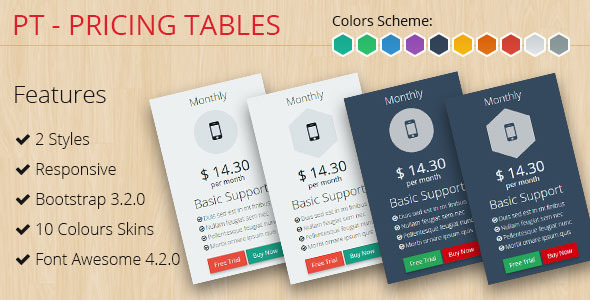
- Bootstrap 3 Framework Foundation: Built on the trusted Bootstrap 3 grid system, this means your pricing tables automatically adjust to desktop, tablet, and mobile viewports. You get a fluid, responsive layout without writing a single line of custom CSS for responsiveness. The column-based structure ensures that your features, buttons, and prices remain aligned and readable regardless of the device your customer uses.
- Font Awesome Icon Integration: The inclusion of Font Awesome icons is not just decorative; it is a functional tool for visual communication. You can place relevant icons next to each feature bullet point, making the table scannable in seconds. Icons like checkmarks, stars, and lock symbols help users instantly differentiate between free and premium tiers.
- 10 Distinct Color Schemes: With ten pre-built color schemes, you bypass the need to design from scratch. These schemes are carefully chosen to match common brand aesthetics, from corporate blues and greys to more vibrant greens and reds. This means you can launch a visually cohesive pricing page in minutes by simply applying a style that complements your existing theme.
- Fully Responsive Design: Every component, from the header background to the call-to-action button, is optimized for touch interaction and small screens. The tables stack vertically on narrow viewports elegantly, ensuring that pricing details never get cut off or wrap awkwardly. This is critical for mobile-first indexing and user experience.
- Clean, Semantic Code: The HTML and CSS structure is straightforward and modular. This allows experienced developers to easily customize the layout further—change border radius, adjust padding, or add custom animations—without fighting against complex, nested divs.
- Cross-Browser Compatibility: Built to work reliably across major browsers including Chrome, Firefox, Safari, and Edge. You do not have to worry about layout breaking for users on older or more modern browser versions.
Who Is This For? Use Cases
Web Developers and Freelancers
For developers who build client sites on tight deadlines, PT – Pricing Tables Bootstrap 3.2.0 eliminates repetitive CSS work. You can copy the markup, assign a color scheme, populate your pricing data, and deliver a polished component in under ten minutes. The Bootstrap base ensures it integrates seamlessly with most WordPress themes and custom coded projects. This is ideal for agencies managing multiple client sites who need consistent, professional-looking pricing sections without reinventing the wheel each time.
SaaS and Subscription Service Owners
Software-as-a-service platforms rely heavily on tiered pricing to convert free users to paid subscribers. This plugin allows you to showcase your Basic, Pro, and Enterprise plans side by side. The responsive nature means that users browsing your site on a tablet during a commute will see the same crisp comparison as someone on a desktop. The color schemes can be used to highlight your recommended plan, subtly nudging users toward the option with the best value, which is a proven conversion optimization tactic.
Digital Product Sellers and Creators
If you sell bundles, courses, or digital downloads through platforms like ThemeForest or your own website, clear pricing visualization is critical. Whether you are offering a single license versus an extended license, or a monthly membership versus a lifetime deal, PT – Pricing Tables Bootstrap 3.2.0 handles the layout cleanly. The Font Awesome icons can symbolize file types, download limits, or support levels, helping customers quickly understand what they are getting at each tier.
Small Business Owners (Non-Technical)
You do not need to be a coder to use this. Because it uses a standard Bootstrap structure, many WordPress theme builders and page builder plugins (like Visual Composer or Elementor) can accommodate raw HTML. You can simply paste the provided table code into a text widget or custom HTML block. The ten color schemes mean you can match your brand colors without touching a CSS file, making this accessible for entrepreneurs managing their own websites.
Technical Details & Compatibility
Version 3.2.0 of PT – Pricing Tables Bootstrap represents a stable iteration of this utility. It is built specifically on Bootstrap 3, which remains a widely used and reliable framework, especially in legacy and well-maintained projects. The asset utilizes Font Awesome 4.x series icons. Compatibility is broad: it works out of the box with any website that loads Bootstrap 3 CSS. For integration with WordPress, it is most compatible with themes that are built on or compatible with Bootstrap 3 (e.g., many premium themes from ThemeForest). It will also function inside HTML widgets and custom post types. The tables are tested for responsiveness on all major browsers and mobile operating systems including iOS and Android. There is no JavaScript dependency for the core layout, meaning it loads fast and does not introduce conflicts. The last update signals a mature product with minimal bugs, focusing on stability over frequent feature additions.
Pros and Cons
Pros
- Extremely lightweight: Adds minimal overhead to your page load time, which is crucial for SEO and user experience.
- Instant visual appeal: The pre-made color schemes are professionally curated and look modern out of the box.
- Mobile-first responsive: The tables degrade beautifully on small screens, preventing layout breakage that plagues many custom solutions.
- Developer-friendly code: The semantic HTML and CSS are easy to understand, modify, and extend for custom projects.
- Versatile integration: Works with almost any Bootstrap-compatible theme or CMS, not limited to a single platform.
- Zero plugin conflicts: Because it is a standalone HTML/CSS component, it does not rely on JavaScript that might conflict with other scripts.
Cons
- Bootstrap 3 specific: If your project uses Bootstrap 4 or 5, you may need to adjust grid classes slightly to maintain perfect alignment.
- No drag-and-drop builder: The user must edit the HTML directly. It does not offer a visual editor or backend panel, which may be a barrier for absolute beginners.
- Limited to 10 schemes: While the schemes are good, you may need to write custom CSS if your brand requires a very specific color palette not covered.
- Font Awesome 4.x dependency: If your site uses Font Awesome 5 or 6, you will have duplicate icon libraries, adding slight extra weight unless you consolidate.
Frequently Asked Questions
Is PT – Pricing Tables Bootstrap 3.2.0 compatible with WordPress and WooCommerce?
Yes, it is fully compatible with WordPress, particularly with themes built on Bootstrap 3. For WooCommerce integration, you cannot use it directly in the product loop, but you can easily paste the pricing table HTML into a product description, a dedicated page, or a custom post type. It works seamlessly as a static HTML component within WooCommerce pages. If your WooCommerce theme also uses Bootstrap 3, the styles will align perfectly.
Does this pricing table include support or documentation?
Support and documentation availability depend on the source from which you purchased the item. Typically, items on ThemeForest (for themes) or CodeCanyon (for plugins) include basic documentation explaining the markup structure and how to change colors. The PT – Pricing Tables Bootstrap 3.2.0 product page usually contains a help file covering installation, customization of columns, and how to switch color schemes. Always check the item description for the author’s specific support policy and update history.
Can I create more than three columns with this pricing table?
Absolutely. Because it is built on the Bootstrap 3 grid, you can create as many columns as will fit within the 12-column layout. For example, you can have four columns at three grid units each (col-sm-3), or six columns at two units each (col-sm-2). The table is highly flexible. However, keep in mind that on mobile devices, having too many columns may make the text very small or require horizontal scrolling, so four columns is generally the practical maximum for readability.
Final Verdict
PT – Pricing Tables Bootstrap 3.2.0 is a time-tested, reliable solution for anyone who needs to display pricing options quickly and professionally. It strips away the unnecessary complexity often found in all-in-one page builders while delivering precisely what a pricing table needs: clarity, responsiveness, and aesthetic appeal. The ten color schemes provide enough variety to match most branding, and the Bootstrap foundation guarantees that your layout will look consistent across every device your customers use. The developer community has embraced this tool for its clean code and straightforward implementation, which is reflected in its consistent sales and positive feedback on marketplaces like ThemeForest. If you value speed, reliability, and conversion-focused design over bloated features, this is a smart investment. Stop wrestling with CSS grids and messy table layouts. Get PT – Pricing Tables Bootstrap 3.2.0 today and let your pricing do the selling.