Key Features
Real Media Library: Media Library Folder & File Manager for Media Management in WordPress is built to transform how you handle digital assets. Developed by the trusted team at devowl, this plugin delivers a robust set of features that streamline your workflow and eliminate the chaos of a cluttered media library.
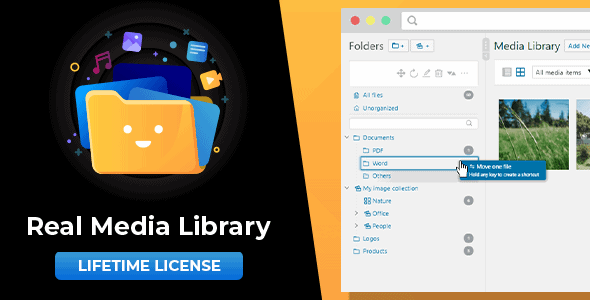
- Folder, Collection, and Gallery Organization: Create a structured hierarchy using folders (for any file type), collections (organizational containers for subfolders and galleries), and galleries (dedicated to images for visual displays). This three-tier system mirrors a real file manager like Windows Explorer or Mac Finder.
- Drag & Drop File Management: Move files between folders with simple drag and drop. Rearrange folder order and sort folder contents by criteria such as name, date, or custom order—either automatically or manually.
- Shortcut System (0 KB Storage): Create shortcuts of files in multiple folders without duplicating physical storage. This is a powerful feature for referencing the same image or document across different projects without wasting server space.
- Bulk Operations and Quick Actions: Select multiple folders to delete them at once. Use the toolbar to create, rename, or delete folders instantly. A quick folder search lets you navigate to any folder in seconds.
- Dynamic Galleries with Gutenberg Block or Shortcode: Generate a visual gallery directly from a folder using the WordPress block editor or a shortcode. This allows you to display an entire folder of images as a customizable gallery in your posts or pages.
- Advanced Upload and Filtering: Upload files directly to a specific folder. Filter by folder in the WordPress insert media dialog, making it easy to find exactly what you need when adding media to content.
- WordPress Multisite Support: Each site in a network maintains its own independent folder tree. This is ideal for agencies or organizations managing multiple WordPress installations.
- Import from Other Plugins: Seamlessly import categories and folders from popular plugins like FileBird, WP Media Folder, Advanced Media Library, and Media Library Wizard, ensuring a smooth migration.
- GDPR/DSGVO Compliant: No personal data is collected without explicit consent, making it a privacy-friendly choice for European and global users.
Who Is This For? Use Cases
Freelance Designers and Developers
If you manage multiple client websites, Real Media Library: Media Library Folder & File Manager for Media Management in WordPress is essential. You can keep client assets—logos, mockups, stock photos—in separate folders, making it easy to locate files when editing or updating sites. The shortcut feature lets you reuse a single logo file across multiple client projects without duplication.
Content Creators and Bloggers
Running a blog with hundreds of posts means accumulating thousands of images, PDFs, and videos. This plugin helps you categorize media by topic, date, or campaign. For example, create a folder for each blog series (e.g., “2024 Travel Posts”) and drag images directly into it. When writing a new post, you can filter by that folder to quickly insert relevant visuals.
E-commerce Store Owners
WooCommerce stores rely on product images, variations, and documentation. Organize product photos by category or brand. Use galleries to display product collections on landing pages. The ability to sort folder contents by custom order ensures your best-selling products appear first in media selection dialogs.
Web Agencies and Teams
In a team environment, consistency is key. Multisite support means each client site has its own folder structure. Team members can collaborate without interfering with each other’s organization. The bulk delete and quick search features save hours when cleaning up old or unused media across multiple sites.
Technical Details & Compatibility
Real Media Library: Media Library Folder & File Manager for Media Management in WordPress is built for modern WordPress environments. It requires PHP 7.4 or newer (fully compatible with PHP 8), WordPress 5.9 or newer, and MySQL 5.7+ or MariaDB 10.3+. The plugin works flawlessly with the Gutenberg block editor and is compatible with all major page builders (Elementor, Beaver Builder, Divi, etc.) and popular themes. It supports the latest versions of Google Chrome, Mozilla Firefox, Microsoft Edge, and Apple Safari. The developer, devowl, provides regular updates with bug fixes and new features—all updates are included free of charge. The plugin is translated into several languages for international use.
Pros and Cons
Pros
- Intuitive drag-and-drop interface that feels like a native file manager.
- Shortcut system saves disk space by avoiding file duplication.
- Dynamic gallery creation via Gutenberg block or shortcode adds flexibility.
- Bulk operations (select multiple folders, delete at once) improve efficiency.
- Seamless import from competing plugins reduces migration friction.
- Multisite support is ideal for networks and agencies.
- GDPR-compliant with no unauthorized data collection.
- Regular free updates and active development from devowl.
- Over 22,786 sales indicate a trusted and widely-used solution.
- Priced at $79.00—a one-time investment for a feature-rich plugin with ongoing support.
Cons
- No built-in cloud storage integration (e.g., Google Drive or Dropbox sync) is mentioned in the description.
- Requires PHP 7.4+, which may exclude users on older hosting environments.
- Learning curve for the three-tier system (folders, collections, galleries) if you are accustomed to simpler folder-only plugins.
- No advanced image editing or compression features—it focuses purely on organization and management.
Frequently Asked Questions
Is Real Media Library compatible with WooCommerce?
Yes, Real Media Library: Media Library Folder & File Manager for Media Management in WordPress works seamlessly with WooCommerce. You can organize product images, variation photos, and documentation into folders. The plugin integrates with the WordPress media library and does not conflict with WooCommerce’s media handling. Users commonly create folders by product category (e.g., “Clothing,” “Electronics”) to streamline product management.
Does the plugin include support and updates after purchase?
Yes, every purchase of Real Media Library includes access to regular free updates and support from the developer, devowl. Updates include bug fixes, compatibility improvements, and new features as described in the release notes. The Envato support policy typically provides six months of support, with the option to extend. The plugin is actively maintained, with over 22,786 sales reflecting a strong track record of reliability.
Can I import existing folders from other media library plugins?
Absolutely. Real Media Library includes a built-in import feature that allows you to migrate categories and folders from popular plugins such as FileBird, WP Media Folder, Advanced Media Library, and Media Library Wizard. This makes switching to Real Media Library straightforward—you will not lose your existing organization. The import process is guided and retains your folder hierarchy as closely as possible.
Final Verdict
Real Media Library: Media Library Folder & File Manager for Media Management in WordPress is a mature, well-supported plugin that solves one of the most persistent pain points for WordPress users: media chaos. With over 22,786 sales and consistent updates from devowl, it has proven itself as a reliable tool for freelancers, agencies, and content creators alike. The three-tier folder system, drag-and-drop interface, and shortcut feature set it apart from simpler alternatives. At $79.00, it offers excellent value for a plugin that can save you hours of searching and frustration every week. If you are tired of scrolling through an endless flat list of media files, this plugin is a smart investment. Try Real Media Library today and take control of your WordPress media library.