Instagram has evolved far beyond a simple photo-sharing app; it’s now a central hub for brand growth, trend discovery, and community engagement. However, the platform’s native features still lack a simple, built-in ‘repost’ button, forcing creators, marketers, and everyday users to rely on workarounds. This is where Repost For Instagram – FastSave bridges the gap, offering a streamlined utility designed specifically for iOS users who want to share content without the usual friction. Instead of juggling multiple screenshots and manual cropping, this tool automates the entire process, ensuring you can credit original creators and populate your feed with high-quality, engaging content in just a few taps. Whether you are managing a brand’s content calendar or simply curating a personal feed, this app positions itself as the fastest way to manage and share media, eliminating the tedious steps typically associated with cross-posting.
Key Features
FastSave is not just about copying and pasting; it is a comprehensive suite of tools designed to enhance your Instagram workflow. Below is a detailed breakdown of the core functionalities that set this app apart from standard bookmarking or screenshot methods.
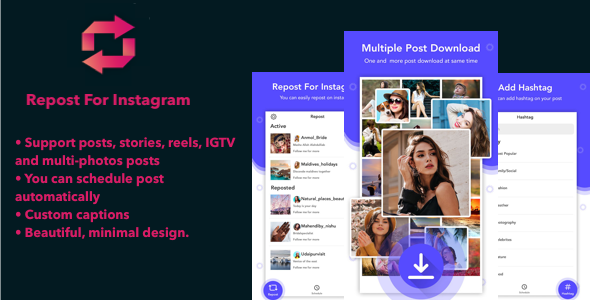
- Universal Reposting Capabilities: Unlike basic tools that only handle feed posts, FastSave supports posts, stories, reels, IGTV, and multi-photo albums. This means you are not limited in the type of content you can share, making it an all-in-one solution for video-heavy and image-heavy accounts.
- Multi-Network Integration: The app understands that your content strategy is not siloed. It supports multiple social networks, allowing you to take a video from Instagram and schedule or share it directly to other platforms, streamlining your cross-posting workflow significantly.
- Smart Auto-Scheduling: One of the standout features is the ability to schedule posts automatically. You can plan your content weeks in advance, ensuring that your feed remains active even when you are offline or busy with other tasks. This is a game-changer for social media managers who rely on consistency.
- Custom Caption & Credit Control: Maintaining proper attribution is crucial in the social media ecosystem. The app allows you to add custom captions and edit repost credits, ensuring that original creators are recognized while allowing you to add your own voice or branding to the shared content.
- Aesthetic Minimalism: The design is beautiful and minimal, focusing on user experience. There is no cluttered interface or confusing menus; the app prioritizes a clean aesthetic that makes navigation intuitive, allowing you to focus on the content rather than the tool.
Who Is This For? Use Cases
The beauty of this tool lies in its versatility. While it is marketed as an app for individuals, its feature set lends itself perfectly to professional environments. Below, we explore three primary user profiles who will benefit most from integrating FastSave into their daily routine.
Social Media Managers and Digital Agencies
If you are juggling multiple client accounts, speed and accuracy are non-negotiable. FastSave allows agency professionals to quickly gather user-generated content (UGC) or trending reels to repurpose for clients. The auto-scheduling feature is particularly valuable here, as it allows you to batch-create content on a Monday and have it roll out across the week without manual intervention. Furthermore, the ability to support multiple networks means you can adapt a single Instagram reel for a Twitter or Facebook audience without needing a separate downloader, saving hours of administrative work each week.
Influencers and Content Curators
Curating a thematic feed is an art form. Influencers who rely on reposting fan art, testimonials, or relevant industry news need a tool that preserves image quality and handles video seamlessly. With FastSave, the process of swiping through a multi-photo album and selecting the right image becomes intuitive. The custom caption feature allows influencers to add their commentary or call-to-action (CTA) while still maintaining the integrity of the original post’s link, which is essential for building a community around shared interests.
Everyday Users and Brand Ambassadors
For the general user who loves sharing recipes, funny memes, or travel inspiration, this app removes the “screenshot and crop” hassle. The fastest way to share is simply to copy the link and let the app do the heavy lifting. Brand ambassadors specifically will find the multi-network sharing useful for spreading promotional content across their personal accounts, ensuring they remain active and engaged with their audience without having to download separate apps for each platform.
Technical Details & Compatibility
Regarding hardware and software requirements, Repost For Instagram – FastSave is optimized for iOS integration, specifically designed to work fluidly with the Safari browser and the native Instagram application. While the description does not specify a minimum iOS version, it is built to interact with the modern Instagram API and clipboard features, meaning it requires a relatively recent version of iOS to function at peak performance. The workflow relies heavily on the clipboard and the share sheet, which suggests a tight integration with Apple’s ecosystem, including iPhones and iPads.
The app’s dependency on the Safari browser is a key technical note. Users must copy the link from the address bar in Safari (or the share menu within the Instagram app), which then triggers FastSave’s background detection. This “auto-paste” detection is what makes it the fastest tool on the market, as there is no manual searching within the app. It is also geared to handle the full range of Instagram media formats, from standard JPEG/PNG images to high-bitrate MP4 files used in Reels and IGTV, ensuring that the downloaded content retains its original resolution for reposting. Given the modern focus on video content, the app’s ability to handle these formats is a critical technical advantage over older, image-only downloaders.
Pros and Cons
To provide a transparent evaluation, we have analyzed the strengths and potential limitations of this tool. Acknowledging both sides helps set accurate expectations for buyers.
Pros
- Feature-Rich Free Version: The app offers a robust free tier that allows unlimited downloads, which is rare in this category where many competitors restrict usage to three or four saves per day.
- Intuitive User Interface: The design is clean and uncluttered, making it extremely easy to navigate, even for first-time users who are not tech-savvy.
- Speed and Efficiency: The “copy link and wait” mechanism is genuinely faster than manual URL input, saving valuable seconds with every use. The support for albums is also a standout feature, as many competitors require you to download images individually from a carousel post.
- Cross-Platform Scheduling: The ability to push content to multiple networks directly from the app adds significant workflow value, reducing the need for separate scheduler apps.
Cons
- iOS Limitation: This app is exclusive to Apple devices. Android users or those managing accounts from a desktop PC would need to seek alternative desktop-based tools, which limits its appeal for multi-device users.
- Copyright Responsibility: As with any reposting tool, there is a risk of copyright infringement if users do not properly credit the original creator. The app provides the tools for custom captions, but the onus is entirely on the user to use them ethically.
- Dependency on Instagram Changes: Since the app relies on Instagram’s internal link structure, any significant changes to the app’s API or URL handling could temporarily affect functionality until the developer releases an update.
Frequently Asked Questions
We have compiled the most common queries regarding the functionality and purchase of this utility to help you make an informed decision.
Is it possible to repost Instagram stories and Reels without watermarks using this app?
Yes, you can save stories and Reels directly to your camera roll without a visible watermark overlay. However, it is considered best practice to use the custom caption feature to credit the original author when you repost the content to your own story or feed. This maintains the quality of the video while respecting the creator’s intellectual property.
Does Repost For Instagram – FastSave include support and updates with the purchase?
Yes, when you purchase the app through the Apple App Store, you gain access to the developer’s support channels. The app relies on the App Store’s update system, meaning future compatibility patches and feature enhancements are delivered automatically as long as the app is installed on your device. If you encounter bugs, the developer typically provides prompt responses via the support email listed on the App Store page.
Can I schedule posts to go live directly from this app, or does it just save to the camera roll?
The app goes beyond simple saving. It includes an integrated scheduler that allows you to queue content for later publication. However, due to Instagram’s API restrictions for third-party apps, the scheduler may trigger a notification reminder that prompts you to publish immediately, or it may utilize the share sheet to transfer the media to Instagram with the caption pre-filled. It effectively streamlines the process, but the final publish action generally remains within the Instagram app itself for security and ToS compliance.
Final Verdict
In a crowded market of downloader and repost tools, Repost For Instagram – FastSave distinguishes itself through a combination of speed, aesthetic quality, and a robust feature set that includes scheduling and album support. It is a reliable utility that eliminates the technical friction of sharing content, regardless of whether you are a professional marketer or a casual user. While it is exclusive to iOS, the developer’s focus on a clean user experience and comprehensive functionality makes it a worthwhile investment for anyone who frequently engages with Instagram content. The app is constantly updated to align with iOS standards, ensuring that the download process remains seamless and secure.
Stop wasting time with screenshots and convoluted workarounds. Whether you are reposting a viral Reel to your story or managing a content calendar for a brand, this tool saves you hours every week while ensuring your feed remains active and engaging. The free version is perfect for testing, but upgrading to the premium features unlocks the full potential of multi-network scheduling and an ad-free experience. Embrace the most convenient way to curate and share content—download Repost For Instagram – FastSave today and experience the difference in your social media workflow. Your future audience will thank you for the consistently high-quality stream of content you are able to offer.