The simplest interactions often have the most significant impact on user experience. A well-placed tooltip can provide instant clarification, guide a user through a complex interface, or simply add a layer of polish that distinguishes a professional website from an amateur one. If you are looking to integrate this level of interactivity without sacrificing performance or visual appeal, the jQuery Tooltips Plugin offers a streamlined solution. This premium asset, available on ThemeForest and CodeCanyon, is designed for developers and site owners who want to add elegant, CSS-powered tooltips to text, links, images, and buttons with minimal effort. By leveraging the power of jQuery and CSS3, this plugin eliminates the need for bulky image assets, resulting in faster load times and crisper visuals across all modern browsers.
Key Features
This plugin stands out in a crowded market by focusing on simplicity, aesthetic quality, and technical efficiency. Below is a breakdown of its core features that make it a worthwhile addition to your web development toolkit.
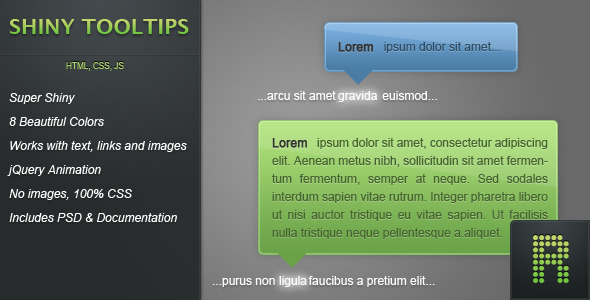
- 8 Beautiful Colors: The plugin ships with a versatile palette including green, yellow, orange, red, pink, dark blue, light blue, and white. This allows you to match the tooltip styling to your existing brand colors or site theme without needing to write custom CSS for each color variant.
- Universal Application: Whether you need tooltips for text snippets, hyperlinks, product images, or call-to-action buttons, this plugin handles all elements uniformly. It attaches cleanly to any HTML element, making it an incredibly flexible tool for various design contexts.
- jQuery-Powered Animation: The appearance and disappearance of tooltips are animated using jQuery. This ensures smooth, cross-browser compatible transitions that feel fluid and responsive to the user’s mouse movements, enhancing the perceived quality of your interface.
- Pure CSS Visuals (No Images): All gradients, drop shadows, and rounded corners are rendered using CSS3. This is a significant advantage. It reduces HTTP requests, allows for infinite scalability, and ensures the tooltips look sharp on high-resolution (Retina) displays because they aren’t dependent on rasterized image files.
- Detailed Documentation & Design Files: A comprehensive documentation file walks you through installation and customization with plenty of examples. Additionally, a PSD file is included, allowing you to conceptualize or further customize the default design visually before implementing it via code.
Who Is This For? Use Cases
This tooltip plugin is designed for a broad spectrum of web professionals. Its lightweight nature and ease of integration make it as suitable for a personal blog as it is for a complex web application dashboard. Below are specific scenarios where this plugin proves invaluable.
Web Designers and UI/UX Developers
For professionals building client sites, this plugin is a time-saver. Instead of hardcoding complex CSS hover states or relying on clunky JavaScript libraries, you can quickly add tooltips to portfolio items, navigation menus, or social media icons. The ability to choose from eight color schemes means you can often find a match without ever opening a CSS file, significantly speeding up the development process for tight deadlines.
E-commerce Store Owners
User experience is critical for conversion in e-commerce. You can use this plugin to display size guides, material details, or shipping information when a user hovers over a product thumbnail or a specific icon. By providing this information instantly without forcing a page reload, you reduce friction and help customers make informed purchasing decisions, potentially decreasing cart abandonment rates.
Web Application Administrators
In SaaS dashboards or internal business tools, icons often lack context. This plugin is perfect for adding explanatory tooltips to dashboard controls, report filters, or data points. It helps new users learn the interface quickly and reduces the need for extensive onboarding documentation, making the tool more intuitive and user-friendly.
Technical Details & Compatibility
Understanding the underlying technology is crucial for ensuring smooth implementation. This plugin is built on a robust stack that prioritizes performance and visual fidelity.
The visual styling leverages CSS3 for gradients and shadow effects. However, it is important to note a specific compatibility nuance: while the gradients work flawlessly in most browsers (including Internet Explorer via proprietary filters), Opera will render a single background color. This is a minor fallback that does not affect the functionality or legibility of the tooltip, but it is a consideration for designers who are pixel-perfect on the Opera browser.
Integration is exceptionally simple. The package is condensed into just two core files: tooltips.min.css and tooltips.min.js. You simply include these in the <head> of your document alongside the necessary jQuery library. The latest update focused on optimization for jQuery 1.7, ensuring compatibility with modern site architecture. The plugin also supports HTML5 validation by utilizing the data-text attribute (which replaced the older text attribute) for storing tooltip content, keeping your markup clean and standards-compliant. Compatibility is confirmed for Chrome versions 7 and 8, alongside standard support for Firefox and Safari.
Pros and Cons
To provide a balanced perspective, it is essential to evaluate both the strengths and the minor limitations of this tool. Here is an honest assessment based on the feature set and historical updates.
Pros
- Lightweight and Fast: Using CSS instead of images significantly reduces the asset weight, leading to better page load speeds.
- Easy to Implement: With only two files to include and a very detailed documentation guide, even novice developers can integrate it within minutes.
- Visual Consistency: The CSS3 gradients ensure tooltips look modern and smoothly blended with the site’s aesthetic, retaining a professional finish.
- Proven Track Record: The changelog shows a history of bug fixes (specifically for IE6 and IE7), highlighting the developer’s commitment to stability and cross-browser polish.
- Retina Ready: Since no raster images are used, the tooltips will appear crisp and sharp on high-DPI screens.
Cons
- Opera Rendering Quirk: The CSS3 gradient backgrounds are not rendered in Opera, resulting in a flat background color. While it doesn’t break functionality, it slightly detracts from the visual consistency for those users.
- Core Dependency: The plugin requires jQuery. If your site does not already have jQuery loaded, you will need to add it, which adds a slight overhead for that specific page.
- Legacy Browser Fixes: While the plugin fixed bugs for IE6 and IE7, modern development standards generally do not require support for these outdated browsers; however, knowing the plugin prioritizes backwards compatibility is a testament to its thoroughness.
Frequently Asked Questions
Is this tooltip plugin compatible with WordPress or WooCommerce?
Yes, the plugin is compatible with almost any platform that uses HTML and jQuery. Since it is simply a CSS and JavaScript file, you can enqueue it in your WordPress theme’s functions.php file. It works independently of CMS-specific code, meaning it will function on WooCommerce product pages as long as you apply the appropriate class or data attributes to your elements.
Can I use images inside the tooltips?
Absolutely. The update in version 1.0.1 specifically added support for images within the tooltip content itself. This means you are not limited to text; you can create rich tooltips that display product thumbnails or informational graphics to further enhance user engagement without navigating to another page.
Does this plugin include a design source file for custom color modifications?
Yes. A PSD file is included with your purchase. This is particularly useful if you want to visualize the tooltip design, modify the gradient styles, or create new color variations in Photoshop before implementing the changes in CSS. The provided documentation and PSD give you full control to ensure the design aligns perfectly with your brand identity.
Final Verdict
The jQuery Tooltips Plugin is a refined, high-quality asset that delivers exactly what it promises: beautiful, animated tooltips with minimal code overhead. It is a testament to the value of purpose-built plugins over hasty DIY scripts. The author has demonstrated a history of active maintenance and bug fixes, addressing critical issues like arrow visibility and positioning glitches in older versions of Internet Explorer. While the styling output relies on CSS3—meaning an older browser like Opera may show flat colors—the overall performance and visual quality on standard modern browsers are outstanding.
In a digital ecosystem where attention is scarce, providing intuitive and immediate feedback is crucial for keeping users engaged. This plugin allows you to create a smoother, more informative browsing experience that encourages interaction and builds trust. The combination of a lightweight footprint, ease of use, and the inclusion of design files makes it an excellent Return-on-Investment for any developer or business owner looking to elevate their site’s usability without bloating the codebase. If you are ready to replace dull static text with interactive, vibrant guidance, this tool is the perfect solution.