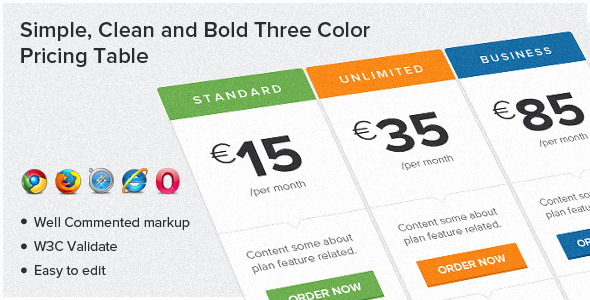
This three-color pricing table offers a visually striking yet minimalist solution for displaying subscription plans, service tiers, or product packages. Built with pure HTML and CSS, the design combines modern aesthetics with practical functionality across three distinct color-coded columns – typically blue, green, and orange – making it ideal for SaaS businesses, agencies, and e-commerce platforms.
Key Features of the Three-Color Pricing Table
- Color-Coded Visual Hierarchy: Each pricing tier features a distinct color scheme (blue, green, orange) for instant visual differentiation
- Minimalist Feature Display: Clean presentation of plan benefits with intuitive tick mark indicators
- Conversion-Focused Design: Prominent “Order Now” buttons optimized for click-through rates
- Responsive Structure: Adaptable layout that maintains integrity across device sizes
- Semantic HTML5: W3C-validated markup ensures accessibility and SEO benefits
Technical Implementation Details
The pricing table leverages modern CSS3 techniques for visual impact while maintaining cross-browser compatibility. The implementation includes:
Typography System
The design uses Lato from Google Fonts, a humanist sans-serif typeface known for its clarity and professional appearance. To implement:
- Add the font link in your HTML head:
<link href='http://fonts.googleapis.com/css?family=Lato' rel='stylesheet' type='text/css'> - Apply the font family in your CSS:
font-family: 'Lato', sans-serif;
Color Scheme Implementation
The three-color system uses CSS variables for easy customization:
:root {
    --primary-blue: #3498db;
    --primary-green: #2ecc71;
    --primary-orange: #e67e22;
}
Browser Compatibility Considerations
While the table renders perfectly in modern browsers (Chrome, Firefox, Safari, Edge), there are important considerations for Internet Explorer:
- CSS3 properties like box-shadow and border-radius may not render
- Consider adding fallback solid borders for IE users
- Gradient effects will appear as solid colors
Customization Guide
This pricing table is designed for easy modification to match your brand identity:
Changing Color Schemes
Simply modify the CSS variables to match your brand palette. For example:
.pricing-column.blue {
    background: var(--your-custom-blue);
    border-top: 4px solid var(--your-custom-blue-dark);
}
Adding/Removing Features
The feature list uses a simple unordered list structure that can be easily edited:
<ul class="features">
    <li><span class="tick"></span> Feature One</li>
    <li><span class="tick"></span> Feature Two</li>
</ul>
Best Practices for Implementation
- Mobile Optimization: Test the responsive breakpoints to ensure proper stacking on smaller devices
- Performance: Compress any background images used in the design
- Call-to-Action: Customize the “Order Now” button text to match your conversion goals
- A/B Testing: Experiment with different color assignments for each pricing tier
Conversion Optimization Tips
To maximize the effectiveness of your pricing table:
- Place your most popular plan in the center (typically the green column)
- Use contrasting colors for the “Order Now” buttons
- Include value indicators like “Most Popular” badges
- Ensure price differentiation is immediately visible
- Keep feature comparisons clear and scannable
For the complete code implementation and live demo, visit the original download source. The well-commented CSS makes customization straightforward even for developers with intermediate skills.