Key Features
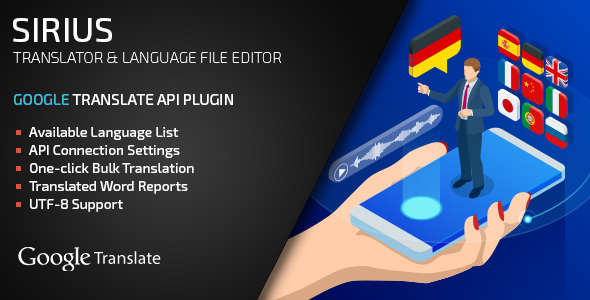
Building a multilingual website or application presents significant challenges, especially when you need to manage language files efficiently. The Sirius PHP Translator is a powerful plugin designed to streamline translation workflows by integrating directly with the Google Translation API. This tool is built for developers and site owners who already use the Sirius PHP Language File Editor and need to automate the translation of language files into multiple languages. Whether you manage a growing eCommerce platform or a content-rich corporate site, this solution eliminates manual editing, reduces human error, and accelerates localization efforts.
- Automated Google Translation API Integration: Connect your Google Translation API credentials to instantly translate PHP language files. No more copying and pasting text between tools.
- Seamless Compatibility with Sirius PHP Language File Editor: This plugin extends the functionality of the core editor, allowing for direct translation of your existing language files without breaking your workflow.
- Batch Language File Processing: Translate multiple language files at once, saving hours of repetitive work. Ideal when adding new languages or updating content across a large project.
- Simple Admin Panel Interface: All operations are managed from a clean, intuitive admin panel. You can select source and target languages, monitor translation progress, and manage API usage.
- Preserves File Structure and Placeholders: The translation engine intelligently keeps placeholders, variables, and code syntax intact, ensuring your application continues to function correctly after translation.
- Multi-Language Support: Leverage the full power of Google Translate to handle dozens of languages. Expand your global reach by translating into languages like Spanish, French, German, Japanese, and more.
Who Is This For? Use Cases
WordPress Developers Building Multilingual Sites
If you develop custom WordPress themes or plugins and rely on Sirius PHP Language File Editor to manage .po and .mo files, this translator plugin is your ideal companion. Instead of manually translating each string, you can automate the process. For example, after creating a new language file, you can feed it through the translator and then fine-tune any machine-translated phrases. This significantly cuts down project timelines, allowing you to deliver multilingual sites faster.
Web Agencies Managing Client Localization Projects
Agencies handling multiple client websites often struggle with repetitive translation work. This plugin allows you to standardize your workflow. You can register one Google API account and use it across all client projects that are compatible with the Sirius ecosystem. The batch processing feature is particularly valuable when rolling out a new language version for a client’s entire site, ensuring all navigation labels, product descriptions, and error messages are translated consistently.
Enterprise Teams Scaling Global Products
For large-scale applications with extensive language files (thousands of lines), manual translation becomes impossible. This plugin provides a scalable solution. You can define source and target languages in the admin panel, process large files, and use cost-effective Google API calls. This reduces the dependency on human translators for basic UI text, allowing your team to focus on context-crucial content like marketing copy or legal disclaimers.
Technical Details & Compatibility
To use Sirius PHP Translator, you must have the Sirius PHP Language File Editor (version corresponding to v.1.1) installed and active. The plugin requires PHP version 5.4 or higher and the cURL extension enabled on your server, which is necessary for making API requests to Google. You will also need valid Google Translation API credentials (API key) from your Google Cloud Console. The plugin supports all standard language file formats that the core editor handles. Last updated in July 2019, it remains compatible with modern PHP environments, but always verify compatibility with your specific server setup. The admin panel works on all modern browsers including Chrome, Firefox, Safari, and Edge.
Pros and Cons
Pros
- Dramatically reduces the time required to translate language files, especially for bulk projects.
- Integrates directly with the well-established Sirius PHP Language File Editor ecosystem.
- Preserves code integrity and placeholders, preventing broken functionality after translation.
- Relatively low cost of entry since you only pay for Google API usage beyond the plugin purchase.
- Simple admin interface that doesn’t require advanced technical expertise to operate.
Cons
- Dependent entirely on the Sirius PHP Language File Editor – it will not work as a standalone tool.
- Requires manual setup of Google Translation API credentials, which can involve a learning curve for beginners.
- Machine translations from Google API may still need human proofreading for nuance and context-specific accuracy.
- Last update was in July 2019, which might raise compatibility concerns with very recent PHP versions (8.x).
Frequently Asked Questions
Is the Sirius PHP Translator compatible with WooCommerce language files?
Yes, if you are using Sirius PHP Language File Editor to manage WooCommerce translation files, this translator plugin will process those files. The translator works at the file level, not the plugin level, so any language file that the core editor supports (including WooCommerce’s localization files) can be processed. However, always test the translated files on a staging site first to ensure UI elements display correctly.
Does this plugin include ongoing support or updates?
The purchase of Sirius PHP Translator includes standard CodeCanyon support from the author for bug fixes and compatibility issues. However, because the last update was in July 2019, you should review the author’s changelog and support forum to understand the current level of maintenance. The plugin’s functionality is stable for PHP 5.4–7.x environments, but users on PHP 8.0+ should test thoroughly.
Do I need a Google Cloud account to use this plugin?
Yes, absolutely. The plugin relies on the Google Translation API to perform translations, and every request requires a valid API key from your Google Cloud project. You will need to enable the Cloud Translation API in your Google Cloud Console and set up billing. This is a standard requirement for any tool that uses Google’s translation services, and the plugin provides a dedicated field in the admin panel to enter your API credentials.
Final Verdict
If you are already invested in the Sirius PHP Language File Editor ecosystem and need to scale your localization efforts, the Sirius PHP Translator plugin is a practical and time-saving investment. It automates the most tedious part of managing multilingual sites—translating language files—while preserving the structural integrity of your code. The plugin leverages the reliable Google Translation API, giving you access to high-quality machine translations for dozens of languages. While it is not a standalone tool and requires some initial API configuration, the productivity gains for developers and agencies handling multiple projects are substantial. With solid sales history and a focused feature set, this plugin fills a specific need well. If you manage multiple multilingual WordPress or PHP-based projects, purchase this plugin today to eliminate the manual drudgery of file translation and accelerate your development velocity.