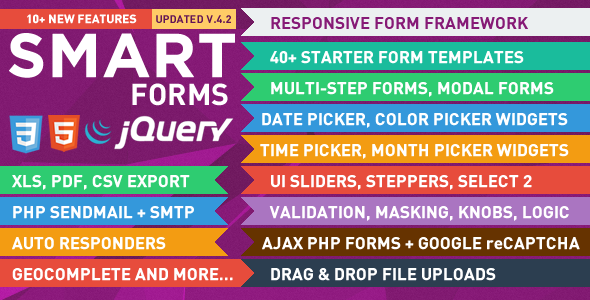
Building a professional web form from scratch is a tedious process that involves wrestling with CSS layouts, writing jQuery validation scripts, and debugging PHP mail handlers. For developers and agencies, this repetitive work eats into project budgets and timelines. Enter Smart Forms, a comprehensive form framework by developer elflaire that replaces this chaotic workflow with a unified, responsive, and feature-rich solution. This isn’t just a collection of inputs; it is a complete UI system built on a fluid 12-column grid, designed to help you construct anything from a simple contact page to complex multi-step booking wizards without requiring deep expertise in CSS3, HTML5, or jQuery. With over 4,300 sales on CodeCanyon, this framework has become a go-to asset for developers seeking speed, consistency, and reliability in their projects.
Key Features
Smart Forms distinguishes itself by bundling an extensive array of widgets and processing tools into a single, coherent package. Instead of hunting for separate plugins for date selection, masking, or CAPTCHA, this framework provides a unified solution. Here are the standout capabilities that define this form framework:
- Comprehensive jQuery Widget Library: The framework includes a deep set of UI elements including Datepickers, Timepickers, Monthpickers, Colorpickers, Numeric Steppers, and UI Sliders with labels and tooltips. It also supports advanced features like Autocomplete with multi-tag select and a customized UI Combo widget.
- Pure CSS3 & HTML5 Visuals: Every element, from checkboxes to toggle switches, is rendered without images. This ensures crisp scaling on high-resolution screens and allows for easy color manipulation via stylesheets.
- Dynamic Form Logic: Version 3.1 introduced the ability to dynamically clone form elements, allowing users to add or remove fields on the fly. You can also create chained select elements (dependent dropdowns) using either normal or AJAX data sources, reducing user error and speeding up data entry.
- Conditional Logic & Branching: This feature allows you to show or hide specific form sections based on user input from checkboxes, radios, or select menus. This keeps complex forms clean and relevant to the user’s specific path.
- Working AJAX PHP Forms with CAPTCHA: The package includes five fully functional PHP forms (Contact, Booking, Quotation, Order, and Multi-Step Project Quote). These are ready to run out-of-the-box and feature a realtime AJAX CAPTCHA system to block spam without full-page reloads.
- Data Management & Export: Form submissions are not just emailed; they can be stored in a CSV file located in an admin folder. The framework includes a password-protected data table view for sorting and searching entries, plus functionality to export data to PDF, XLS, CSV, or print it directly from the browser.
- Visual Flexibility: You are not locked into a single look. Smart Forms ships with 3 distinct styles (Elegant, Flat, Dark) and 7 theme colors per style, allowing you to match the form aesthetic to your brand identity.
- Styling Extras: Beyond standard inputs, you get access to 400+ FontAwesome vector icons, animated tooltips, notification alerts, CSS3 multi-shape buttons, and animated progress bars to create a polished user experience.
Who Is This For? Use Cases
Smart Forms is a versatile toolkit that serves a broad spectrum of web professionals. Whether you are a freelancer building sites for clients or a product manager looking to streamline internal tools, the framework adapts to your specific requirements. Its primary strength lies in reducing the development time associated with complex data capture.
Web Developers and Freelancers
If you build custom websites for clients, this framework is a massive time-saver. Instead of coding unique CSS and jQuery for each project, you can integrate Smart Forms and utilize the 40+ starter templates to quickly assemble a quote generator, a job application form, or a complex order form. The framework’s consistency means you don’t have to re-learn a new UI pattern for every project.
UI/UX Designers Prototyping Interactions
Designers who need to prototype high-fidelity interactions without getting bogged down in backend logic will find Smart Forms useful. The drag-and-drop file uploads, modal popup forms with timed auto-show, and multi-step wizard themes (Vertical, Horizontal, Smart Steps, and Progress) allow you to test user flows and present interactive concepts to stakeholders quickly.
Businesses Requiring Data Collection & Reporting
For internal tools or client-facing portals, the data management features are invaluable. The ability to store submissions in a CSV file and view them in a searchable data table—without needing to set up a MySQL database—is a significant advantage. The export options (PDF, XLS, CSV) make it easy to integrate form data into existing reporting workflows or accounting software.
Non-Technical Site Owners
For those who manage their own websites and need robust functionality without coding knowledge, the included “Working AJAX PHP Forms” are a perfect fit. You can deploy the Contact or Booking forms immediately, modify the settings.php file for your email address, and rely on the built-in SMTP/Sendmail support to handle the technical complexities of email delivery.
Technical Details & Compatibility
Understanding the technical foundation of a framework is crucial before integration. Smart Forms is built on a modern stack but maintains a wide compatibility net. Here are the specific details regarding its build and environment:
- Core Technologies: The framework utilizes HTML5 and CSS3 for structure and styling, with jQuery (version 1.7+) powering the interactive widgets and AJAX calls. PHP handles all backend processing, email sending, and data storage.
- Grid System: The layout is built on a fluid 12-column grid, ensuring that forms scale gracefully across different screen sizes without requiring separate mobile templates.
- Browser Compatibility: It has been tested on IE9+, Chrome, Safari, and Firefox. Mobile support extends to Android and iOS browsers, ensuring that the forms are fully responsive and usable on touch devices.
- Email Handling: The PHP forms support both SMTP and SENDMAIL protocols, giving you flexibility depending on your server configuration and email deliverability requirements.
- File Management: The framework supports drag-and-drop file uploads via Dropzone.js, complete with a visual percentage progress bar for the user.
- Security & Validation: It includes both client-side and server-side validation. The CAPTCHA system has been updated to support Google reCAPTCHA in addition to the custom realtime AJAX CAPTCHA.
- Update History: The framework has been regularly maintained, with the most recent changelog entry (Version 4.2) focusing on bug fixes and CSS updates to ensure stability and compatibility with modern browsers and APIs.
Pros and Cons
While Smart Forms offers an impressive feature set, it is important to evaluate its performance objectively. Below is a breakdown of the strengths and potential limitations based on the provided documentation.
Pros
- Massive Feature Set: It is rare to find a package that includes date pickers, color pickers, captcha, file uploads, and conditional logic all in one. This eliminates the need to integrate and style multiple third-party plugins.
- Rapid Development: The 40+ starter templates and working PHP forms allow you to launch a functional form in minutes. The documentation is reported to be detailed and well-organized, facilitating a smooth learning curve.
- Excellent Value: At $11.00, the cost is minimal compared to the hours of development time it saves. This is a one-time purchase for a framework that is used across unlimited projects.
- Strong Support & Reputation: The author, elflaire, has a strong reputation for responsive and helpful support. With over 4,300 sales and a history of regular updates, there is a proven track record of reliability and community satisfaction.
- Data Export Capabilities: The ability to export submissions to PDF, XLS, and CSV formats is a professional-grade feature often only found in premium SaaS tools.
Cons
- Not a WordPress Plugin: The description explicitly states this is not a WordPress plugin. This means WordPress users will need to integrate the HTML/PHP code into their theme files manually, which might be a barrier for pure beginners.
- jQuery Dependency: While standard, the reliance on jQuery (1.7+) could cause conflicts if you are running a modern WordPress theme with a heavily customized script stack. You may need to manage script enqueues carefully.
- Design Aesthetics: While the “Elegant, Flat, and Dark” styles are flexible, they may not match every modern design trend out-of-the-box. You might need to invest time in CSS overrides to match a highly bespoke brand identity.
Frequently Asked Questions
Is Smart Forms compatible with WordPress?
Smart Forms is not a dedicated WordPress plugin, but it can be integrated into a WordPress site. Since it is built with standard HTML, CSS, and jQuery, you can paste the form markup into a custom page template or a HTML widget. However, you will need to ensure that the necessary PHP files are included and that jQuery is loaded correctly. The framework is independent of WordPress core, so it will not conflict with your theme as long as script dependencies are managed properly.
Does Smart Forms include working PHP scripts for sending emails?
Yes. The package includes five fully functional AJAX PHP forms, including a Contact Form, Booking Form, and Order Form. These scripts handle server-side validation, CAPTCHA verification, and email delivery. You can configure them to use either the SMTP protocol or the standard Sendmail function depending on your hosting environment. The scripts are organized in a settings.php file for easy configuration of your recipient email address.
Can I use Smart Forms to create a multi-step form or a modal popup?
Absolutely. Smart Forms includes dedicated widgets for creating multi-step forms with several navigation themes, including Vertical, Horizontal, and Smart Steps. Additionally, you can convert any form into a modal popup. The framework supports multiple modal forms on a single page and even includes a “timed auto-show” feature, allowing you to trigger a popup form after a user has spent a certain amount of time on the page.
Final Verdict
Smart Forms is a heavyweight champion in the realm of web form development. It successfully bridges the gap between a simple contact form generator and a complex data-collection enterprise tool. The sheer volume of included features—from UI Sliders and Color Pickers to Chained Selects and Drag-and-Drop Uploads—is staggering, especially when you consider the low price point. The framework is not just about collecting data; it is about presenting a professional, consistent, and responsive interface that builds trust with your end-users. The inclusion of export functions and a data table view elevates it from a front-end asset to a mini back-office solution.
While the lack of a native WordPress plugin might give some pause, the flexibility of the HTML/CSS output and the excellent support provided by elflaire mitigate this issue for most developers. The 4,303 sales count and the glowing testimonials regarding the author’s responsiveness are strong indicators of a product that is actively maintained and backed by a community of satisfied users. If you are tired of patching together disparate scripts and struggling with responsive layout issues, Smart Forms offers a streamlined, professional alternative. It is a smart investment that will pay for itself many times over in saved development hours.