For developers and system administrators managing complex databases, the ability to execute ad-hoc queries directly from within a proprietary application is a powerful, time-saving capability. The SQL Query Analyzer Form delivers this exact functionality, allowing you to embed a full-featured query editor directly into your .NET Windows Forms projects. Instead of forcing users to switch between your application and heavyweight tools like SQL Server Management Studio (SSMS) or Oracle SQL Developer, this component provides a seamless, integrated environment for database analysis, administration, and troubleshooting. Designed for both VB.NET and C# environments, it supports SQL Server and Oracle databases, making it a versatile asset for internal enterprise tools.
Key Features
- Multi-Database Support: The most significant upgrade in version 2.0 is full support for Oracle Database Connections, in addition to the existing SQL Server compatibility. This eliminates the need for separate tools when your environment includes both database platforms.
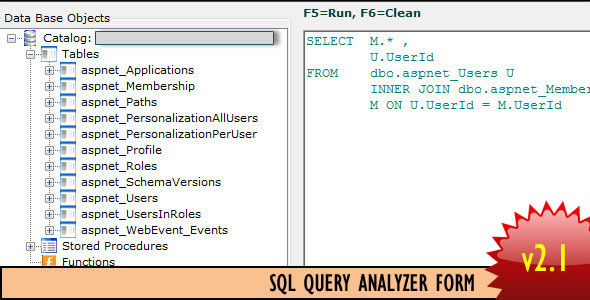
- SQL and PL/SQL Editor: The core of the tool is a rich text editor designed for writing queries. You can edit or create new Stored Procedures, functions, and views directly from the interface, streamlining schema management.
- Visual Database Navigation: Upon selecting a connection string, the left panel populates with all database objects—tables, views, stored procedures, and more. This provides instant, visual access to your schema hierarchy.
- Drag-and-Drop Schema Exploration: You can simply drag and drop a table name from the object explorer directly into your query editor. This speeds up query writing by eliminating manual typing and reducing the risk of typos in table or column names.
- Data Manipulation Queries: The tool fully supports Select, Insert, Delete, and Update operations, allowing for complete CRUD (Create, Read, Update, Delete) functionality through the interface.
- Dual-Language Support: Version 2.1 introduces a dedicated C# version for both SQL Server and Oracle, alongside the original VB.NET version. This ensures developers can integrate the control regardless of their preferred .NET language.
- Customizable Interface: You have the ability to change the font color of the query textbox, adapting the editor’s appearance to match your application’s theme or user preferences for better readability.
- Seamless Connection String Integration: The form automatically reads from your application’s .config file, populating a dropdown with available connection strings. This eliminates the need for manual re-entry of credentials, enhancing security and convenience.
Who Is This For? Use Cases
Enterprise Application Developers
If you are building a line-of-business application for an enterprise, your end-users often need to run reports or debug data without leaving the application interface. Instead of building a custom query UI from scratch, you can embed the SQL Query Analyzer Form in minutes. This saves weeks of development time and provides a professional-grade, proven solution that handles connection management and schema loading automatically.
System Administrators and DBAs
Database administrators responsible for multiple internal systems will find this tool invaluable for remote diagnostics. By integrating this analyzer into a central administration console, you can connect to any SQL Server or Oracle instance listed in the configuration file. This allows you to quickly execute maintenance scripts, check table structures, or validate data after scheduled jobs—all without opening multiple separate database management tools.
Internal Help Desk and Support Teams
Support staff who need to investigate user issues often require direct database access. Providing them with a controlled, read-only or limited-privilege view inside a custom application enhances security while maintaining utility. The SQL Query Analyzer Form can be integrated into a help-desk application, giving agents the power to perform targeted SELECT queries or execute pre-approved stored procedures, all within a familiar environment.
Software-as-a-Service (SaaS) Providers
For companies offering on-premise installations of their software, providing customers with an embedded query tool as part of a management portal can significantly improve the user experience. Administrators can analyze their own tenant database within the software, reducing the burden on your support team. The form’s ability to read connection strings from a configuration file makes it straightforward to deploy across different client environments.
Technical Details & Compatibility
The SQL Query Analyzer Form is built on the .NET Framework 2.0 or higher, ensuring compatibility with a vast range of Windows-based .NET applications, including legacy systems. It supports both SQL Server (via System.Data.SqlClient) and Oracle Database (via Oracle.DataAccess.dll).
To connect to Oracle, you will need to install the Oracle Data Access Components (ODAC), which provides the necessary ODP.NET and OleDB providers. The required Oracle.DataAccess.dll is included with your purchase, along with a C# and VB.NET version of the form. After adding this reference and System.Configuration to your project, the component integrates directly into the Visual Studio toolbox.
The component is designed for Windows Forms applications. It does not require additional third-party charting or reporting libraries. It reads connection strings from the standard app.config or web.config file, ensuring a secure and standard integration pattern. The source code is fully available, allowing advanced users to modify the UI or extend the query logic to suit specific needs.
Pros and Cons
Pros
- Highly Productive: Eliminates the need to switch between your application and external database tools, saving developer and admin time.
- Multi-Platform Database Support: Works seamlessly with both SQL Server and Oracle, reducing the number of components needed for mixed environments.
- Easy Integration: Requires only a few steps to add to an existing .NET project—copy files, add references, and the form is ready.
- Source Code Included: Full source code allows for deep customization, theming, and feature additions.
- Lightweight: No heavy dependencies beyond the .NET Framework and ODAC for Oracle. The form loads quickly and responds well.
- Dual Language Support: Available in both C# and VB.NET, catering to the majority of the .NET developer community.
- Automatic Connection Discovery: Reads connection strings from config files, reducing manual setup and improving security.
Cons
- Requires ODAC for Oracle: Users connecting to Oracle databases must download and install the Oracle Data Access Components separately, which adds an extra setup step.
- Windows Forms Only: This component is not compatible with ASP.NET Web Forms, WPF, or cross-platform frameworks like MAUI without significant rework.
- Basic UI Customization: While you can change font colors, the default interface is functional but not modern. Developers will likely want to improve the visual design for production applications.
- No Built-In Query History: The tool does not include a query history or saved query feature out of the box, which may require custom development for power users.
- Security Responsibility: The developer is responsible for implementing proper authentication and authorization within the hosting application, as the form itself does not enforce user permissions.
Frequently Asked Questions
Is the SQL Query Analyzer Form compatible with .NET Core or .NET 5/6+?
The provided component is built for the .NET Framework 2.0 and above, targeting full-framework Windows Forms applications. It will work with .NET Framework 4.x and .NET Framework 4.8. For .NET Core or .NET 5/6/8 Windows Forms applications, you may need to migrate the source code, as the Oracle.DataAccess.dll is specific to the full .NET Framework. Some developers have successfully ported similar controls, but it is not officially supported for those newer runtimes without code modifications.
Does this tool work with MySQL, PostgreSQL, or other databases?
Out of the box, the SQL Query Analyzer Form is designed specifically to support SQL Server (via native .NET providers) and Oracle (via ODP.NET). It does not include built-in drivers for MySQL, PostgreSQL, or SQLite. However, because the source code is provided, a developer with moderate database experience can modify the form to use other ADO.NET providers (like MySQL Connector/NET) by changing the database connection logic and the object explorer queries.
How do I secure the application so users cannot run dangerous queries?
The SQL Query Analyzer Form itself is a tool that supports any query the connected database user has permission to execute. Security is handled at the database level by using restricted SQL logins or database users. The integrated application should pass a connection string that uses a user account with only the necessary permissions (e.g., read-only for support staff, data modification for administrators). The form does not bypass any database security; it simply provides an interface for commands the configured user is already authorized to run.
Final Verdict
The SQL Query Analyzer Form solves a very specific but perennial need for .NET developers: embedding a competent SQL querying tool directly into a desktop application. It removes the friction of context-switching and provides a solid foundation that you can quickly integrate. The inclusion of both VB.NET and C# versions, plus support for SQL Server and Oracle, makes it a uniquely versatile component for mixed-technology environments. While the user interface could benefit from a modern touch and it lacks built-in features like query history, the core functionality—automatic connection loading, visual schema browsing, and a functional editor—is reliable and well-executed. For any developer who has ever needed to add an administrative console, a support ticket investigation panel, or a database query window to a .NET Windows Forms project, this component offers a robust and time-saving solution. It is a practical tool that delivers exactly what it promises, making it a worthwhile investment for enhancing your enterprise applications.