Sticky Note Widget for iOS 17 is a native iOS source-code package sold on ThemeForest for $99. It gives developers a working app project that creates two kinds of home-screen widgets — a sticky note and a timed to-do list — with customisable colours, gradients, photo backgrounds and fonts. It is aimed at developers and studios who want a finished, re-skinnable widget app to publish under their own name rather than at end users buying an app.
The listing describes the package as Objective-C code built with Storyboard interfaces on Xcode 15.3, with in-app purchase already wired in. The vendor does not disclose sales figures, so there is no purchase history to weigh as social proof. What follows is an assessment of what the package contains, where it fits, and where the $99 price needs scrutiny.
What the Sticky Note Widget for iOS 17 package actually contains
The core of the product is a complete Xcode project rather than a snippet library or a design file. That distinction matters: a buyer receives something that is expected to compile, run and be submittable, not a set of assets to assemble from scratch.
Two widget types with different jobs
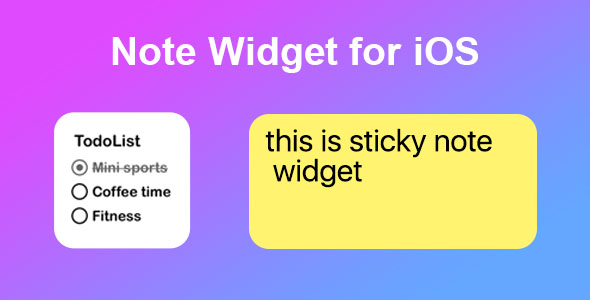
The sticky note widget is the simpler of the two — a small surface on the home screen for a short piece of text, styled to look like a physical note. The to-do list widget adds structure: multiple items, each of which can carry a time, turning the widget into a lightweight scheduling surface rather than a single reminder. Together they cover the two most common reasons someone pins a widget to a home screen: jotting something down and checking off a list.
Appearance controls that go beyond a colour picker
Customisation runs to solid colours, gradients and photo backgrounds, plus a choice of fonts. In practice this is what separates a widget app that feels native from one that feels like a template. A photo background behind a note, or a gradient that shifts with the user’s chosen palette, is the kind of detail that drives screenshots and shares. Because the styling is exposed in the app rather than hard-coded, the same build can serve a pastel, minimal aesthetic or something bolder without touching the source.
Commercial plumbing already in place
In-app purchase support is included in the project. For a paid app this is often the least enjoyable part of the build — product configuration, restore logic, testing against sandbox accounts — so having it present in the codebase is a genuine time saving, provided the implementation is clean enough to extend. The vendor does not state which purchase model is implemented, so the exact shape of the monetisation needs checking in the code before purchase.
Built for re-skinning and submission
Storyboard-based interfaces make the layout approachable for developers who are comfortable with Interface Builder but not with programmatic UI. The vendor supplies step-by-step documentation and describes the app as ready to style and publish, with a resource list for further assets. The stated design language is minimal and native, which is the correct instinct for a utility of this kind — widget apps live or die on looking like they belong on the home screen.
Where a Sticky Note Widget for iOS 17 codebase fits — and where it does not
The clearest fit is a developer or small studio with a client who wants a branded utility app quickly. A gym, a stationery brand, a productivity blog or an events company could each carry a note-and-list widget app under their own identity, and this package supplies the functional core so the work becomes branding, content and App Store presentation rather than widget engineering.
It also suits a solo developer building a portfolio of small utilities. The scope is deliberately narrow, which means the maintenance burden after launch is modest and the app can be shipped, iterated and left alone without a large support commitment. Anyone learning how WidgetKit extensions are structured inside a real project — target configuration, shared data between app and extension, timeline updates — will find a working reference more instructive than documentation alone.
The wrong buyer is anyone without iOS development experience. This is source code, not a no-code builder, and publishing requires an Apple Developer account, code signing, App Store Connect configuration and the willingness to debug someone else’s Objective-C. It is equally a poor fit for a team that has standardised on Swift and SwiftUI: adopting an Objective-C codebase with Storyboards means either maintaining a stack the team does not use or rewriting the app, at which point the $99 buys very little. And a buyer expecting a finished, market-differentiated product will be disappointed — the concept is common, and the package provides a starting point rather than a competitive edge.
Strengths and limitations of this widget app source code
Strengths
- A complete, runnable project rather than isolated components, which shortens the path from purchase to a testable build.
- Two complementary widget types that cover both quick notes and timed tasks, widening the app’s appeal without doubling the work.
- Layered appearance options — colour, gradient, photo, font — that make genuine visual differentiation possible.
- In-app purchase already integrated, removing a fiddly and error-prone build stage.
- Storyboard interfaces and step-by-step documentation lower the barrier for developers who prefer visual layout tools.
- Lightweight by design, which is the right call for a utility that lives on the home screen.
Limitations
- Objective-C with Storyboards is a dated stack for a new 2024-era project; many teams will see the codebase as technical debt from day one.
- The listing is titled for iOS 17 but the description refers to iOS 14 widgets, so buyers should confirm which widget APIs and features are actually implemented rather than assuming the newer capabilities.
- No sales history is disclosed, which removes the usual signal of other developers having shipped with it.
- The vendor does not specify the in-app purchase model, the licence terms for client work, or whether updates track future iOS releases — all material questions at this price.
- At $99 the package sits in the premium tier for a single-purpose app template, and the value depends heavily on code quality that cannot be judged from the listing alone.
How the Sticky Note Widget for iOS 17 compares with the wider template market
iOS app templates on marketplaces generally fall into three groups: full social or e-commerce apps with backends, single-purpose utility apps like this one, and UI kits that provide screens without working logic. This package belongs firmly in the middle group, and that is its advantage — it is small enough to understand completely and functional enough to ship.
Against full-featured app templates, it offers far less surface area but also far less risk. There is no server to configure, no user accounts to secure and no third-party service that might change its pricing. Against UI kits, it offers the opposite trade: working widget logic and in-app purchase, but a narrower design scope and less flexibility to become something else. Buyers who want a foundation for a broader productivity app will find the ceiling low; buyers who want exactly a notes-and-tasks widget app will find the fit close.
The stack is the main differentiator. Templates built on SwiftUI are now common, and a team already working in Swift will usually prefer them. This package competes on completeness and on being immediately familiar to developers who learned iOS development in the Objective-C era — a shrinking but still substantial group, particularly in agencies maintaining older client apps.
Frequently Asked Questions
Is Sticky Note Widget for iOS 17 a complete app or just a template?
It is a complete Xcode project intended to be re-skinned and published, not a design template or a set of screens. The vendor describes it as ready to style and submit to the App Store, and includes documentation covering the steps. Buyers should still expect to supply their own branding, App Store assets and developer account configuration.
Do I need to know Objective-C to use this package?
Yes. The project is written in Objective-C with Storyboard interfaces, so any customisation beyond colours and assets requires reading and editing that code. Developers who only work in Swift can still ship it, but they will be maintaining a language and UI approach outside their normal workflow, which raises the long-term cost of ownership considerably.
Does the app include in-app purchases and advertising?
In-app purchase support is included in the project, according to the listing. Advertising is not mentioned, so it should be assumed absent unless confirmed. The vendor does not state which purchase model is implemented — subscription, one-off unlock or consumable — so the exact monetisation structure needs to be verified in the code or by asking the author before buying.
Can the widgets be customised without rewriting the app?
Largely yes. Colours, gradients, photo backgrounds and fonts are all exposed as user-facing options, so the visual identity can be changed substantially through configuration and asset replacement. Deeper changes — new widget sizes, additional data types or different interaction patterns — will require source edits, since the package covers two defined widget types.
Verdict: who should buy this Sticky Note Widget for iOS 17 package
This is a sensible purchase for an Objective-C-comfortable developer or agency that needs a small, branded notes-and-tasks widget app shipped quickly, and that values having in-app purchase and a working widget extension already assembled. It is also a reasonable learning purchase for someone who wants to study a complete WidgetKit project end to end. It is not suitable for non-developers, for Swift-only teams, or for anyone expecting a differentiated product out of the box. At $99 the decision rests on code quality that the listing does not demonstrate, so requesting a preview or asking the author about the in-app purchase implementation and update policy is the prudent step before committing.