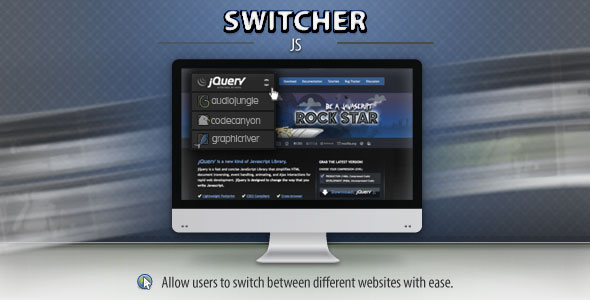
For website owners, developers, and digital agencies managing a network of related sites, maintaining a cohesive and professional user experience across the entire portfolio is a persistent challenge. Visitors who land on one of your sites may be completely unaware of your other valuable resources, leading to missed engagement opportunities and fragmented branding. The Switcher plugin directly addresses this by transforming a standard, often clunky, dropdown menu into a sophisticated, custom-styled website selector. This tool empowers you to seamlessly link your digital properties, guiding users between related websites, sister brands, or regional versions of your content with a single, intuitive click. It’s more than a navigation widget; it’s a strategic asset for increasing cross-site traffic, reinforcing brand authority, and keeping users within your ecosystem.
Key Features
- Custom Styling & Design Control: Unlike basic HTML select elements, Switcher gives you complete control over the visual presentation. You can style the dropdown to perfectly match your site’s design language, adjusting colors, typography, borders, hover effects, and animations to create a native, integrated feel.
- Flexible Website Management: Easily add, remove, and reorder the websites or links that appear in the switcher menu. This is typically managed through a simple interface in the WordPress admin, allowing for quick updates without touching code.
- Advanced Placement Options: Implement the switcher anywhere on your site. Most solutions offer shortcode, widget, and PHP snippet functionality, letting you place it in a header menu, sidebar widget area, footer, or within specific page content.
- Performance-Optimized: A well-coded switcher is lightweight and loads efficiently, ensuring it doesn’t negatively impact your site’s core web vitals or overall page speed—a critical factor for both user experience and SEO.
- Responsive & Mobile-Friendly: The dropdown interface is built to work flawlessly on all devices. It will adapt its behavior and styling for touchscreens, ensuring a smooth experience for mobile and tablet users.
- SEO-Friendly Implementation: A proper switcher uses clean, semantic HTML and avoids JavaScript-heavy solutions that can hide links from search engine crawlers, ensuring your linked sites benefit from clear navigation signals.
Who Is This For? Use Cases
The Switcher plugin serves a diverse range of professionals who manage multiple online properties. Its utility extends far beyond a simple “link list,” enabling strategic navigation architectures.
Digital Agencies & Freelancers
Agencies managing client portfolios can use Switcher to elegantly showcase their other work directly on a client’s site (with permission) or within their own agency site’s portfolio section. It provides a professional, interactive way to demonstrate breadth of experience and guide potential clients to relevant case studies.
Businesses with Multiple Brands or Products
Companies operating several distinct brands, product lines, or regional sites (e.g., example.com, example.uk, example.de) can use the switcher as a global navigation element. This allows a visitor on the US site to effortlessly jump to the UK or German version, improving international user experience and consolidating brand presence.
Content Networks & Niche Site Owners
Publishers or affiliate marketers running a network of sites in related niches (e.g., fitness, nutrition, and supplement reviews) can significantly increase cross-visitation. Placing a styled switcher in a prominent sidebar or header encourages readers interested in one topic to explore your authoritative content on another, boosting page views and engagement metrics.
Developers with Client Demo Sites
If you host multiple client demo sites on a single domain, a switcher is an ideal tool for providing easy access. It creates a clean, centralized hub, allowing prospects to toggle between different theme or plugin demos without needing to navigate complex folders or remember separate URLs.
Technical Details & Compatibility
While specific version numbers depend on the individual item on ThemeForest or CodeCanyon, a professional Switcher plugin will adhere to modern WordPress development standards. You should expect compatibility with the latest stable versions of WordPress, ensuring ongoing security and feature support. It will be built with PHP 7.4+ in mind and should not conflict with major page builders like Elementor, WPBakery, or Beaver Builder. Furthermore, compatibility with caching plugins (e.g., W3 Total Cache, WP Rocket) and CDN services is essential for performance. The front-end code should be tested across all major browsers (Chrome, Firefox, Safari, Edge) and be fully responsive, utilizing CSS media queries or a mobile-first approach to ensure perfect rendering on smartphones and tablets. A key signal of quality is regular updates from the author, indicating ongoing maintenance, security patching, and adaptation to new WordPress core releases.
Pros and Cons
Pros
- Enhanced User Experience: Replaces confusing text links with a clear, intuitive interface for site switching, reducing user friction.
- Professional Branding: A custom-styled dropdown looks significantly more polished than a default browser select element, elevating the perceived quality of your site.
- Increased Engagement & Traffic: Strategically placed, it can guide users to your other relevant content, increasing session duration and pageviews across your network.
- Implementation Flexibility: The ability to place the switcher via widgets, shortcodes, or PHP makes it adaptable to virtually any theme or page layout.
- Lightweight Solution: A well-coded plugin adds minimal overhead, preserving your site’s loading speed and SEO performance.
Cons
- Potential for Clutter: If overused or placed poorly, an additional dropdown can add visual clutter to a header or navigation menu.
- Dependence on Quality: The user experience hinges entirely on the plugin’s code quality. A poorly coded switcher could have styling conflicts, JavaScript errors, or lack mobile responsiveness.
- Requires Thoughtful Information Architecture: It is not a substitute for a clear site structure. The list of sites must be curated and ordered logically for it to be useful to visitors.
- May Require Minor Styling Tweaks: To achieve a perfect visual match with your theme, some custom CSS might be necessary, requiring basic technical knowledge.
Frequently Asked Questions
Can I use Switcher with any WordPress theme?
In most cases, yes. A professionally developed Switcher plugin is designed to be theme-agnostic. It will generate clean HTML and CSS that can be styled to integrate with virtually any well-coded theme. The use of standard WordPress hooks, widgets, and shortcodes ensures broad compatibility. However, extreme edge cases with highly customized or non-standard themes may require minor CSS adjustments for perfect visual harmony.
Does the switcher work on mobile devices and touchscreens?
Absolutely. A core feature of any reputable Switcher plugin is full responsiveness. The dropdown trigger and menu are designed to be easily tappable on touchscreens, with appropriate touch-friendly sizing and behaviors. The menu should also adapt its width and positioning to fit within smaller viewports, providing a seamless experience across smartphones and tablets.
Is the plugin translation-ready and compatible with multilingual sites?
High-quality plugins from established authors are typically prepared for internationalization. This means the plugin’s admin interface and front-end labels can be translated using standard WordPress translation files (.po/.mo). For multilingual sites using plugins like WPML or Polylang, you would configure the switcher’s links to point to the corresponding language versions of your other sites, making it a powerful tool for global site networks.
Final Verdict
The Switcher plugin solves a specific but impactful problem for multi-site operators: creating a graceful and functional bridge between related digital properties. Its value lies not in a vast feature list, but in executing a single function exceptionally well—transforming basic navigation into a branded, user-friendly experience. By keeping visitors within your ecosystem, you foster deeper engagement, strengthen your overall web presence, and present a unified, professional front. When selecting a Switcher from a marketplace like CodeCanyon, prioritize items with a strong sales history, positive user reviews, and an author with a track record of consistent updates and support. This social proof is a reliable indicator of code quality and long-term reliability. If you manage more than one website in a related field, implementing a well-designed Switcher is a low-cost, high-impact strategic upgrade. It moves beyond mere convenience, becoming an integral part of a cohesive digital strategy designed to retain audience attention and maximize the value of your entire online portfolio.