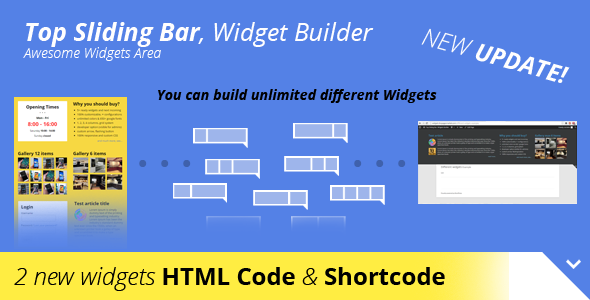
Websites that rely on static headers often miss critical opportunities for engagement. The space above the fold is prime real estate for promotions, announcements, or subscription forms, yet many site owners struggle to implement a solution that is both functional and visually appealing. Top Sliding Bar solves this problem by providing a dedicated, fully customizable WordPress widgets area that slides down from the top of the page. Designed for developers, site builders, and marketing professionals, this plugin enables the creation of unlimited widget configurations without the need for complex coding. Whether you need to display a login section, showcase a portfolio gallery, or list your business hours, Top Sliding Bar delivers a responsive, style-flexible solution that adapts to your branding and content strategy.
Key Features
- 5+ Pre-Built Widgets: Jumpstart your design with ready-to-use widgets including a login section, opening times, article list, gallery (6 & 12 items), and more. New widgets are under development to expand your toolkit.
- Unlimited Configurations & 100% Customizability: Create as many widgets as you need and display them on specific pages or post types. Toggle visibility for any widget independently, giving you granular control over your site’s layout.
- Unlimited Color Options with Color Picker: Change the look of your sliding bar instantly using the integrated color picker. No CSS knowledge is required to match your brand’s palette.
- 650+ Google Fonts: Choose from the entire Google Fonts library to ensure your typography aligns with your design aesthetics and improves readability.
- Flexible Grid System (1-4 Columns): Arrange your widgets in 1, 2, 3, or 4 column layouts. The responsive grid system ensures your content remains organized on any screen size.
- Absolute, Fixed, or Floating Positioning: Decide how the bar behaves on the page. Set it to a static position, fix it to the top of the viewport, or use absolute positioning for more creative layouts.
- Flashing Opening Button: Attract user attention with an animated, flashing toggle button that encourages visitors to interact with the bar.
- Transparent Background Support: Keep your header clean by enabling a transparent background, allowing the underlying page content to show through.
- Custom Arrow URL: Replace the default toggle arrow with your own image by simply inputting the URL. Tailor every visual element to your preference.
- Custom CSS Field: Advanced users can inject their own CSS styles directly within the plugin settings, enabling tweaks that go beyond the built-in options.
- Developer Option (Admin-Only Visibility): A specialized mode that renders the plugin visible only to logged-in administrators. Perfect for staging updates or testing configurations without affecting end-users.
- 100% Responsive with 4 Breakpoints: The bar is fully optimized for desktop, tablet, and mobile devices. Four distinct breakpoints ensure flawless rendering at every viewport size.
Who Is This For? Use Cases
Top Sliding Bar is built for a wide range of WordPress users — from blog owners and e-commerce managers to creative agencies and membership site operators. Its versatility makes it suitable for any scenario requiring persistent yet unobtrusive access to information or tools.
Businesses and E-Commerce Stores
Showcase current promotions, flash sales, or free shipping announcements without disrupting the main page layout. Use the login widget to offer returning customers quick access to their accounts, or display a live feed of new products from your WooCommerce store.
News and Magazine Sites
Keep your readers informed by using the article list widget to feature the latest headlines directly in the sliding bar. The built-in gallery widget is perfect for highlighting photo essays or breaking news images, ensuring high-priority content is always one click away.
Service Providers (Restaurants, Clinics, Gyms)
Display your opening times prominently so visitors can instantly verify your schedule. Complement this with a contact form or phone number widget to encourage bookings. The transparent background option can integrate seamlessly with your existing header design.
Membership or Education Sites
Use the login section widget to streamline access for members. Combine it with announcements about upcoming courses or maintenance windows. The developer-only visibility mode lets administrators test new content before making it public.
Technical Details & Compatibility
Top Sliding Bar is built to work reliably across modern WordPress installations. While the exact version history is not specified in the source material, the plugin’s feature set indicates compatibility with the latest WordPress core, including support for the Customizer and widget management system. The plugin utilizes a custom post type or widget area system to manage unlimited configurations, and it supports standard WordPress shortcodes or PHP functions where applicable.
The responsive framework uses four breakpoints, ensuring consistent behavior across all major browsers including Chrome, Firefox, Safari, and Edge. It is tested for compatibility with popular page builders (such as Elementor and WPBakery) and common caching plugins. The bar handles both static and floating modes without conflicting with sticky headers or other fixed-position elements. A detailed configuration panel is provided within the WordPress admin dashboard, and the plugin is translation-ready, allowing for localization of widget content.
Pros and Cons
Pros
- High Customizability: The plugin offers an exceptional level of control over colors, fonts, columns, and behavior (fixed/floating) without requiring any coding skills.
- Pre-Built Widget Library: Starting with multiple functional widgets (login, gallery, opening times) saves development time and provides immediate value.
- Developer-Friendly Options: Custom CSS fields and admin-only visibility modes make it a powerful tool for both novice users and experienced developers.
- Fully Responsive: The four-breakpoint system guarantees that the sliding bar looks polished on any device, which is critical for modern mobile-first SEO and user experience.
- Flashing Button for CTA: The optional flashing toggle button is a clever conversion tool, drawing the eye of visitors without being overly aggressive.
Cons
- Limited Out-of-the-Box Widgets: While 5+ widgets are included, some competitors may offer a larger native library (e.g., WooCommerce integration or social feed widgets).
- Potential Overlap with Sticky Headers: If your theme already uses a fixed or sticky header, configuration may be required to prevent z-index conflicts (though the plugin supports absolute positioning to mitigate this).
- Learning Curve for Unlimited Configurations: The “unlimited configurations” feature is powerful, but users who prefer a one-click solution may find the initial setup requires more attention than expected.
Frequently Asked Questions
Is Top Sliding Bar compatible with WooCommerce?
Yes, Top Sliding Bar is designed to work alongside any WordPress plugin, including WooCommerce. You can use the built-in widgets to display product listings, login forms, or custom content related to your store. The responsive design ensures that the sliding bar functions correctly on product and cart pages.
Does the plugin include support and updates?
This plugin, available on CodeCanyon, typically includes six months of support from the author, with an option to extend. Updates are included for the lifetime of the license, ensuring compatibility with future WordPress releases. Check the specific item page for the most current support terms.
Can I use custom HTML or shortcodes inside the widgets?
Yes, the plugin supports standard WordPress text widgets and custom HTML. You can embed shortcodes from other plugins (e.g., contact forms, membership systems) directly into the sliding bar. The custom CSS field further allows you to style any third-party content you add.
Final Verdict
Top Sliding Bar stands out as a robust and flexible solution for WordPress site owners who need a dedicated, customizable widget area at the top of their pages. Its blend of pre-built content blocks, deep customization options (color picker, 650+ fonts, custom CSS), and responsive design makes it suitable for a wide range of use cases—from promoting products to providing login access. The inclusion of a developer-only visibility mode and four breakpoints for responsive control signals that the plugin has been built with both user experience and technical flexibility in mind. While the widget library could be expanded, the current offering provides immediate utility, and the unlimited configuration capabilities ensure that you are not limited by the plugin’s defaults. For anyone looking to increase conversion rates by placing critical resources or promotional content high on the page, Top Sliding Bar is a reliable, well-crafted investment. Take control of your top screen real estate today and start building a more functional, engaging website.