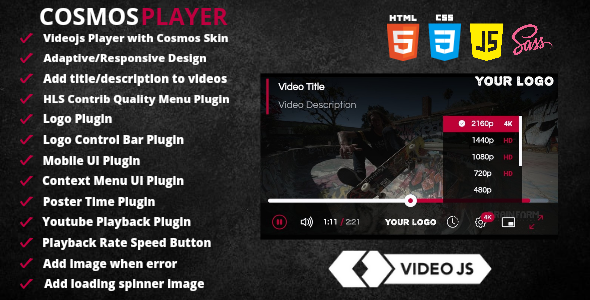
Video.js is the industry-standard HTML5 video player, but its default interface often feels utilitarian, clashing with modern, polished web designs. **Cosmos Video Player Skin** for Video.js is a premium, feature-rich skin that transforms the default player experience into a sleek, modern, and highly functional component. Designed for developers, agencies, and content creators, this skin integrates a comprehensive suite of plugins—including a quality selector, mobile UI enhancements, and a custom context menu—making it a complete, out-of-the-box solution for any website that prioritizes high-quality video presentation.
Key Features
The Cosmos skin is not merely a visual refresh; it bundles powerful functionality that elevates the user experience. Below are the core features that set this theme apart from standard Video.js configurations.
- Modern Cosmos Skin (CSS/SCSS): The player’s design is built on a clean, modular architecture using CSS and SCSS. This ensures a lightweight, responsive interface that is easy to customize to match your brand’s specific style guide. The visual design is modern and user-friendly, focusing on minimizing UI clutter to keep the viewer’s attention on the content.
- Bootstrap Icons Integration: All UI controls are powered by the widely-used Bootstrap Icons set. This guarantees crisp, high-quality glyphs for play, pause, volume, and settings, ensuring visual consistency with other Bootstrap-based elements on your site without loading an entire separate icon font library.
- Fully Responsive & Adaptive Design: The skin is engineered to adapt fluidly to any screen size, from widescreen desktop monitors to portrait-oriented mobile devices. The layout adjusts spacing and element sizes automatically, ensuring that controls remain accessible and visually balanced across all viewports.
- Enhanced Video Metadata Display: You can easily inject a title and description directly into the player interface. This creates a self-contained video module, perfect for storytelling, tutorials, or product showcases where context needs to be displayed alongside the media.
- Precision Playback Controls: The player includes dedicated Skip Buttons for rewinding and fast-forwarding, allowing users to precisely jump through content. Additionally, a Playback Rate Speed Button lets viewers adjust the video speed (e.g., 0.5x, 1x, 1.5x, 2x) without digging into the default Video.js context menu.
- Built-in Quality Selector Plugin: For videos with multiple resolution sources, the skin includes a seamless quality selector. Users can switch between 1080p, 720p, or other available renditions directly from the player UI, ensuring optimal streaming based on their bandwidth and display resolution.
- Custom Logo Plugin: Brand your video player with your company logo. The skin allows you to place a clickable logo in the player corners, driving traffic back to your homepage or campaign site while reinforcing brand identity during playback.
- Mobile UI Optimization: The mobile plugin is a standout feature, offering double-tap navigation (tap right side to fast-forward, left side to rewind) and an automatic rotate-for-fullscreen gesture, providing a native-app-like feel on smartphones and tablets.
- Custom Context Menu UI: The default right-click menu is replaced with a branded, stylized context menu. This not only looks better but can be used to display specific links, licenses, or “About” information, keeping users within your ecosystem.
- Dynamic Poster Time Plugin: Before playback, the player can display the total video duration or a “LIVE” badge directly on the poster image. This gives users immediate information about the content length, improving click-through rates.
- YouTube Playback Support: The skin is compatible with the Video.js YouTube plugin, allowing you to use the Cosmos styling for embedded YouTube videos without integrating a separate player architecture.
- Custom Error & Loading States: You can define a custom image to display when video errors occur, preventing a jarring black screen. Similarly, a custom loading spinner (SVG) can replace the default animation, allowing for a fully white-labeled experience.
- Developer Support & Updates: Purchasing the skin includes access to the author’s support channel and guarantees compatibility updates for future Video.js releases.
Who Is This For? Use Cases
The Cosmos Skin is a versatile tool designed for professionals who need a premium video experience without assembling a patchwork of custom plugins. It is suitable for a wide array of digital environments.
Streaming Platforms and Video-On-Demand (VOD)
Whether you are building a subscription-based VOD service or a free ad-supported streaming site, the Quality Selector and mobile UI are crucial. Viewers on varying internet speeds demand control over resolution. The sleek, minimal design ensures the skin doesn’t distract from the movie or TV show, while the custom context menu can host links to copyright notices or support pages. The ability to display a “LIVE” badge on posters is also perfect for news or event streaming sections.
Online Course Creators and Educational Platforms
E-learning relies heavily on video retention. The Playback Rate Speed Button is a non-negotiable feature for students who want to listen at 1.25x or 1.5x speed to save time. The Skip Buttons (usually set to 10 seconds) are perfect for navigating lecture pauses or tangential discussions. Furthermore, adding a title and description overlay keeps course module information visible without requiring a separate page block, creating a cleaner Learning Management System (LMS) interface.
Corporate Websites and Marketing Agencies
For product demos and promotional videos, brand consistency is imperative. The Logo Plugin ensures your brand stays on screen throughout the playback. The custom loading spinner allows agencies to replace the default gray circle with a client’s branded animated SVG, maintaining visual fidelity from the landing page to the video player. The availability of SCSS files means web developers can alter color variables to match the exact hex codes of the corporate identity, ensuring a seamless integration.
News Portals and Bloggers
Media-rich articles benefit from the Cosmos skin’s lightweight nature. The Poster Time Plugin informs readers upfront if a video is a quick 3-minute briefing or a long-form 30-minute documentary, setting the right expectations. The contextual right-click menu allows journalists to include source links or disclaimers without cluttering the visible player interface.
Technical Details & Compatibility
To integrate the Cosmos Skin successfully, you should be comfortable with basic HTML, CSS, and JavaScript. The skin is not a standalone player; it requires Video.js version 8.6.1 or later to function.
Implementation: The setup involves linking to the standard Video.js CSS and the custom vjs-cosmos.css file in your HTML head. Then, you include the Video.js core library and the video-player.js bundle. The entire structure is fully commented and included in the downloadable HTML file, allowing for quick starting points.
Browser Support: Because it relies on Video.js, the skin supports all modern evergreen browsers, including Chrome, Firefox, Safari, and Edge. It also leverages HTML5 video APIs and CSS3 variables, ensuring fallback compatibility for older browsers (though the styling may degrade gracefully).
Responsiveness: The stylesheet heavily utilizes media queries to manage the interface at various breakpoints. On mobile devices, the default control bar shrinks, and the Mobile UI Plugin takes over for gesture support, ensuring that no buttons are too small to tap accurately.
Customization: For developers who want to change colors or border-radius, the inclusion of SCSS files is critical. Editing the source variables and recompiling is much cleaner than overriding CSS classes. If you don’t use SCSS, the generated CSS file is minified, so keep your custom overrides in a separate stylesheet loaded after the skin.
Pros and Cons
To deliver a balanced assessment, let’s break down the strengths and potential limitations of the Cosmos Skin. This helps you make an informed decision for your specific project constraints.
Pros
- All-in-One Solution: Eliminates the need to install six separate plugins. The skin bundles essential plugins, reducing server requests and the risk of JavaScript conflicts.
- Superior Mobile Experience: Most “responsive” players just resize; this one actively changes UX via double-tap and rotation gestures, leading to higher engagement on mobile devices.
- Extensive White-Labeling: From the context menu to the error message and spinner, every visual state can be customized, perfect for professional agencies.
- Clear Codebase: The inclusion of SCSS suggests a developer-friendly structure that is easy to maintain and extend, rather than fighting against a minified, unreadable CSS file.
- Performance Focused: By relying on Bootstrap Icons (which are lightweight SVGs) rather than bulky image sprites, the player maintains fast load times.
Cons
- Requires Video.js Knowledge: If you are a WordPress user who clicks and drags blocks, you may find the manual code integration more complex than installing a standard WordPress plugin with a settings panel.
- Version Synchronization: You must ensure that the
video-player.jsfile included in the skin matches the Video.js core version you are using. Upgrading Video.js independently might break the skin until an update is pushed. - No Single Video.js File: You must include both the Video.js CDN and the local skin files. Some niche players offer a single bundle that includes everything, though Cosmos keeps the player separate for security.
Frequently Asked Questions
Can I use the Cosmos Skin with a WordPress theme?
Yes, but it depends on how you embed videos. If you are using a classic theme or a custom HTML block, you can paste the <video-js> tag and link the CSS/JS files in your theme header. It will not work out-of-the-box with the default WordPress “Video” block unless you replace the default video tag with the video-js element or use a custom script to initialize it on existing videos. If you’re using a page builder like Elementor or WPBakery, switch that element to “Custom HTML” to insert the code.
Does including the skin slow down my website?
No, the skin is optimized for performance. The CSS file is minified, and the icons are embedded as inline SVGs rather than making separate HTTP requests. The JavaScript plugin bundle (video-player.js) is designed to be modular, and it only initializes the plugins you call in your initialization script. Because it relies on Bootstrap Icons, you avoid loading an icon font package unless you are already using Bootstrap, in which case it adds zero overhead.
Do I need to purchase any premium plugins from CodeCanyon to use the features?
No. The Cosmos Skin includes all the necessary JavaScript for the Quality Selector, Mobile UI, Context Menu, and Poster Time features directly in the package. While Video.js has some open-source plugins available, the versions included here have been specifically tailored to work with the Cosmos skin’s design language, ensuring that CSS variables are shared correctly between the skin and the plugin logic.
Final Verdict
The **Cosmos Video Player Skin** delivers on its promise of a premium, feature-complete player interface. It solves the most common pain points developers face when building custom video experiences: the tedious styling of the control bar, the implementation of simple gesture controls, and the integration of multiple conflicting plugins. By bundling everything into a cohesive, well-documented package, the author has effectively provided a “rocket ship” for your video content, allowing you to skip the assembly time and get straight to deployment.
While it requires a bit of front-end literacy to install, the payoff in user experience is substantial. The inclusion of a mobile-specific UI and the quality selector immediately upgrades your player from “functional” to “professional”. For developers building high-end custom sites, this is a worthwhile investment that adds polish to your deliverables and saves billable hours on coding functionality that already exists, just not in as polished a form.
If you are ready to move beyond the default Video.js appearance and want a skin that your clients and users will immediately recognize as superior, purchasing the Cosmos Skin is the right move. It combines design flair with practical plugins, ensuring your video player looks stunning and behaves intuitively across every device. Visit the ThemeForest listing directly to review the live demo and secure your copy today.