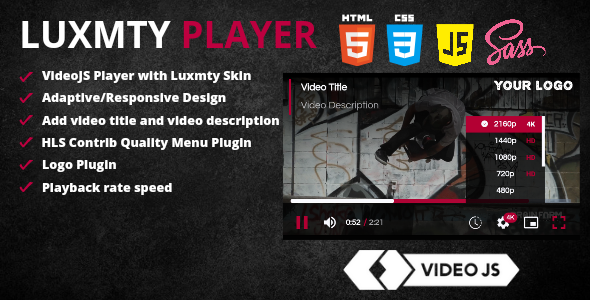
The Videojs Luxmty Skin is a premium customization package for the popular Video.js HTML5 player that combines elegant design with powerful functionality. This skin transforms the standard video player interface into a visually appealing and feature-rich media experience while maintaining full compatibility with all Video.js core features.
Key Features of Videojs Luxmty Skin
Enhanced Visual Design
The Luxmty skin offers a modern, polished interface with:
- Custom CSS/SCSS styling that completely overhauls the player’s appearance
- Responsive layout that adapts seamlessly to all screen sizes and devices
- Professional color scheme with carefully selected contrast ratios for optimal visibility
Advanced Functionality
Beyond aesthetics, this skin package includes essential plugins:
- Title and description overlay – Display contextual information about your video content
- Custom logo integration – Brand the player with your organization’s logo
- Quality selector – Let viewers choose between different resolution options
- Playback rate control – Adjust video speed from 0.5x to 2x normal speed
- Skip navigation buttons – 10-second forward/backward jumps for better content navigation
- YouTube compatibility – Play YouTube videos through the same elegant interface
Implementation Guide
CSS Integration
To implement the Luxmty skin, first include the required CSS files:
<link rel="stylesheet" href="https://cdn.jsdelivr.net/npm/[email protected]/dist/video-js.min.css">
<link rel="stylesheet" href="dist/vjs-luxmty.css">
HTML Setup
Configure your video element with the appropriate classes:
<video-js id="video-player" class="vjs-luxmty vjs-16-9" poster="your-poster-image.jpg">
  <source src="your-video.mp4" type="video/mp4">
</video-js>
JavaScript Initialization
Load the necessary JavaScript files to activate all features:
<script src="https://cdn.jsdelivr.net/npm/[email protected]/dist/video.min.js"></script>
<script src="dist/video-player.js"></script>
Customization Options
The Luxmty skin offers multiple customization avenues:
Branding Customization
- Replace the default logo with your brand logo
- Adjust color schemes to match your corporate identity
- Modify control bar positioning and visibility
Functional Adjustments
- Configure quality selector options based on available streams
- Set default playback speed preferences
- Adjust skip button duration increments
Performance Considerations
The Luxmty skin has been optimized for:
- Fast loading times – Minified CSS ensures minimal impact on page speed
- Browser compatibility – Works across all modern browsers including Chrome, Firefox, Safari, and Edge
- Accessibility compliance – Meets WCAG standards for users with disabilities
Maintenance and Support
The package includes:
- Regular updates to maintain compatibility with new Video.js versions
- Bug fixes and performance improvements
- Documentation updates reflecting new features
Useful Resources
For further customization and troubleshooting:
- Video.js Official Documentation
- CSS Minification Tools
- CSS Validation Services
- Color Code References
- Logo Creation Tools
For developers looking to extend functionality, the modular SCSS architecture allows for easy modifications without compromising future updates. The skin maintains clean separation between presentation and functionality, ensuring your customizations remain stable across version upgrades.