Never Get Lost Again: The “What Is Near To Me?” App Is Your Ultimate Local Discovery Tool
Finding essential services and points of interest when you are in an unfamiliar location can be a stressful experience. Whether you are a frequent traveler, a new resident exploring a city, or a field service professional navigating a territory, the ability to instantly locate the nearest bank, hospital, restaurant, or gas station is an absolute necessity. The What Is Near To Me? app provides a streamlined, intuitive, and powerful solution to this common problem. Built for Android devices, this tool leverages Google Maps to deliver precise, real-time data about your surroundings. It eliminates the friction of manual searching and guesswork, presenting you with a curated list of nearby places based on the category and distance you specify. This application is not just a utility; it is a reliable digital companion that ensures you are never without critical information, no matter where you are. For developers and businesses, the full source code and admin panel offer a robust foundation for creating a branded local discovery application or integrating location-based features into an existing ecosystem.
Key Features
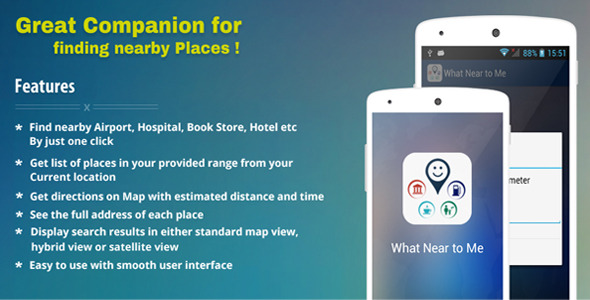
- One-Click Category Search: The application simplifies the discovery process by organizing places into logical categories. Users can tap to find Airports, Hospitals, Hotels, Book Stores, Banks, Gas Stations, Restaurants, and many more points of interest. This eliminates the need to type specific search queries, making the app incredibly fast and user-friendly.
- Customizable Radius Search: Unlike many location apps that rely on a fixed system, this app empowers you to define your search area. By entering a specific range—for example, 500 meters or 2 kilometers—you can precisely control the scope of your results. This feature is critical for finding the closest option rather than a place that is simply in the general vicinity.
- Comprehensive Place Details: Each search result provides the full street address of the location. This level of detail is essential for confirming a location before proceeding, ensuring you have the correct destination for navigation or planning purposes.
- Turn-by-Turn Navigation with Google Maps: The core functionality of the app seamlessly integrates with Google Maps. By selecting any location from your results, the app automatically launches a route from your current position to the destination. It displays a clear map with the best driving, walking, or transit route, along with the estimated time duration and total distance.
- Multiple Map Views: Users are not limited to the standard road map. The application allows you to toggle between Standard Map View, Hybrid View (satellite with street labels), and Satellite View. This flexibility is particularly useful for assessing terrain, checking traffic, or getting a visual perspective of the neighborhood.
- Intuitive and Smooth User Interface: The entire user experience is designed for speed and clarity. The interface is clean, with large, easily tappable buttons and a logical flow from category selection to result display. This ensures that even users who are not tech-savvy can operate the app without confusion.
Who Is This For? Use Cases
Travelers and Tourists
When visiting a new city or country, the “What Is Near To Me?” app becomes an indispensable travel guide. Instead of relying on outdated maps or asking strangers for directions, a traveler can instantly find the nearest ATM, a pharmacy, a hotel, or a highly rated restaurant. The ability to search by a specific radius helps tourists find amenities within walking distance of their accommodation, making exploration safer and more efficient.
Field Service Workers and Delivery Professionals
Professionals such as electricians, plumbers, couriers, and sales representatives work in constantly changing environments. This app allows them to quickly locate a hardware store for supplies, a gas station for a refuel, or a restaurant for a lunch break. The integration with Google Maps for turn-by-turn directions saves valuable time and reduces the stress of navigating a service territory.
New Residents and Students
Moving to a new neighborhood or university campus requires learning a new geography. New residents can use the app to map out essential services in their area, such as the nearest grocery store, post office, library, or medical clinic. This helps them become familiar with their new surroundings and establish a routine quickly.
Real Estate Agents and Property Scouts
When evaluating a property, location is everything. Real estate agents can use this app to immediately show a potential buyer what is nearby—schools, parks, public transport, and shopping centers. It provides a powerful, visual demonstration of a neighborhood’s amenities, which can be a decisive factor in a property sale.
Technical Details & Compatibility
This product is a complete Android Source Code package developed using Android Studio. It includes all necessary libraries and dependencies, allowing developers to open, build, and customize the application immediately. The system is compatible with a wide range of Android devices and versions, ensuring broad market reach. The package also includes a fully functional Admin Panel, which enables you to manage categories, update place data, and oversee the application’s content from a web interface. The comprehensive documentation, complete with screenshots, provides a step-by-step guide on rebranding the app, changing the package name, adding custom images, and populating new categories. This ensures that even developers with limited experience can successfully launch their own branded version of the app. The application relies on the Google Maps API for location services and map rendering, requiring a standard API key for operation.
Pros and Cons
Pros
- Complete White-Label Solution: You receive the full source code and an admin panel, allowing you to rebrand and customize the app entirely as your own. This is ideal for startups, agencies, or developers looking to create a product without building from scratch.
- Radically Simple User Experience: The focus on category selection and radius input makes the app incredibly fast to use. There is no learning curve; the workflow is logical and direct.
- Real-Time Navigation Integration: The seamless handoff to Google Maps for directions with time and distance estimates adds immense practical value. Users do not just see where a place is; they know exactly how to get there and how long it will take.
- Flexible Map Views: Offering Standard, Hybrid, and Satellite views caters to different user preferences and use cases, from simple route planning to detailed terrain analysis.
- Excellent Documentation: The inclusion of a detailed, screenshot-rich document significantly reduces the development effort required for rebranding and deployment.
Cons
- Relies on Google Maps API: The application is dependent on the Google Maps API, which requires an active API key and may incur usage costs at higher traffic volumes. Developers need to manage their own API billing.
- Primarily a Utility App: While the core functionality is excellent, it does not include advanced social features, user reviews, or photos of the places listed. It focuses strictly on discovery and navigation.
- Data Source Dependency: The accuracy of the results depends on the underlying data in the Google Maps database for the specific region. In very remote or rapidly developing areas, information may be incomplete.
Frequently Asked Questions
Is the “What Is Near To Me?” app compatible with Apple iOS devices?
No, the provided source code is specifically designed for the Android platform and is built using Android Studio. It is not a cross-platform solution and cannot be directly compiled for iOS without a complete rewrite in a language like Swift or Objective-C.
Can I add my own list of categories and places to the app?
Yes, absolutely. The application comes with a full admin panel that allows you to create, edit, and delete categories. You can also populate the database with your own list of places, addresses, and coordinates. The included documentation provides a detailed walkthrough of how to add new entries and modify the existing ones.
Does the purchase include technical support and future updates?
The purchase includes the full source code as specified in the item description. Support policies vary by author, but typically you receive support for item-related bugs and essential setup assistance. It is recommended to check the author’s support policy on the sales page. The code is provided as a solid foundation, and you are free to update and maintain it as needed.
Final Verdict
The What Is Near To Me? app delivers exactly what it promises: a fast, reliable, and intuitive tool for discovering nearby places. Its strength lies in its simplicity and focus on the core user need—finding a specific type of location within a set distance and immediately seeing the route. The inclusion of a fully functional admin panel and an easy-to-follow documentation guide makes it an exceptional value for developers and entrepreneurs. You are not just buying an app; you are acquiring a complete, ready-to-launch business asset that can be branded and deployed quickly. For anyone looking to enter the local discovery app market or to add a white-label navigation utility to their portfolio, this source code provides a robust and well-architected starting point. Stop searching for vague results and start giving your users the precise, actionable information they need. Download the full Android source code today and build your own powerful location-based application.