Outdated, clunky shopping carts are a leading cause of abandoned checkouts. When a customer clicks “Add to Cart,” they expect instant feedback, seamless navigation, and a clear path to purchase—not a jarring page reload that disrupts their browsing flow. This is precisely where the Th All In One Woo Cart Pro plugin steps in to transform the default WooCommerce experience into a high-converting, visually appealing sales engine. Designed for store owners who prioritize user experience (UX) and conversion rate optimization (CRO), this tool replaces the standard cart page with a dynamic, Ajax-powered fly cart that includes advanced merchandising features like upsells, cross-sells, and shipping calculators. Whether you are running a budding eCommerce startup or a bustling enterprise store, this plugin bridges the gap between “browsing” and “buying” by keeping shoppers engaged without ever leaving the product page. It is more than just an add-on; it is a complete cart management solution that leverages the power of WordPress and WooCommerce to its fullest potential.
Key Features
The Th All In One Woo Cart Pro is packed with a suite of features designed to streamline the shopping journey and boost average order value. Here is a breakdown of the core functionalities that make this plugin an essential asset for any WooCommerce store:
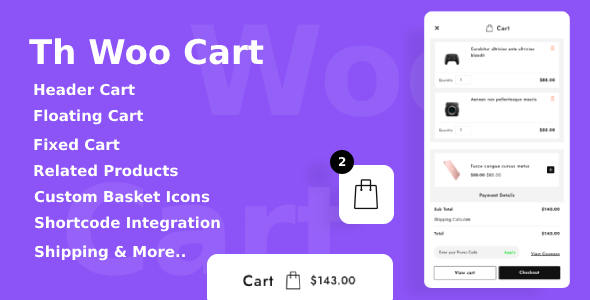
- Effortless Cart Integration: Forget complex coding. The plugin offers flexible integration methods to suit your build. You can add the cart icon directly to your theme’s Header Menu, place it anywhere on a page using a simple Shortcode, or manually inject it via PHP code for complete control over placement.
- Versatile Cart Display Styles: Choose how your cart appears to shoppers. Select from a smooth Slide Right animation, a Slide Left panel, or a classic Dropdown on click menu. This flexibility ensures the cart matches your site’s navigation style and user expectations.
- Advanced Ajax Coupon & Shipping Forms: Eliminate friction during checkout. The plugin allows customers to apply discount codes and calculate shipping costs directly within the cart panel via Ajax, without a single page reload. This keeps the momentum going and reduces abandonment rates.
- Built-in Upsell & Cross-Sell Sliders: Maximize revenue potential by showcasing Related Products, Upsells, and Cross-Sells inside the cart. This native merchandising feature encourages shoppers to add more items to their order while they are already in a purchasing mindset.
- Customizable Cart Icon & Basket Options: Maintain brand consistency. The plugin provides Six Different Cart Basket Icons to choose from, or you can Upload a Custom Basket Image to match your logo and design aesthetic perfectly.
- Comprehensive Product Information Display: The cart panel isn’t just a list; it’s an information hub. It displays the Product Title, Product Image, Product Price, Product Quantity adjusters, and even Product Rating (if reviews are enabled), giving users full context before they click “checkout.”
- Persistent Cart Panel Elements: Keep essential tools at your customers’ fingertips. The panel includes a view of Added Products, a Shipping Calculator, and Available Coupons, ensuring users have everything they need to complete a purchase confidently.
Who Is This For? Use Cases
The Th All In One Woo Cart Pro is not a one-size-fits-all tool; it is a versatile solution that caters to various business models and technical skill levels. Here are the primary personas and scenarios that benefit most from this plugin:
Store Owners Focused on Conversion Rate Optimization
If you are tracking your analytics and notice high exit rates on the standard cart page, this plugin is your direct solution. By eliminating the need to navigate away from the shop or product page, you reduce the time-to-checkout drastically. The built-in cross-sell and upsell features are proven strategies to increase Average Order Value (AOV), making this an invaluable tool for businesses looking to maximize revenue from existing traffic.
E-commerce Sites with Extensive Product Catalogs
For stores with hundreds of SKUs, navigation is critical. The slide-out cart ensures that customers don’t lose their place in the catalog when they add an item. They can continue browsing seamlessly, with the cart panel acting as a persistent reminder of their selections. This is particularly effective for fashion, electronics, and home goods retailers where shoppers often browse multiple categories before purchasing.
Non-Technical Business Owners Using Page Builders
You don’t need to be a developer to enhance your checkout experience. With simple shortcode integration, you can place the cart icon anywhere—inside a header built with Elementor, WPBakery, or the Gutenberg editor. The plugin is designed to work flawlessly with any WordPress theme, ensuring you don’t need to hire a programmer for installation or customization.
Marketers Running Flash Sales or Promotions
During high-traffic events like Black Friday or seasonal clearances, page speed and user experience are paramount. The Ajax Coupon feature allows users to apply promo codes instantly within the cart. This prevents the frustration of realizing a code doesn’t work (or does work) after a page reload, keeping the sales funnel smooth and frustration-free during peak traffic spikes.
Technical Details & Compatibility
When investing in a commercial plugin, technical robustness is just as important as features. The Th All In One Woo Cart Pro is built with modern web standards in mind. It is a standalone plugin designed specifically for the WooCommerce ecosystem, and it supports all available translation plugins (such as WPML or Polylang), making it a global-ready solution for international merchants.
The plugin is fully responsive and retina-ready, ensuring your cart looks sharp on mobile devices, tablets, and desktops. It is compatible with all modern browsers including Chrome, Firefox, Safari, and Edge. The development team at ThemeHunk regularly updates the plugin to ensure compatibility with the latest versions of WordPress and WooCommerce, providing a stable and secure add-on for your store. Furthermore, the use of Ajax technology ensures that the cart operations (add, remove, update quantity, apply coupons) run smoothly on the front-end without causing server-side reloads that slow down the user experience.
Pros and Cons
Making an informed decision is easier when you weigh the strengths and potential limitations. Here is an honest look at what this plugin offers:
Pros
- Zero Friction Checkout: The Ajax-driven interface reduces page reloads, significantly speeding up the shopping process.
- Built-in Merchandising Tools: You won’t need a separate plugin for related products; the cart includes upselling capabilities natively.
- Highly Customizable Appearance: From cart icons to display positions (left, right, dropdown), you have full control over how the cart integrates with your design.
- Translation Ready: The plugin plays well with translation plugins, making it easier to sell in multiple languages.
- User-Friendly Integration: The shortcode and PHP integration methods offer flexibility for developers and beginners alike.
- Persistent Shipping Calculation: Allowing users to calculate shipping before checkout removes the “sticker shock” of hidden fees later.
Cons
- Feature Overlap: If your theme already includes a mini-cart with similar slide-out functionality, you may need to disable that to avoid conflicts or duplicate elements.
- Learning Curve for Customization: While the basic setup is easy, achieving a specific unique design (beyond the ‘Custom Basket Image’) might require some knowledge of CSS to override default styles.
- Dependency on WooCommerce: This plugin is exclusively for WooCommerce. If you are using a different eCommerce platform, this will not be applicable for you.
Frequently Asked Questions
Is the Th All In One Woo Cart Pro plugin compatible with my existing WordPress theme?
Yes, the plugin is designed to be theme-agnostic. It can be easily integrated with any WordPress theme, including popular page builders and block themes. While it functions out-of-the-box, you may want to use the ‘Custom Basket Image’ option or add a small CSS snippet to perfectly match it with your theme’s specific color palette and layout, but no hard-coding is required for standard functionality.
Does the cart plugin include upsell and cross-sell features, or do I need a separate plugin for that?
This plugin includes the upsell and cross-sell features natively. It automatically generates a Related Product slider and displays cross-sells within the cart panel. This eliminates the need to purchase an expensive separate merchandising plugin, as the Pro version handles these product recommendations directly in the cart interface, giving you a significant boost in potential revenue.
Can customers apply discount codes without refreshing the page using this plugin?
Absolutely. One of the standout features of this plugin is the Ajax Coupon feature. Customers can enter their promo codes directly into the cart panel, and the discount is applied instantly without a page reload. This functionality is integrated seamlessly with WooCommerce’s native cart and coupon system, ensuring accuracy and a smooth user experience.
Final Verdict
In a competitive eCommerce landscape, the difference between a sale and an abandoned cart often comes down to user experience. The Th All In One Woo Cart Pro addresses the critical gap between the product page and the checkout page, turning a standard “view cart” link into a powerful conversion tool. By integrating shipping calculators, Ajax coupons, and visual product sliders into a sleek, sliding panel, you are not just optimizing for convenience—you are actively increasing your store’s revenue per visitor. ThemeHunk has built a reputation for creating reliable, high-quality plugins that integrate seamlessly with the WordPress core, and this product is a testament to that legacy.
If your current WooCommerce cart feels sluggish, ugly, or is simply costing you sales, the upgrade is a no-brainer. Stop forcing your customers to jump through hoops to see their total. Give them the sleek, efficient, and modern shopping experience they expect. Elevate your online store’s professionalism and boost your sales figures today. Click the button to download the Th All In One Woo Cart Pro and take the first step toward a higher-converting WooCommerce store.