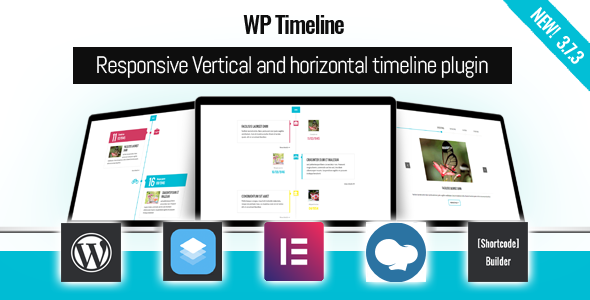
When a brand’s history, a project’s roadmap, or a company’s milestones need to be presented in a way that captures attention, a static list of dates simply doesn’t cut it. The WP Timeline – Vertical and Horizontal timeline plugin by Ex-Themes solves this problem by transforming chronological data into visually engaging, interactive stories. With over 6,700 sales on CodeCanyon, this plugin has become a trusted tool for developers, marketers, and content creators who need to display timelines, histories, and roadmaps without touching a single line of code. Whether you are building a corporate “About Us” page, a product roadmap, or a personal resume, this plugin offers the flexibility, design options, and performance needed to make your content stand out.
Key Features
The WP Timeline plugin is packed with features that cater to both beginners and advanced users. Below is a breakdown of the most impactful capabilities that make this plugin a serious contender in the WordPress ecosystem.
- 45+ Beautiful Layouts: Choose from a vast library of pre-designed styles, including vertical, horizontal, and side-by-side arrangements, ensuring you never run out of creative options.
- 40+ Animation Effects: Bring your timeline to life with smooth, modern animations that enhance user engagement without slowing down your site.
- Advanced Date Support (BC/AD): Unlike many timeline plugins, WP Timeline supports dates from the year 1000 and includes BC/AD date options, making it perfect for historical or archaeological content.
- Custom Post Type & Taxonomy Integration: Display any post type, category, tag, or custom taxonomy, giving you total control over what content appears on your timeline.
- Ajax Filter & Load More: Users can filter timeline items by category in real-time without a page reload. The plugin also supports Ajax load more, infinite scroll, and page navigation for handling large datasets.
- Elementor, WPBakery & SiteOrigin Support: Seamlessly integrate with the most popular page builders, allowing you to drag and drop timelines directly into your layouts.
- Dark & Light Modes: Switch between dark and light color schemes to match your website’s aesthetic perfectly.
- Media-Rich Content: Embed videos, audio files, image galleries, and lightbox popups directly within your timeline entries to create a multimedia storytelling experience.
- Shortcode Builder: Generate complex shortcodes with a user-friendly builder interface, eliminating the need to memorize parameters.
- RTL & Translation Ready: Full right-to-left language support and translation readiness make it suitable for global audiences.
- Unlimited Customization: Set custom colors for individual categories, change fonts, adjust metadata styling, and even use custom icons or images instead of standard Font Awesome icons.
Who Is This For? Use Cases
The versatility of the WP Timeline – Vertical and Horizontal timeline plugin means it serves a wide range of industries and purposes. Here are the most common scenarios where this plugin excels.
Corporate History & Company Milestones
Businesses often struggle to present their growth story in a compelling way. With WP Timeline, you can create a visually stunning “Our History” page that walks visitors through key milestones—from founding dates to major product launches. The ability to use custom post types and categories means you can organize milestones by era, department, or geographic region, providing a comprehensive yet digestible corporate narrative.
Product Roadmaps & Feature Releases
SaaS companies and tech startups can use the horizontal timeline layout to showcase upcoming features, past releases, and long-term vision. The “History bar” and “Next/Previous” navigation features allow stakeholders to scroll through a product’s evolution with ease. The Ajax filter is particularly useful here, letting users view only “Released” or “Planned” items based on their interest.
Educational & Historical Timelines
Teachers, historians, and museum curators will appreciate the BC/AD date support. You can easily create timelines covering ancient civilizations, historical events, or even geological eras. The single-column layout and image lightbox features make it ideal for creating interactive learning materials that are both informative and engaging.
Personal Resumes & Career Portfolios
Freelancers and job seekers can use WP Timeline to create a visual resume that highlights career progression, key projects, and educational achievements. The clean, professional layouts and customizable color schemes allow you to match the timeline to your personal brand, making your portfolio memorable to potential employers.
Event Recaps & Lifestreams
For event organizers, bloggers, or social media managers, the plugin can function as a dynamic “lifestream” or event recap. Embed photos from a conference, link to speaker videos, and use the lightbox feature to display full-size images. The infinite scroll option ensures that even long recaps remain fast and responsive.
Technical Details & Compatibility
Keeping your WordPress site secure and up-to-date is crucial, and Ex-Themes prioritizes this. The plugin is compatible with WordPress 6.x and PHP 8.3, ensuring it works smoothly with the latest core updates. The most recent version, 3.7.3, was released on 03/02/2026, and the changelog reveals a consistent pattern of updates addressing security hardening (including XSS and LFI vulnerability fixes), minor bug fixes, and compatibility improvements with major page builders like Elementor.
In terms of design flexibility, the plugin supports Font Awesome 4.7 and 5.9, along with updates to version 6.5 in recent releases. It is fully responsive and mobile-ready, ensuring your timelines look sharp on any device. The plugin also includes an option to load CSS and JavaScript only on pages where the shortcode is used, which is a significant performance optimization for sites with many scripts.
Pros and Cons
No plugin is perfect, and being transparent about both strengths and potential drawbacks helps you make an informed decision.
Pros
- Extensive Layout Library: With 45+ layouts and 40+ animations, you have an immense amount of design freedom out of the box.
- Unparalleled Date Flexibility: The support for BC/AD dates and a date picker from year 1000 is rare and highly valuable for historical content.
- Strong Page Builder Integration: Works flawlessly with Elementor, WPBakery, and SiteOrigin, making it accessible for non-coders.
- Performance Optimizations: The option to conditionally load assets and the recent PHP 8.3 compatibility ensure your site remains fast.
- Active Development: The changelog shows regular updates since 2016, demonstrating a commitment to security and feature improvements.
- Proven Track Record: With over 6,700 sales and a long list of live customer sites, the plugin has a solid reputation in the community.
Cons
- Learning Curve for Advanced Features: While the shortcode builder simplifies things, leveraging custom taxonomies and advanced date fields may require a bit of a learning curve for beginners.
- Price Point: At $45.00, it is priced higher than some basic timeline plugins, though the feature set justifies the cost for professional use.
- Design Overlap: Some of the 45+ layouts may look similar to one another, meaning you might only use a handful of them in practice.
Frequently Asked Questions
Is WP Timeline compatible with the Elementor page builder?
Yes, the plugin offers dedicated support for Elementor, allowing you to embed timelines directly into your Elementor layouts. You can also use the shortcode builder to generate a code snippet and paste it into any Elementor widget, such as a Shortcode or HTML element. The developers have released specific fixes to address any notice bugs with Elementor, ensuring a smooth integration.
Can I display different custom post types on the same timeline?
Yes, the plugin allows you to pull content from any post type, including custom post types, categories, tags, and custom taxonomies. You can create a single timeline that aggregates content from multiple sources or create separate timelines for each post type using different shortcodes. The Ajax filter feature also lets visitors filter the timeline by category or taxonomy in real-time.
Does the plugin support infinite scroll or pagination for long timelines?
Absolutely. WP Timeline offers three distinct navigation methods: Ajax load more (which appends new items to the list), infinite scroll (which automatically loads content as the user scrolls), and page navigation (which splits your timeline into multiple pages). This flexibility ensures that even timelines with hundreds of entries remain user-friendly and performant.
Final Verdict
The WP Timeline – Vertical and Horizontal timeline plugin is a comprehensive solution that has earned its place as a top-selling item on CodeCanyon. With over 6,700 sales and a history of frequent updates from Ex-Themes, it is clear that this is not a “set and forget” plugin. The developer’s commitment to security, new features, and compatibility with the latest WordPress versions makes it a reliable long-term investment.
From corporate histories to educational timelines and product roadmaps, the plugin’s versatility is its greatest strength. The combination of 45+ layouts, 40+ animations, robust filtering, and deep page builder integration means you are unlikely to outgrow its capabilities. While the $45 price tag is higher than some alternatives, the feature depth and the developer’s track record offer excellent value for money, especially for businesses and professionals who rely on visual storytelling.
If you are ready to elevate your content and present your data in a way that truly captivates your audience, the WP Timeline plugin is worth every penny. Click the button below to purchase it from CodeCanyon and start building timelines that leave a lasting impression.