Elevate Your Visual Storytelling with ZoomSlider V1.0
For web designers, creative agencies, and WordPress developers, the visual impact of a portfolio or product showcase can make or break a user’s first impression. Static galleries simply cannot compete with the immersive, cinematic feel of a smoothly animated slideshow. ZoomSlider V1.0 is a dedicated jQuery plugin designed to bridge the gap between a standard gallery and an interactive, multimedia experience. This tool delivers fluid zoom transitions, customizable fade effects, and full keyboard or mouse-wheel navigation—all wrapped in a lightweight package that prioritizes performance. Whether you are building a high-end photography portfolio, a real estate listing gallery, or a digital agency case study, this slider empowers you to create a dynamic, attention-grabbing visual narrative. It is not just about showing images; it is about creating a moment of engagement that keeps visitors scrolling, clicking, and converting.
Key Features
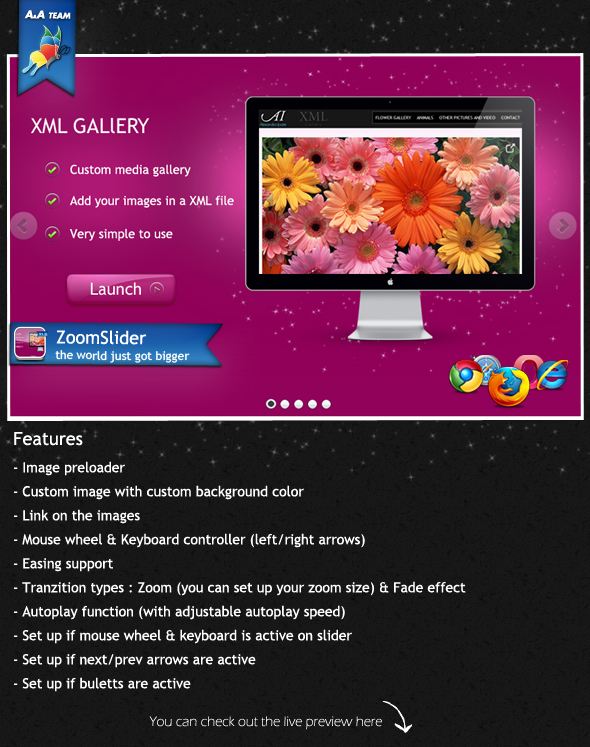
- Image Preloader: Eliminates visual flickering and broken image states by loading all assets before the animation begins, ensuring a seamless start for your audience.
- Dynamic Background & Image Control: Offers the flexibility to set a custom background color for the slider container, ensuring your images pop against a brand-consistent backdrop.
- Clickable Image Links: Each slide supports a direct hyperlink, allowing you to drive traffic to specific product pages, project details, or affiliate links directly from the image.
- Dual Interaction Modes: Supports both mouse wheel and keyboard controller (arrow keys) for navigation, catering to power users and enhancing accessibility.
- Advanced Easing & Transition Effects: Includes a library of easing functions for smooth, organic motion, and offers two primary transition types: Zoom (with fully adjustable zoom intensity) and Fade.
- Autoplay with Smart Pause: An integrated autoplay function allows the slider to run on its own with a user-configurable speed. The pause on hover feature ensures users can inspect a detail without losing their place.
- Granular UI Control: Allows you to toggle every interface element independently. You can enable or disable the next/prev arrows, bullet navigation, and auto-hide arrows based on your layout needs.
- Live Preview A real-time setup panel lets you preview every setting—including transition, zoom size, and animation speed—before committing to a configuration.
Who Is This For? Use Cases
Portfolio Websites for Photographers & Designers
High-resolution imagery requires a presentation layer that does not compromise quality. ZoomSlider V1.0 is ideal for creative professionals who want to showcase a series of photos with a dramatic zoom-in effect. The ability to set a custom background color ensures that the viewer’s eye stays focused on the image, while the keyboard controller allows for a hands-free browsing experience during client demos or portfolio reviews.
Digital Agencies & Case Study Pages
When presenting a project timeline or a before-and-after transformation, a standard slideshow feels flat. By leveraging the zoom transition and automatic animation speed adjustments, agencies can create a narrative flow that emphasizes project highlights. The link on images feature is particularly powerful here, enabling you to direct potential clients directly to a live project or a detailed case study PDF.
E-commerce Product Showcases
While not a direct WooCommerce plugin, this slider excels at static product galleries on landing pages or sales funnels. You can pair the zoom effect with rapid image fading to highlight different product angles or feature callouts. The mouse wheel controller makes it intuitive for shoppers to scroll through multiple product variations quickly, improving the user experience on product detail pages.
Technical Details & Compatibility
ZoomSlider V1.0 is built as a standalone jQuery plugin, making it compatible with virtually any web project that supports the jQuery library—including WordPress, Joomla, Drupal, and static HTML sites. It relies on standard web technologies (HTML, CSS, and JavaScript) and does not require any proprietary frameworks. The plugin’s lightweight architecture ensures fast load times, and the built-in image preloader prevents layout shifts. It is cross-browser compatible, functioning reliably on modern browsers such as Chrome, Firefox, Safari, and Edge. While the exact version history is not detailed, the plugin’s description indicates it is a stable V1.0 release, suggesting a mature codebase free from the usual early-development bugs. No external APIs or third-party services are required, making it a secure and self-contained solution.
Pros and Cons
Pros
- Highly Customizable: You control zoom intensity, transition type, animation speed, and UI elements, giving you complete creative freedom.
- Multiple Navigation Options: Keyboard arrows, mouse wheel, bullets, and arrows provide a robust UX that suits both novice and expert users.
- Lightweight & Fast: No bloatware or unnecessary dependencies, ensuring it loads quickly on mobile and desktop.
- Secure & Self-Hosted: All code runs locally on your server; no external CDN or tracker dependencies.
- Accessible Controls: The ability to toggle arrows, bullets, and autoplay separately makes it adaptable for ADA guidelines and minimal designs.
Cons
- No Dynamic Content Support: The slider is image-focused and lacks native support for video, iframes, or dynamic content from an API without custom coding.
- jQuery Dependency: Modern projects moving toward vanilla JS or React may require an additional library to implement.
- No Drag or Swipe: While mouse wheel and keyboard are supported, there is no built-in touch swipe for mobile devices (though mouse wheel works on desktop trackpads).
Frequently Asked Questions
Is ZoomSlider V1.0 compatible with the latest version of WordPress?
Yes. Because ZoomSlider V1.0 is a standard jQuery plugin, it integrates seamlessly into any WordPress site that uses the bundled jQuery library. You can implement it via a custom page template, a shortcode (if you build a wrapper), or a plugin like “Custom HTML” blocks in the Gutenberg editor. It does not rely on deprecated WordPress functions, so it is compatible with modern WordPress versions including 5.x and 6.x.
Can I set different zoom levels for each individual slide?
No. The zoom level is a global setting applied to all slides in the slider. However, the zoom intensity is fully adjustable via the setup panel, and you can create multiple separate slider instances on a single page (each with its own unique zoom setting) if you need slide-specific effects. This offers a workaround for users who require varied zoom levels throughout their gallery.
Does the plugin include dedicated customer support and documentation?
Yes. The product is supported via the author’s dedicated support portal at support.alexandraipate.com/. This includes access to setup guides, troubleshooting resources, and direct ticket-based support for any technical issues. Additionally, the plugin’s setup panel includes a live preview tool, which functions as an interactive manual to help you understand each setting before implementation.
Final Verdict
ZoomSlider V1.0 delivers exactly what it promises: a focused, high-performance zoom and fade slider that elevates the aesthetic of any image-heavy website. It is not a jack-of-all-trades multimedia player; it is a specialist tool for creators who demand control over their visual transitions. The ability to fine-tune easing, animation speed, and zoom size, combined with the freedom to toggle navigation elements, makes it a versatile asset for portfolios, sales pages, and agency case studies. The product benefits from the author’s reputation for providing reliable support, which adds a layer of security for developers who need a responsive backstop. If you want a slider that offers a unique “wow” factor without the heavy overhead of bulky gallery plugins, this is a smart investment. Visit ThemeForest or CodeCanyon to download ZoomSlider V1.0 today and transform your image gallery into a cinematic user experience that drives engagement and conversions.