Sky Tabs css is a pure CSS tabbing component sold on ThemeForest for $7, built to create horizontal and vertical tabbed navigation without loading a single line of JavaScript. It suits front-end developers, freelancers and agencies who need lightweight, accessible-looking tab panels inside a static or hand-coded site, and who would rather edit a stylesheet than configure a plugin. Anyone expecting a WordPress plugin, a page builder add-on or a drag-and-drop interface should look elsewhere.
The package is authored by voky, a developer whose ThemeForest profile also includes the Sky Mega Menu component, and buyer testimonials repeatedly single out code organisation and support responsiveness. The listing does not disclose a sales figure, so no meaningful social proof can be drawn from volume — the credibility signal here is the author’s track record and the detailed changelog rather than a download count.
What Sky Tabs css actually delivers
The core proposition is a tab system built entirely from semantic HTML markup and standards-compliant CSS3, with no jQuery or other library dependency. That matters more than it sounds: a JavaScript tab widget adds a render-blocking request, a potential conflict with other scripts on the page, and a failure mode where the panels stay hidden if the script errors out. Removing that layer means the tabs degrade more predictably and the page weight stays low.
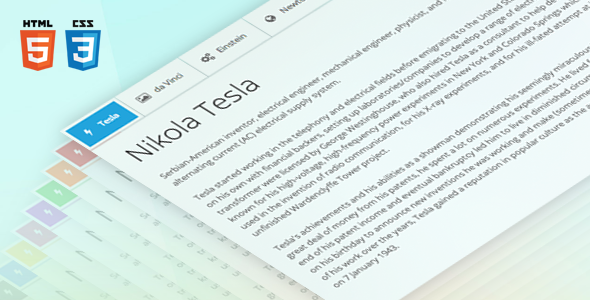
Layout flexibility is the strongest part of the package. Seven arrangements are included: five horizontal variants (top-left, top-right, top-centre, top-justified and a split left-plus-right configuration) and two vertical variants (tabs down the left edge or the right). The split horizontal layout is the least common of these in competing products and is useful for comparison-style content where two opposing panels sit under a shared header row.
Responsiveness is handled with a choice of mobile behaviours rather than a single fixed breakpoint rule. On narrow screens the tabs can collapse into an icon row, stack vertically, or switch to a dropdown-style switcher. Being able to pick between those three is a genuine advantage, because icon-only tabs fail badly when the labels carry the meaning, and stacked tabs consume a lot of vertical space on a phone.
Auto-height is the feature worth calling out specifically. Animated pure-CSS tabs normally require a fixed height on the content container, because CSS cannot animate to an unknown value — which forces the developer to guess a pixel height and then watch the layout break the moment a panel contains more text than expected. Sky Tabs avoids that manual step, so panels with uneven content lengths animate without clipping or leaving dead space.
Beyond the structural features, the package bundles a small front-end toolkit: twelve CSS3 animations (flip, scale, fade, rotate and eight slide directions), nine colour schemes each in its own stylesheet so a custom palette can be produced by editing one file, a nested tab capability where inner tab sets can carry different options from their parent, a “steps” mode that disables normal tab switching to produce a wizard-style progression, a twelve-column fluid grid with offset support, and typography defaults covering headings, paragraphs, images and both list types. Font Awesome is included as 369 vector icons, and the whole thing is retina-optimised. Thirty-six example files ship with the download as starting points.
Content inside panels is unrestricted — text, images, audio, video and any other HTML element can be placed in a tab body, which is the expected behaviour but worth confirming since some CSS-only tab implementations constrain markup to keep the sibling-selector trick working.
Where Sky Tabs css fits, and where it does not
The natural home for this component is a hand-coded static site, a custom theme built from scratch, or a landing page where the developer controls the markup. It also works well as a drop-in for agencies maintaining older sites that need a tabbed section but cannot absorb another plugin or script dependency. The grid system and typography set mean it can double as a lightweight layout foundation for a small static build, which is what one buyer describes doing alongside the author’s mega menu component.
It is a poor fit for anyone working inside WordPress, Shopify, Squarespace or a similar CMS without touching template files. There is no plugin wrapper, no shortcode, no Gutenberg block and no admin settings screen — the tabs are inserted by writing HTML and linking a stylesheet. A site owner who wants to add tabs through a visual editor will find this package unusable and should be looking at a plugin instead.
It is also the wrong choice for projects that need stateful tab behaviour: deep-linking to a specific tab via URL hash, remembering the last-open tab across page loads, lazy-loading panel content on demand, or firing analytics events when a tab is clicked. Pure CSS cannot do any of that on its own. If those requirements are on the brief, a JavaScript-based tab library is the correct tool regardless of how clean this markup is.
Strengths and limitations
Strengths
- No JavaScript dependency at all, which keeps the page light and removes a common source of script conflicts.
- Auto-height on animated panels eliminates the fixed-height workaround that plagues most CSS-only tab implementations.
- Three distinct mobile behaviours (icons, stack, switcher) rather than one forced responsive pattern.
- Nine colour schemes split into separate stylesheets, making a custom palette a single-file edit rather than a hunt through a monolithic CSS file.
- Nested tabs and a steps/wizard mode extend the component beyond simple content switching.
- Semantic HTML5 markup and a documented changelog showing the author has shipped real bug fixes, including an IE8 fallback correction and a Firefox animation fix.
- Thirty-six examples and a step-by-step guide reduce the time from purchase to working implementation.
Limitations
- Browser testing is stated for IE8 through IE10, which dates the compatibility work; the listing does not mention testing against modern evergreen versions or current Safari and iOS releases.
- Support is handled by email through the author’s profile contact form rather than a ticketing system, so there is no public issue tracker or searchable knowledge base.
- No URL hash linking, no persisted tab state and no lazy loading — all structural consequences of the no-JavaScript approach.
- Accessibility is not addressed in the listing at all. There is no mention of ARIA roles, keyboard arrow-key navigation between tabs, or focus management, and CSS-only tab patterns frequently fall short on these points. Buyers with WCAG obligations should verify this before committing.
- The bundled icon set is Font Awesome as it existed at the time of release, so the icon library will feel dated next to current versions.
- Sales figures are not disclosed, so there is no volume signal to weigh against the positive testimonials.
How it compares with other tab solutions
The tab category splits broadly into three groups: JavaScript widget libraries, CMS plugins, and CSS-only components like this one. JavaScript libraries win on capability — they handle hash routing, lazy content, keyboard navigation and dynamic tab creation, and they usually ship with an accessibility layer already built. The cost is an extra script, a dependency to maintain, and a failure mode where the tabs break if the script does not load.
CMS plugins win on convenience. They install in a minute, offer a settings panel, and require no template editing. The trade-off is bloat: many tab plugins load their own CSS and JavaScript on every page whether or not a tab set appears, and styling them to match a bespoke design often means fighting the plugin’s defaults with overrides.
Sky Tabs css sits in the third group and competes on weight and control. Against other CSS-only tab components, its differentiators are the auto-height behaviour, the breadth of layout options and the steps mode — most free CSS tab snippets offer one layout and no animation. Against JavaScript alternatives, it loses on interactivity features and likely on accessibility, and buyers should weigh that honestly rather than assuming a lighter solution is automatically better.
Frequently Asked Questions
Does Sky Tabs require jQuery or any JavaScript?
No. The entire component runs on HTML5 markup and CSS3, with no JavaScript dependency of any kind. That is the central design decision behind the product and the reason the auto-height feature exists — the author worked around the fixed-height requirement that normally forces developers toward a scripted solution.
Can Sky Tabs be used in a WordPress site?
Only by editing theme template files directly. There is no WordPress plugin, shortcode or block included, so the tab markup and stylesheet have to be added to a theme manually. Site owners who need to insert tabs through the WordPress editor should use a dedicated tab plugin instead of this package.
Is Sky Tabs accessible for keyboard and screen reader users?
The vendor listing does not state whether ARIA roles, keyboard arrow navigation or focus management are implemented, so accessibility cannot be confirmed from the product data. Given that CSS-only tab patterns commonly omit these, buyers with WCAG requirements should test the component against their own audit criteria before relying on it.
What does the $7 licence include?
The download includes the component files, nine colour scheme stylesheets, twelve animations, the Font Awesome icon set, a responsive twelve-column grid, 36 example files and step-by-step documentation. Free updates covering improvements and bug fixes are provided, and support is available by email through the author’s profile contact form.
Verdict
Sky Tabs css is a well-organised, genuinely lightweight component that solves a narrow problem well, and at $7 it costs less than an hour of the development time it saves. Developers building hand-coded sites or custom themes who want tabbed panels without a script dependency should buy it, particularly if the auto-height behaviour or the steps mode matches a specific requirement. Agencies maintaining legacy sites with older browser support in scope will also find the IE8 fallback useful. Buyers who need CMS integration, URL-linked tabs, dynamic content loading or documented accessibility support should not buy it — those requirements point to a JavaScript library or a plugin, and no amount of clean CSS will close that gap.