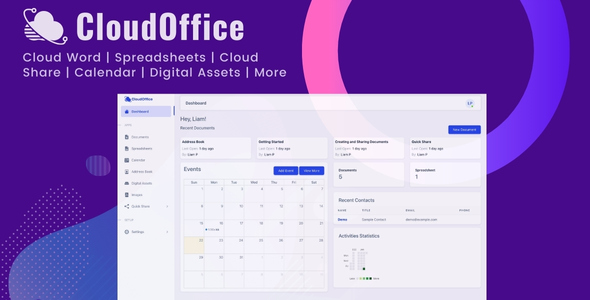
CloudOffice miscellaneous is a self-hosted productivity suite sold on ThemeForest that bundles word processing, spreadsheets, a calendar, an address book, digital asset management and an image editor into a single installable package. It is aimed at teams and organisations that want document creation and file sharing under their own hosting rather than inside a third-party SaaS account. The $49 price covers the full module set, with no per-seat subscription attached.
The vendor, CloudOnex, has not published a sales figure or rating for this item, so there is no purchase history to weigh up. That makes the demo the only reliable way to judge whether the suite fits a given workflow, and the listing does provide one with working credentials.
What the CloudOffice miscellaneous suite actually contains
The product is best understood as six or seven loosely connected modules sharing one login and one storage layer, rather than a single application with tabs. Each module has its own purpose, and the value comes from how much of that ground a buyer would otherwise have to cover with separate tools.
Documents and spreadsheets
The documents module behaves like a browser-based word processor. It handles text, tables and embedded images, with formatting controls for the usual structural elements. Version 1.2 added image uploads inside the editor, plus export to PDF and to .docx. That export path matters more than it first appears: it means documents created in CloudOffice can leave the system in formats that Microsoft Word and Google Docs both open, so the suite does not become a roach motel for content. The stated use cases are internal knowledge bases, online user guides and web copy.
The spreadsheet module covers the conventional grid of rows and columns, with cells holding numbers, text or formulas. Formulas can reference other cells, which is enough to build budget models, forecast sheets and expense trackers. Export to .xlsx arrived in the same 1.2 release. What the listing does not state is the depth of the formula library — whether functions like VLOOKUP, nested IFs or pivot-style summarisation are supported is not documented, and that is the single most important thing to test in the demo before buying.
Calendar and address book
A built-in calendar offers day, week and month views. It is a shared scheduling surface rather than a full CalDAV client as far as the listing describes, and there is no mention of external calendar sync. The address book stores names, phone numbers, email addresses and similar contact fields, and can be populated through an API — a detail that suggests the vendor expects integration with an existing CRM or internal system rather than manual entry alone.
Digital asset management and the image editor
The digital assets module is the most substantial piece beyond documents. It acts as a central library for images, video, audio and files, so an organisation can store an asset once and reuse it across teams instead of hunting through shared drives. Assets can be shared with multiple users inside the organisation, which is the core promise of any DAM system.
Sitting on top of that library is an image module that filters the image assets and allows editing in place. Master images can be kept intact and reused, which is the correct approach for brand assets — editing a copy rather than the original. The listing does not specify which editing operations are available, so it is unclear whether this is a crop-and-resize tool or something closer to a layered editor.
Quick Share and access logging
Quick Share generates a short URL for images, video, zip archives and text snippets, and can push them outside the organisation. The distinguishing feature is an access log that records when a share link is opened. For anyone who has sent a file by email and wondered whether it was ever seen, that tracking is a genuinely useful addition, and it is the kind of thing consumer file-sharing tools often charge for or omit.
Where the CloudOffice miscellaneous suite fits, and where it does not
The clearest fit is a small business, agency or internal department that has outgrown ad-hoc Google Drive folders but does not want to pay per-user fees for a full workspace subscription. A team of ten to fifty people that mainly needs shared documents, a central media library and a way to send large files with some visibility into opens would find most of the suite’s surface area relevant.
It also suits organisations with data residency or compliance constraints. Because the whole thing is self-hosted, documents and assets stay on infrastructure the buyer controls. That is a meaningful difference from cloud-only alternatives, and it is probably the strongest single argument for the product.
Internal documentation teams are another reasonable fit. The combination of a document editor, a shared asset library and export to .docx and .pdf covers the lifecycle of writing, illustrating and distributing a guide or policy document without leaving the suite.
Where it is the wrong choice is any project needing real-time co-editing. Nothing in the listing describes simultaneous multi-cursor editing, comment threads or suggestion mode — the features that make Google Docs and Office 365 collaborative rather than merely shared. A team whose core requirement is two people typing in the same paragraph at once will be disappointed. It is also a poor fit for anyone wanting a mature mobile experience, since the listing makes no mention of native apps.
Strengths and limitations of CloudOffice miscellaneous
Strengths
- Self-hosted deployment keeps documents, contacts and media on infrastructure the buyer controls, which matters for compliance and data ownership.
- Six functional areas — documents, spreadsheets, calendar, address book, DAM and image editing — under one login for a one-off $49, with no per-seat pricing.
- Export to .docx, .xlsx and PDF means content is not locked inside the platform.
- Quick Share includes an access log, giving senders visibility into whether a link was opened.
- An API for creating address book contacts points to integration potential with existing systems.
- Digital asset management with in-place image editing and master-image preservation is unusual at this price point.
Limitations
- No published sales count or rating, so there is no independent purchase history to reference.
- No real-time collaborative editing is described, which rules it out for teams that need simultaneous document work.
- The spreadsheet formula library is undocumented; complex financial modelling may or may not be viable.
- The image editor’s toolset is not specified, so its capability relative to a dedicated editor is unknown.
- Calendar sync with external providers such as Google Calendar or Outlook is not mentioned.
- Self-hosting shifts responsibility for updates, backups, security patching and server costs onto the buyer — the $49 is not the total cost of ownership.
- Documentation depth is not indicated in the listing, which is a risk for a multi-module system.
How it compares with the wider category
Buyers evaluating this product are usually choosing between three broad options: a hosted workspace subscription, a set of separate self-hosted open-source tools stitched together, or a bundled commercial script like this one.
Against hosted subscriptions, CloudOffice trades polish and ecosystem for ownership and a flat fee. A hosted suite will almost certainly have better real-time collaboration, mobile apps and third-party integrations. What it will not have is a one-time price or data that stays on the buyer’s own servers. For a cost-sensitive organisation with modest collaboration needs, that trade can be worth making.
Against assembling separate self-hosted tools, the advantage is integration and a single admin surface. Running a wiki, a file manager and a calendar as three separate open-source projects means three update cycles, three sets of user accounts and no shared asset library. CloudOffice consolidates that, at the cost of being dependent on one vendor for fixes and improvements.
Against other bundled commercial scripts in the same marketplace category, the differentiator here is breadth. Many competing scripts focus on one function — a file manager, or a document editor — and do it thoroughly. CloudOffice covers more ground with less depth in each area. The right choice depends on whether a buyer values consolidation or specialisation.
Frequently Asked Questions
Does CloudOffice support real-time collaboration on documents?
No. The vendor listing describes shared documents and multi-user access to assets, but it does not describe simultaneous editing, live cursors, comments or suggestion mode. Teams that need two or more people editing the same document at the same moment should treat this as a gap rather than assume the feature exists. It is worth confirming directly with the vendor before purchase.
Can documents and spreadsheets be exported to Microsoft formats?
Yes. Version 1.2 added export to PDF and .docx for documents, and .xlsx for spreadsheets. That means content created inside CloudOffice can be moved into Microsoft Word, Excel or Google’s equivalents without a conversion step. Import in the other direction is not mentioned in the listing, so round-tripping existing Office files into the suite is unverified.
Is CloudOffice a hosted service or something I install myself?
It is self-hosted. The buyer installs the suite on their own server, which means they control where documents, contacts and digital assets are stored. That arrangement suits organisations with data residency requirements, but it also means server provisioning, backups, security updates and uptime are the buyer’s responsibility rather than the vendor’s.
What is included in the digital assets module?
The digital assets module acts as a central library for images, video, audio and documents, allowing assets to be stored once and shared with multiple users across an organisation. Images are filtered into a separate view where they can be kept as master files and edited in place. The listing does not specify which editing tools are available.
Verdict on the CloudOffice miscellaneous suite
CloudOffice miscellaneous is worth buying for organisations that want document, spreadsheet, calendar and asset management under their own hosting for a one-time fee, and that can live without real-time co-editing. The combination of DAM, an in-place image editor and tracked file sharing at $49 is a reasonable proposition for a small team with a server and an administrator.
It is not the right purchase for teams whose work depends on simultaneous document editing, for anyone needing mature mobile apps, or for buyers who want a vendor to handle hosting and maintenance. The absence of any published sales or rating data also means the demo should be treated as essential rather than optional.
Before committing, test three things specifically: the depth of the spreadsheet formula engine, the actual toolset inside the image editor, and whether the calendar can connect to external providers. Those three unknowns carry most of the risk in this purchase.