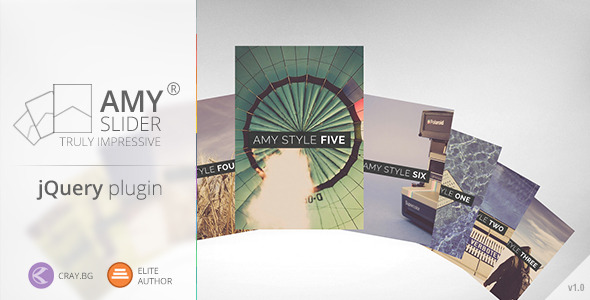
AMY Slider is a jQuery-based content slider from the ThemeForest marketplace that arranges slides as a grid of tiles rather than a single full-width frame, applying 3D scrolling transitions, parallax movement and shadow effects to whatever media is placed inside. It is aimed at web developers and designers who want a distinctive, tile-driven carousel for a portfolio, agency site or media-heavy landing page, and who are comfortable wiring a jQuery plugin into their own markup. The AMY Slider javascript package sells for $10 and supports images, video and audio players alongside ordinary HTML widgets.
What the AMY Slider javascript package actually delivers
The core idea is a departure from the conventional hero slider. Instead of one slide occupying the viewport at a time, AMY Slider presents a mosaic of tiles and animates between arrangements. That structural choice drives most of what the plugin can do, and it is the main reason a buyer would pick it over a standard carousel.
Transition styles and scrolling effects
The plugin ships with nine scrolling effects and seven tile styles. In practice this means the same set of slides can be presented with different motion signatures and different tile geometries without rebuilding the content, which is useful when a design needs to be tuned to a brand’s tone. Colour variations are described as unlimited, so tile backgrounds and accents are not locked to a fixed palette. A shadow effect adds depth to tiles, which matters more here than in a flat slider because overlapping tiles need visual separation to read as layered rather than cluttered.
Mixed media inside a single slide
Slides are not restricted to images. The vendor states that video players, audio players and general widgets can all be embedded, with the slider handling the layout around them. For a photographer or a small production studio, that means a single component can carry a showreel, a podcast clip and a still gallery without three separate plugins. Different image sizes are also supported, which is important in a tiled layout where forcing every asset into one aspect ratio would leave visible gaps or heavy cropping.
Navigation and input methods
Four navigation routes are provided: arrow controls, keyboard keys, mouse clicks and swipe gestures on touch devices. Keyboard support is the detail worth flagging, because it is frequently missing from cheaper sliders and it affects accessibility and desktop usability. Swipe handling covers phones and tablets without a separate mobile build.
Responsiveness, looping and multiple instances
Two responsiveness modes are offered — a slider style and a grid style — so the layout can either compress into a scrollable strip or reflow into a static grid at smaller widths. Infinite scroll keeps the sequence looping, and multiple instances can coexist on one page. A parallax effect and a setting for which slide holds focus round out the control set. The focus option is a small but meaningful inclusion: in a tiled arrangement, the eye needs a defined anchor, and being able to nominate it is better than leaving it to chance.
Where AMY Slider fits, and where it does not
The strongest fit is a project where the slider is part of the visual identity rather than a utility. Creative agencies, photographers, illustrators, event sites and product launch pages benefit from a component that looks unlike a stock carousel. Because video and audio can sit inside the same tile system, it also suits media producers who need one block on a page to carry mixed assets. Developers building a custom theme or a bespoke front end will find the jQuery dependency unremarkable, since they are already managing scripts.
It is a poor choice for a site owner who wants to configure a slider through a page builder or the WordPress customiser without touching code. The listing describes a jQuery plugin, not a WordPress plugin, and the vendor does not state that a WordPress wrapper, Gutenberg block or shortcode is included. Anyone without javascript experience should assume integration work is required. It is also a weak fit for a content-heavy news or corporate site where the slider is a secondary element and predictability matters more than visual novelty — a tiled, animated mosaic draws attention away from the page’s primary content and adds motion that some audiences will find distracting.
One practical caveat sits in the listing itself: the preview images are not part of the download. Buyers should budget for their own photography or licensing, because the demo’s impact depends heavily on strong source material.
Strengths and limitations of the AMY Slider javascript plugin
Strengths
- Distinctive presentation. The tiled, multi-effect approach produces a slider that does not read as a default template, which is the main reason to consider it at this price point.
- Genuine media flexibility. Video, audio and arbitrary widgets can share the same slide system, reducing the number of separate components a page needs.
- Broad input support. Arrows, keyboard, mouse and swipe are all covered, so the slider remains usable across desktop and touch devices.
- Two responsive behaviours. The slider and grid modes give a real choice between preserving motion and simplifying layout on small screens.
- Low entry cost. At $10 the financial risk is minimal for a developer who can integrate it themselves.
- Multiple instances and infinite looping. Useful on long pages where more than one content block needs the same treatment.
Limitations
- No WordPress or page-builder integration is stated. The vendor does not mention a CMS plugin, shortcode or visual editor module, so buyers on WordPress should expect to write markup and enqueue scripts manually.
- Demo assets are excluded. The preview imagery is not licensed with the download, so the visual result depends entirely on the buyer’s own media.
- No documented performance guidance. Nine effects, parallax, shadows and video in a tiled layout can be heavy; the listing gives no information on how the plugin behaves with large slide counts or on low-powered mobile hardware.
- Thin public track record. The listing discloses no sales figures, and there is no visible body of user feedback to draw on, so reliability has to be assessed from the demo rather than from community experience.
- Accessibility is only partly addressed. Keyboard navigation is present, but the vendor says nothing about focus management, reduced-motion preferences or screen-reader announcements for slide changes.
- Documentation depth is unstated. The listing does not describe the options reference or support terms, which matters for a script that will need configuration.
How it compares with the wider slider category
Most sliders on the market compete on the same axis: a full-width frame, a handful of fade and slide transitions, and deep integration with a CMS or builder. That category is mature and, for many sites, the correct answer — a well-supported free or bundled slider with a settings panel will do the job with less effort. AMY Slider competes on a different axis, visual arrangement, and that changes the comparison.
Against general-purpose carousels, it offers more expressive layouts and mixed-media handling but less ecosystem support. Against premium multi-purpose slider plugins that bundle layer animation, dynamic content sources and extensive admin interfaces, it is narrower in scope and clearly cheaper; buyers who need to pull slides from a database or a CMS query should look at those instead. Against lightweight CSS-only or vanilla javascript carousels, it carries a jQuery dependency and more configuration surface, but delivers effects those approaches cannot match without substantial custom work. The honest positioning is this: AMY Slider javascript is a specialist component for developers who want a specific look, not a general replacement for a site’s default slider tool.
Frequently Asked Questions
Does AMY Slider require jQuery to work?
Yes. It is distributed as a jQuery plugin, so the jQuery library must be loaded on the page before the slider script. That is normally trivial in a custom theme but can conflict with setups that already load a different jQuery version or defer scripts aggressively. Buyers should confirm the load order during integration.
Can AMY Slider be used in WordPress?
Not without custom work. The vendor describes a jQuery plugin and does not state that a WordPress plugin, shortcode or page-builder module is included. A developer can enqueue the scripts and styles in a theme and output the required markup manually, but site owners expecting a settings screen in the dashboard will be disappointed.
What file types can be placed inside a slide?
Images, video players, audio players and general HTML widgets are all supported according to the listing. Different image sizes can be mixed, which helps in a tiled layout. The preview images themselves are not included in the download, so all media must be supplied or licensed separately by the buyer.
Does AMY Slider work on mobile devices?
Yes, touch devices are supported through swipe navigation, and two responsiveness modes are offered: a slider style and a grid style. The grid mode is the safer choice on small screens, since a dense tiled animation with parallax and shadows can be demanding on lower-powered phones. The vendor provides no performance data.
Verdict: who should buy AMY Slider and who should walk away
AMY Slider javascript is worth buying for front-end developers and small studios who need a visually unusual, tile-based slider and are happy to integrate a jQuery script by hand. The combination of nine effects, seven tile styles, mixed media support and multi-instance capability is solid value at $10, and the keyboard and swipe navigation show the developer thought beyond the demo. It is not the right purchase for WordPress users without coding skills, for projects that need CMS-driven slide sources, or for sites where accessibility and measured performance must be documented before launch. Anyone evaluating it should test the live demo on a mid-range phone first, then decide whether the visual payoff justifies the integration effort.