The frustration is real. You need a quick image effect—a grayscale version for a blog post thumbnail, a subtle blur for a background section—and your only tool is opening a heavyweight image editor. You save a copy, export it, upload it, and suddenly your workflow grinds to a halt. What if the process could be instantaneous, automated, and performed directly in the browser without altering a single original file?
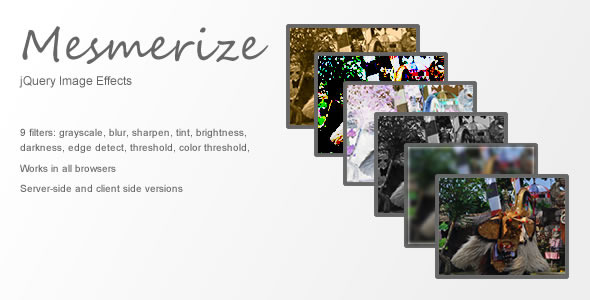
Enter jQuery Image Effects, a lightweight and powerful script designed to apply professional-grade transformations to your images on the fly. This plugin bridges the gap between client-side speed and server-side reliability, offering nine distinct effects ranging from essential filters like grayscale and blur to advanced algorithms like edge detection. Whether you are a front-end developer building interactive galleries or a business owner looking to add dynamic visual flair to your landing page, this tool eliminates the Photoshop middleman and puts the power directly into your markup.
Key Features
This isn’t just a simple filter script; it is a comprehensive imaging solution packed with functionality that prioritizes user experience and performance. Here are the standout capabilities that make it a valuable asset for any web project:
- Nine Distinct Visual Effects: Go beyond the basics. While grayscale and blur are included, you also gain access to sharpen, brightness, darkness, tint, threshold, color threshold, and edge detect. This diverse toolkit allows for creative styling and practical UI enhancements without external assets.
- Real-Time Canvas Rendering: On modern browsers including Firefox, Chrome, Safari, IE9+, Opera, and the majority of mobile browsers, the script utilizes the HTML5 Canvas API. This means effects are calculated and applied instantaneously, providing a smooth, 60fps experience with zero page reloads.
- Seamless PHP/GD Fallback: Compatibility is king. For older browsers that lack Canvas support, or for instances where images are hosted on a different domain (which causes canvas security restrictions), the plugin automatically switches to a server-side rendering engine built on PHP and the GD library. This ensures your site never breaks and the effect is always applied.
- Non-Destructive Workflow: Your original image files remain completely untouched on the server. The effects are applied either transiently on the client-side or as a temporary cached output on the server-side. This preserves your master assets for future use and ensures you aren’t cluttering your media library with duplicates.
- Easy Implementation: Built on the ubiquitous jQuery framework, the implementation syntax is clean and intuitive. With a few lines of code, you can target specific image classes or IDs and define the effect parameters, making it accessible even for developers with moderate JavaScript experience.
- High Performance & Optimization: By leveraging browser-native capabilities, the plugin reduces server load. Instead of sending requests to pre-process images, the heavy lifting is done client-side, freeing up your server resources for essential tasks like database queries and page delivery.
Who Is This For? Use Cases
This plugin is versatile enough to fit a wide range of digital scenarios. It is designed for anyone who needs dynamic image manipulation without the overhead of complex image processing libraries or external SaaS APIs.
Web Developers and Freelancers
If you are building custom websites, you know that user interactivity is a major plus. Imagine a portfolio site where hovering over a color photo smoothly transitions it to a grayscale version, then back to color when the mouse leaves. Or a photography site that allows users to preview different “developing” styles—like Sepia Tint or a high-contrast Threshold—directly on the screen. This plugin allows you to offer these features out-of-the-box with minimal code, saving you hours of complex JavaScript or Canvas API programming.
E-commerce and Retail Managers
Enhance product presentation without re-shooting your catalog. You can use the edge detect effect to create stylized “sketch” versions of products for promotional banners. Alternatively, use the blur effect to obscure parts of an image for a “sneak peek” teaser campaign, encouraging customers to click to reveal the product in full detail. This adds a layer of gamification and engagement to the shopping experience.
Digital Marketers and Content Creators
Creating consistent branding often requires specific visual treatments. If your blog uses duotone images or a specific tint overlay, you can standardize this process. Instead of manually editing every photo, you can use color threshold or brightness adjustments to ensure every featured image matches your brand guidelines automatically. It is also perfect for A/B testing—you can test if a grayscale hero image converts better than a vibrant one, then switch it with only a script change rather than a graphic redesign.
UI/UX Designers and Agencies
When building prototypes or dynamic interfaces, you often need to simulate visual states. This plugin is perfect for creating “inactive” states using darkness or grayscale tools. It allows you to prototype features like “dark mode” toggles or “locked content” overlays efficiently, ensuring that the design concept is communicated clearly to stakeholders before any heavy asset creation begins.
Technical Details & Compatibility
Understanding the technical backbone is crucial for assessing if this script fits your stack. The plugin is fundamentally a jQuery plugin, meaning it requires the jQuery library to be loaded on your page. It acts as an enhancement layer that checks the user’s environment and chooses the best rendering path.
The primary logic relies heavily on the HTML5 Canvas API. This allows for pixel-level manipulation directly in the user’s browser, ensuring speed and reducing bandwidth costs. The canvas approach works seamlessly with modern web standards and CSS layouts.
For the fallback mechanism, the script calls a bundled PHP script that utilizes the GD Library (a standard extension for PHP, widely enabled by web hosts). This ensures that even if a visitor uses an outdated browser where canvas is disabled or stores images on a CDN domain, the effect is still rendered—the request is simply sent to the server and returned to the client.
Compatibility is broad. On the client-side, it supports the major top-tier browsers. On the server-side, it is agnostic to your CMS (WordPress, Joomla, etc.) as long as you can include the PHP file and adjust the URL paths. The plugin is an excellent choice for responsive design frameworks since the canvas redraws quickly on resizing events, provided you code the event handlers correctly.
Pros and Cons
No tool is perfect for every job. Here is a balanced look at what this plugin does exceptionally well and the limitations you should keep in mind before integration.
Pros
- Low Cost & Easy Install: You receive the full script for a one-time price, negating monthly subscription fees for image processing APIs.
- Offloads Server Work: By using the Canvas API for 95% of users, you save critical PHP processing power and reduce page load times compared to server-processed alternatives.
- Enhances User Interaction: Enables real-time filters that respond to clicks, hovers, or sliders, which is a significant UX upgrade over static images.
- Graceful Degradation: The PHP fallback is a standout feature. It prevents a broken image or missing effect, ensuring your content remains accessible to legacy users.
- Great for UX Prototyping: Designers can quickly test visual treatments on the fly without going back to the drawing board.
Cons
- Requires jQuery: If your project is built purely on modern Vanilla JavaScript, adding the jQuery dependency (albeit small) may conflict with your strict performance or code architecture standards.
- Cross-Domain Restrictions: While there is a PHP fallback, it requires server access. If you are doing rapid development without server-side control, cross-origin images might have limitations related to CORS headers that need configuration.
- Performance on Low-End Devices: While Canvas is fast, excessive use of effects on a page with 100+ images can still cause lag on older mobile phones, as the processor is doing the heavy lifting.
- Not a CSS Replacement: For simple filters like grayscale or blur, native CSS filters are often faster. This plugin shines when you need the more complex algorithms (edge detect, threshold) that CSS cannot replicate.
Frequently Asked Questions
Is jQuery Image Effects compatible with WordPress and WooCommerce?
Yes, absolutely. Since it is a standard jQuery plugin, you can enqueue it in your theme’s functions.php file. For WooCommerce specifically, you can target product loop images or the main gallery image. However, note that because WooCommerce often uses thumbnails generated by WordPress, you may need to target the full-size `` tag inside the `a` element to get the best result quality. The PHP fallback is particularly useful here because your images may be served via a CDN (which is cross-domain), ensuring the effects still apply without CORS issues.
What happens if images are on a different domain (CDN)?
This is a common scenario. The HTML5 Canvas API has a security feature called “tainted canvas” that prevents reading pixel data from images hosted on a different domain unless the server sends the correct `Access-Control-Allow-Origin` header. In this configuration, the “on the fly” client-side effect will not work. However, this plugin automatically detects this fact and falls back to the server-side PHP implementation. It sends the image URL to your server, fetches the image server-to-server (which bypasses the browser security), applies the effect, and returns the result. This guarantees consistency for your users.
Does using this plugin improve page speed or slow it down?
In specific scenarios, it can improve perceived performance. By moving the filtering logic to the client-side, you save bandwidth by not downloading pre-processed images. You just download the original once and manipulate it locally. However, if you apply heavy effects to massive 4K images on a slow device, you may see a frame-rate drop in the animation. It is recommended to use reasonably sized assets (e.g., 1200px wide) for effects. The server-side fallback is excellent for page speed because it can cache the generated result, meaning the second time a user visits, the PHP script serves a cached image rather than re-processing it.
Final Verdict
If your workflow involves CSS filters that fall short of your creative vision, or if you are tired of managing multiple versions of the same image, this jQuery plugin is a robust and pragmatic solution. It strikes an excellent balance between modern web technology and backwards compatibility. The inclusion of the PHP fallback is a mature decision that illustrates a deep understanding of real-world web environments, setting it apart from many other canvas-only scripts that fail silently on older browsers or CDN-heavy setups.
With its reputation for quality and ongoing support, this asset represents a reliable investment for your development toolkit. It empowers you to deliver a richer, more interactive experience to your end-users. Stop wasting time with manual edits and static exports. Purchase jQuery Image Effects today and integrate a dynamic, efficient, and professional image manipulation suite into your projects with minimal effort. Your users will notice the difference, and your workflow will thank you.