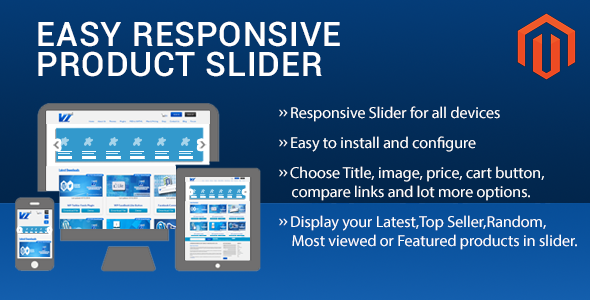
Easy Responsive Product Slider Magento Extension is a $24 ThemeForest add-on from Vivacity Infotech that places horizontally or vertically scrolling product carousels on Magento 1 storefronts. It pulls from product collections such as newest, bestseller, most viewed, featured, random or a chosen category, and lets administrators control which product elements appear inside each slide. It suits store owners running Magento Community Edition who want merchandising blocks on the home page, category pages or sidebars without building a custom module.
What the Easy Responsive Product Slider Magento Extension Actually Does
The extension is a front-end presentation tool rather than a merchandising engine. Its job is to query an existing product collection and render it as a carousel, with configuration exposed in the Magento admin. The vendor lists compatibility with Magento CE 1.5.0.1 through 1.9.3.1, which covers the whole tail of the Magento 1 lifecycle. That range matters: many extensions sold today have quietly dropped older 1.x releases, so a store still running 1.7 or 1.8 has a reasonable chance of a working install here.
Collection sources and placement options
Five product sources are supported out of the box: latest, bestseller, most viewed, featured and random. A sixth mode restricts output to one or more category IDs, and the changelog shows multi-category selection arrived in version 1.0.4. Placement is handled either through a widget inserted in the CMS editor or through static block code, with templates named per collection type. The vendor documents the block syntax directly, for example a productslider/productsliderblock type paired with a template such as productslider/best-seller.phtml. That means a home page can carry a bestseller rail while a category page carries a filtered one, and multiple sliders can coexist on a single page.
Control over what appears inside each slide
Administrators can toggle individual product elements: image, title, description, price, add-to-cart button and add-to-compare link. Thumbnail dimensions are configurable, which is the detail that usually decides whether a slider looks native to a theme or visibly bolted on. Slider title text is also editable from the admin, and the block can be assigned to a left or right sidebar position. Navigation arrows accept a colour selection, with the vendor listing five presets (red, pink, black, green, white) plus a colour picker, and pagination dots are available alongside arrow navigation.
Orientation, touch input and script handling
Both horizontal and vertical carousels are supported, the latter added in the March 2016 release. Mobile devices get touch swipe, and the whole thing runs on JavaScript with no Flash dependency, which is table stakes rather than a differentiator in 2017-era Magento work but still worth confirming. More practically useful is the jQuery handling: the extension offers an optional jQuery library inclusion and a noConflict mode. On a Magento 1 store with several third-party modules already loading their own script versions, that switch is often the difference between a working carousel and a broken checkout page.
Where This Slider Fits and Where It Does Not
The clearest fit is a small or mid-sized Magento 1 catalogue where the theme’s default product grid is static and the store owner wants motion on the home page without commissioning development. A fashion or electronics store with a rotating “new arrivals” rail, a bookstore surfacing bestsellers, or a store running periodic promotions that wants a featured block swapped by category ID — all of these map directly onto what the module does. Agencies maintaining several legacy Magento 1 clients may also find it a cheap, repeatable component to drop into builds, particularly given the lifetime update promise and the open-source codebase.
It is the wrong choice in three situations. First, any store on Magento 2 or Adobe Commerce: the compatibility list stops at 1.9.3.1, and there is no indication of a 2.x port. Second, stores that need behavioural targeting, personalised recommendations or analytics-driven merchandising — this extension renders a fixed collection, it does not decide which products deserve the space. Third, teams that want a slider integrated into a page builder or a modern theme’s own block system; the widget and static-block approach is functional but dated compared with drag-and-drop layout tools.
Strengths and Limitations of the Product Slider Extension
Strengths
- Broad Magento 1 compatibility (1.5.0.1 to 1.9.3.1) makes it viable on stores that cannot upgrade.
- Element-level toggles for image, title, description, price, cart button and compare link give real control over slide density.
- Six collection modes plus multi-category filtering cover most routine merchandising needs.
- jQuery noConflict and optional library inclusion reduce the risk of script collisions with existing modules.
- Horizontal and vertical orientations, touch swipe and multiple sliders per page handle most layout scenarios.
- Open-source code with a documented changelog dating back to January 2015, which suggests the module has been maintained rather than abandoned.
Limitations
- The current version is 1.0.5, and the most recent changelog entry is dated January 2017. The module has not visibly evolved since then, so buyers should assume no further feature development.
- Configuration is spread across admin fields and static-block code. Inserting a slider on a CMS page requires pasting block syntax with the correct template filename, which is not a point-and-click workflow.
- The vendor’s own installation note warns that the Magento cache can misbehave after install and advises logging out and back in — a small but telling sign of rough edges in the install path.
- Support is limited to weekdays, Monday to Friday, through the vendor’s support site. There is no stated response-time commitment.
- No sales figures or ratings are disclosed on the listing, so there is no public purchase history to weigh.
- The colour presets for navigation arrows are a fixed set of five, which will clash with some brand palettes unless the colour picker behaves as expected.
How It Compares With Other Magento Slider Options
The alternatives fall into three groups. The first is a general-purpose slider or carousel extension, which typically offers more transition effects, layering and content flexibility but knows nothing about Magento product collections — the store owner has to build each slide manually and update it whenever stock changes. The second is a full merchandising or product-listing suite, which is far more capable: automated rules, sorting logic, A/B testing hooks and deeper catalogue integration. Those suites also cost considerably more than $24 and usually demand more configuration time.
The Easy Responsive Product Slider Magento Extension sits between them. It is narrower than a merchandising suite and more catalogue-aware than a generic carousel. Its closest functional peers are the small single-purpose product slider modules that were common on Magento Connect, most of which are now unmaintained. Against that field, the differentiators here are the multi-category filter, the vertical orientation, the jQuery conflict handling and the documented block syntax. Against a modern page builder’s native product widget, it loses on ease of use but wins on the breadth of Magento 1 versions supported. Buyers should judge it on fit: if the requirement is a configurable product rail on an existing Magento 1 theme, it competes well; if the requirement is a broader content or merchandising system, it is too limited.
Frequently Asked Questions
Which Magento versions does Easy Responsive Product Slider support?
The vendor states compatibility with Magento Community Edition 1.5.0.1 through 1.9.3.1. No Magento 2 or Adobe Commerce version is listed, so the extension should be treated as Magento 1 only. Stores on 1.9.x are the safest fit, and older 1.x releases are covered but less likely to have been tested recently.
Can it show products from a specific category only?
Yes, a category slider mode restricts output to chosen category IDs, and multiple IDs can be combined. That lets a store build a rail for one department or a promotion without touching the rest of the catalogue. The category filter was extended to support multiple IDs in version 1.0.4 of the extension.
Does the slider work on mobile phones and tablets?
Yes, the carousel is responsive and supports touch swipe on mobile devices. It runs on JavaScript with no Flash, so it functions in modern mobile browsers. The changelog also records a fix for pagination dots displaying incorrectly on tablet and iPad views, which suggests that area has had attention.
How is the slider added to a CMS page or sidebar?
It is added either through a widget in the CMS editor or by pasting block code into a page or static block. The vendor documents the exact block type and template filenames for each collection. Sidebar placement is set to left or right in the admin, and several sliders can appear on one page.
Verdict on the Easy Responsive Product Slider Magento Extension
This is a sensible purchase for a store owner or agency running Magento 1 who needs a configurable product carousel and does not want to pay for a full merchandising platform. The Easy Responsive Product Slider Magento Extension covers the common collection types, gives fine control over slide contents, and handles the jQuery conflicts that plague older Magento installs. The $24 price is easy to justify against even a single hour of developer time.
Buyers should not expect active development. The last changelog entry is from January 2017, support runs on weekday hours only, and installation involves block syntax rather than a visual builder. Anyone on Magento 2, anyone wanting personalised or rules-based merchandising, and anyone who needs guaranteed support response times should look elsewhere. For the specific job of putting a working product rail on a legacy Magento 1 storefront, it remains a reasonable, low-cost option.