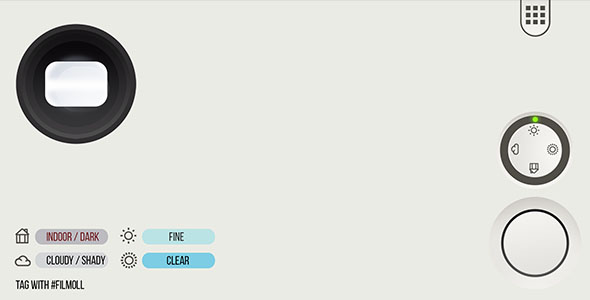
Film Camera for iOS Full Applications is a native iOS photo app source code package sold on ThemeForest for $199. It ships as a complete Xcode project that simulates analogue film photography: users shoot through virtual film rolls, then apply analogue-style colour grades, grain and light-leak artefacts to produce images that look scanned from negative stock. It is aimed at developers and agencies who want a ready-made camera product to rebrand and publish on the App Store rather than building a filter pipeline from scratch.
The package is written in Objective-C with a Storyboard-based interface, requires Xcode 14.1 to build, and targets iOS 15 and later. The vendor describes it as App Store-ready, with step-by-step documentation and a design that can be re-skinned. No sales figures are disclosed on the listing, so there is no adoption data to weigh.
What Film Camera for iOS Full Applications Actually Ships With
The core of the product is a layered effects engine rather than a single filter slider. Three separate effect libraries are bundled: 30 analogue colour filters, 43 noise and grain overlays, and 133 light-leak textures. Because these are independent layers rather than fixed presets, the practical output is a very large number of combinations — a user can pair a warm faded stock look with heavy grain and a corner leak, or keep the grade clean and add only a subtle halation. That combinatorial approach is what separates a film-simulation app from a basic Instagram-style filter pack, and it is the most defensible part of the offer.
The “pretend roll of film” mechanic is the second notable capability. Rather than applying effects after the fact in a gallery, the app frames shooting as loading a roll, exposing a limited number of frames, and then “developing” them. This is a deliberate UX constraint borrowed from analogue cameras, and it changes how the app feels to use: shooting becomes an event with a beginning and an end rather than an infinite stream. For a developer, it also means the app has a built-in retention loop and a natural place to gate content.
A photo editor is included alongside the capture flow, so users are not locked into whatever the camera produced. The listing does not specify which adjustments the editor exposes — crop, exposure, contrast and similar controls are typical for this category, but the vendor does not enumerate them, so that detail needs verification in a live demo before purchase.
Monetisation, Codebase and Rebranding Considerations
In-app purchase is wired into the project. That matters more than it might appear: a camera app with a film-roll metaphor has an obvious monetisation model — sell additional rolls, unlock premium stocks, or charge for higher-resolution exports — and having the IAP plumbing already in place removes a meaningful chunk of integration work. The vendor does not state which IAP model is implemented by default, whether it is consumable rolls or a non-consumable unlock, so that is a question to put to support.
The codebase is Objective-C with Storyboard interface files. This is a deliberate trade-off worth understanding. Objective-C and Storyboards are mature and extremely well documented, and a large pool of iOS contractors can read them without friction. They are also not where new iOS work is generally headed; SwiftUI and Swift concurrency are the modern default. A buyer inheriting this project is committing to a stack that is stable but increasingly legacy, and any plan to modernise it later is a rewrite rather than a refactor. For a quick reskin-and-ship project this is fine. For a long-lived product roadmap it is a constraint.
The listing claims the app is lightweight and uses native iOS design conventions, and the requirement of Xcode 14.1 with iOS 15+ support is consistent with a project built in the 2022–2023 window. Buyers should expect to open it in a current Xcode and resolve any deprecation warnings before submission; the vendor does not claim compatibility with newer SDKs beyond the stated build environment.
Who This Suits, and Where It Does Not Fit
The clearest fit is a developer or small studio that wants to launch a photography app under its own brand without commissioning custom effect work. The 133 light-leak assets and 43 noise overlays represent real asset production time; recreating that library from scratch is weeks of work, and the $199 price is trivially below the cost of building it. A freelancer delivering a camera app for a client on a fixed timeline is the second strong fit, because the Storyboard interface and step-by-step documentation shorten the path to a working build.
It also suits niche publishers — a wedding photographer wanting a branded app for clients, a film-lab or camera retailer building a marketing app, or a creator with an audience already interested in analogue aesthetics. The film-roll metaphor gives those buyers a product story that a generic filter app cannot offer.
It is the wrong choice for a team that has already standardised on SwiftUI and Swift, or that intends to maintain the app for years with a modern codebase. It is also a poor fit for anyone expecting a turnkey business: the app is a camera and editor, not a social network. There is no feed, no sharing graph, no cloud sync and no backend described in the listing. A buyer whose plan depends on community features will be building those from zero, at which point the value of the package shrinks considerably.
Strengths and Limitations
Strengths
- Genuine asset depth. 30 filters, 43 noise effects and 133 light leaks is a substantial library, and the layered combination model produces far more distinct looks than the raw counts suggest.
- Distinctive product concept. The virtual film-roll mechanic gives the app a personality and a retention loop that a plain filter app lacks.
- Monetisation already wired. In-app purchase support is built in, removing integration work for anyone planning paid rolls or premium stocks.
- Low technical barrier to rebrand. Storyboard interfaces and Objective-C are widely understood, and the vendor states the design is easy to re-skin.
- Documented and submission-oriented. Step-by-step documentation and a stated intent that the project is ready to publish reduce the unknowns for a first-time app publisher.
- Price relative to build cost. At $199 the package costs less than the asset production alone would.
Limitations
- Legacy stack. Objective-C and Storyboards are stable but no longer the default for new iOS work; modernising later means a rewrite, not a refactor.
- No backend or social layer. The listing describes no feed, sharing, accounts or cloud storage. Any community feature is entirely the buyer’s build.
- Undisclosed sales history. No sales count is published, so there is no signal about how many other developers have shipped with it or how well it has held up in production.
- Editor scope unspecified. The photo editor is named but its controls are not enumerated, which makes it hard to judge whether it meets a given brief without a demo.
- Build environment pinned to Xcode 14.1. Compatibility with current Xcode and SDK versions is not stated, so expect to spend time resolving deprecations before submission.
- Effect quality is unverifiable from the listing. Filter and grain quality is the whole product, and marketing copy cannot demonstrate it; only a live preview or demo build can.
How It Compares With the Wider Category
Camera and filter app source codes on marketplaces generally fall into three tiers. The first is the single-filter template: a handful of LUTs, a basic capture screen and little else, usually priced low and useful only as a starting skeleton. The second is the preset-pack app, which bundles a larger filter library but treats effects as fixed looks rather than composable layers. Film Camera for iOS Full Applications sits above both, because the separation of colour grade, grain and light leak into independent layers is a more capable architecture, and the film-roll framing is a product concept rather than a skin.
Against custom development, the comparison is straightforward: a bespoke build gives full control of stack and architecture but costs far more and takes far longer, and the effect asset library still has to be produced. Against building on a modern SwiftUI template, the trade-off reverses — the buyer gets a contemporary codebase but almost certainly a thinner effect library and no film-roll mechanic. The honest positioning is that this package trades architectural modernity for asset depth and a finished concept, and that trade is reasonable for a fast launch and questionable for a long-term platform.
Frequently Asked Questions
What is Film Camera for iOS Full Applications?
It is a complete iOS camera app source code project sold on ThemeForest for $199. It lets users shoot through simulated film rolls and apply analogue colour filters, grain and light-leak effects, and it is intended for developers and agencies who want to rebrand and publish their own photography app rather than build one from scratch.
What programming language and tools does it require?
The project is written in Objective-C with Storyboard interface files and is built in Xcode 14.1. It supports iOS 15 and later. Buyers should expect to work in a current Xcode version and resolve any deprecation warnings, since the vendor does not state compatibility beyond the specified build environment.
Can the app be rebranded and published under my own name?
Yes, rebranding is the intended use. The vendor states the design is easy to re-skin and that the project is ready to publish on the App Store, with step-by-step documentation provided. Standard marketplace licensing applies, so the buyer should confirm the licence terms cover commercial distribution before submitting.
Does it include in-app purchases and a backend?
In-app purchase support is included, which suits selling extra film rolls or premium stocks. No backend, user accounts, cloud sync or social feed is described in the listing, so any community or server-side feature would have to be built separately by the buyer.
Verdict on Film Camera for iOS Full Applications
This is a well-stocked, conceptually distinctive package for a developer who wants to ship a photography app quickly and is comfortable working in Objective-C. The layered effect engine and the film-roll mechanic give it more substance than the typical filter template, and the built-in in-app purchase support removes real integration work. It is a sensible buy for freelancers on fixed timelines, studios launching a branded camera app, and niche publishers with an audience already drawn to analogue aesthetics.
It is not the right purchase for teams standardised on SwiftUI, for anyone planning a multi-year product roadmap on a modern codebase, or for buyers who need social or cloud features out of the box. Those cases justify custom development despite the higher cost. Film Camera for iOS Full Applications earns a recommendation for fast, asset-rich launches and a cautious one for anything longer-term.