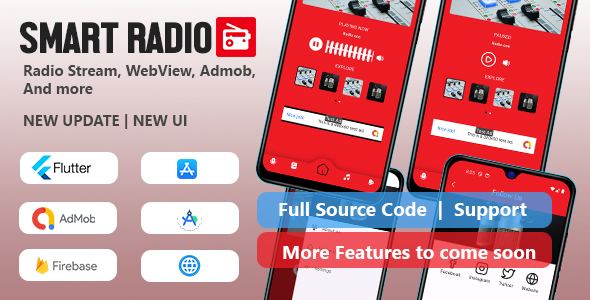
The Single/Multiple Radio Stations Flutter application is a source-code package for building a mobile radio streaming app on Android and iOS from one codebase. Sold on ThemeForest for $24 under the Olesoft name, it supports either one station or a multi-channel lineup, includes an in-app web view and social links, and requires no backend server. It suits freelancers and small studios that need a lightweight branded radio app without commissioning custom development.
The package is listed at version 0.1 and built against Flutter 3.19.3, which places it early in its release life. Buyers should weigh that maturity level carefully against the low price and the narrow but clear feature set.
What the Single/Multiple Radio Stations Flutter app actually includes
The core function is audio streaming from a radio stream URL, and the vendor frames the app around two deployment modes. In single-station mode the app behaves as a dedicated player for one broadcaster. In multi-station mode it presents a list of channels that listeners can browse and switch between. That flexibility means the same codebase can serve a community station with one feed or a small network aggregating several genres, which is unusual at this price point.
Streaming itself relies on standard audio stream URLs rather than a proprietary delivery system. The vendor does not name the specific audio plugin or state which stream formats are supported, so buyers should confirm codec compatibility with their own stream provider before committing. In practice most internet radio feeds use MP3 or AAC over HTTP, and any Flutter audio package worth using handles those, but the listing leaves this unstated.
Two secondary features round out the app. The first is an embedded web view, which lets a station surface companion content such as news pages, music portals or YouTube channels without sending listeners to an external browser. The second is social media integration, which links listeners out to a station’s profiles. Together these turn a bare player into something closer to a branded listening hub, though neither is a substitute for a proper content management workflow.
Architecturally, the package is deliberately simple. There is no backend, which means no database, no admin panel and no server hosting to configure. Station details and stream URLs are configured within the app project itself. That removes an entire layer of infrastructure and cost, but it also means changing a station lineup requires rebuilding and resubmitting the app rather than editing a record in a dashboard. For a single station that rarely changes, this is a reasonable trade. For a network that adds channels regularly, it becomes friction.
The vendor states that more features are planned, and the version number signals the package is still being developed. Documentation and support are provided through the vendor’s email address, and a downloadable Android build is offered for testing before purchase — a sensible step given the no-refund policy.
Where this radio app template fits, and where it does not
The clearest fit is a broadcaster, church, campus station or community radio group that wants a presence in the app stores without hiring a Flutter developer. Because the app is cross-platform, a single build serves both Android and iOS audiences, and the absence of a backend keeps ongoing costs near zero beyond store fees and stream hosting.
Freelancers and agencies also have a use case: the package can serve as a starting point for a client radio project, with the web view and social links providing enough surface area to look like a finished product rather than a bare player. At $24 the economics are easy to justify even if only part of the code is reused.
It is the wrong choice in several scenarios. Anyone who needs listener accounts, favourites synced across devices, playlists, podcasts, analytics dashboards or advertising insertion should look elsewhere, because none of those are present and the no-backend design makes them non-trivial to add. Projects requiring a web admin panel to manage stations dynamically will also find the architecture mismatched. And teams that need a stable, long-supported codebase with a track record should be cautious about a version 0.1 release with no disclosed sales history.
Strengths and limitations of the Single/Multiple Radio Stations Flutter package
Strengths
- One codebase covers both Android and iOS, which halves the build and maintenance effort compared with native development.
- Single and multi-station modes are both supported, so the package scales from a one-feed station to a small channel lineup.
- No backend requirement removes hosting, database and server maintenance costs entirely.
- The embedded web view and social links give the app more depth than a plain audio player.
- Price is low at $24, and a testable Android build is offered before purchase.
- Built on Flutter 3.19.3, a recent stable framework release, so the code should align with current Flutter tooling.
Limitations
- Version 0.1 indicates an early-stage product; the vendor explicitly lists additional features as still to come, so the current feature set is the finished one for now.
- No backend means station data is baked into the app, so lineup changes require a rebuild and store resubmission.
- The listing does not name the audio streaming library or confirm supported codecs, leaving buyers to verify compatibility themselves.
- There is no refund policy once the item is downloaded, which raises the cost of a mismatch.
- No sales figures are disclosed, so there is no independent signal of adoption or community support.
- Features common to mature radio apps — favourites, sleep timer, background playback controls, analytics — are not mentioned and should be assumed absent unless confirmed.
How it compares with other routes to a radio app
The main alternatives fall into three groups: building from scratch, subscribing to a hosted radio app service, and buying a more feature-complete template.
Custom development offers total control but costs orders of magnitude more than $24 and takes weeks or months. A hosted radio app platform typically bundles station management, analytics and push notifications behind a monthly fee, trading upfront cost for recurring spend and less code ownership. A more mature template on the same marketplace may include a backend, admin panel and richer player features, but usually at a higher price and with more configuration complexity.
Against those options, this package sits at the simple, cheap, self-contained end of the spectrum. It wins on cost and setup speed and loses on extensibility and polish. The right comparison is not which product has more features but which trade-off matches the project: a one-off branded player for a single station is well served here, while anything requiring ongoing content management is not.
Frequently Asked Questions
Does the Single/Multiple Radio Stations Flutter app need a server or backend?
No. The vendor states that no backend is required, so there is no database or admin panel to host. Station details and stream URLs are configured inside the app project. That keeps running costs low, but it also means station changes are made in code and shipped through a new app release rather than edited in a dashboard.
Can it stream more than one radio station?
Yes. The package supports both a single-station mode and a multi-station mode, letting listeners browse and switch between several channels within one app. The vendor does not specify a limit on the number of stations, so the practical ceiling depends on how the project is configured and how the channel list is presented.
Which Flutter version and platforms does it support?
It is built for Flutter 3.19.3 and targets both Android and iOS from a single codebase. Buyers should ensure their local Flutter environment matches or is compatible with that version before building. The vendor also provides a downloadable Android build so the app can be tested on a device before purchase.
Is there a refund if the app does not work for a project?
No. The vendor’s policy states that refunds are not offered once the item has been downloaded, and buyers are asked to read the description and compatibility details before purchasing. That makes pre-purchase testing and a careful check of stream compatibility with the intended radio provider especially important.
Verdict on the Single/Multiple Radio Stations Flutter application
This package is a sensible buy for a single broadcaster, community station or freelancer who needs a low-cost, cross-platform radio app with no server overhead and is comfortable working inside a Flutter project. The dual single and multi-station support, web view and social links give it more substance than a bare player, and the $24 price makes experimentation cheap.
It is not the right purchase for anyone needing listener accounts, dynamic station management, analytics or a long-supported codebase, and the version 0.1 status plus the no-refund policy mean buyers should test the Android build first. The Single/Multiple Radio Stations Flutter package rewards projects that match its simple architecture and punishes those that need it to grow.