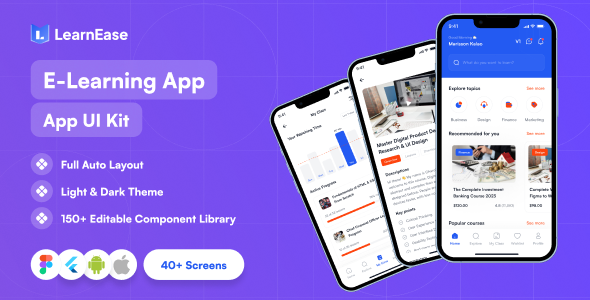
Learn Ease Flutter is a $14 UI template for building an online education app on Android and iOS. It ships more than 40 light and dark mode screens, a reusable widget set, GetX state management and documentation, aimed at Flutter developers and agencies who want a finished course-app interface rather than a blank project. It is a front-end starting point, not a working learning platform.
The listing on ThemeForest is thin on specifics and the item has no disclosed sales history, so this review is based on what the vendor states and what that implies for real projects. The price is low enough that the decision is mostly about fit rather than budget.
What the Learn Ease Flutter template actually provides
The core deliverable is a screen library. Forty-plus screens covering both light and dark themes is a meaningful amount of interface work, and the vendor’s claim that this saves developers time is directionally reasonable: rebuilding authentication flows, course catalogues and lesson views from scratch is slow, repetitive work. What matters is whether the screens are structured well enough to extend.
On that front, the vendor states the layers are organised and named, and that the template uses reusable elements and widgets. That combination is the difference between a template that saves a week and one that costs a week in cleanup. Named layers and shared widgets mean a developer can restyle a card component once and have it propagate, rather than hunting through duplicated code. The claim cannot be verified without opening the files, but it is the right thing to promise.
State management is handled with GetX. This is a deliberate choice with consequences. GetX is popular in the Flutter community for reducing boilerplate around routing, dependency injection and reactive state, and it lets a small team move quickly. It is also opinionated, and teams already standardised on Riverpod, Bloc or Provider will either need to port the screens or accept a second state management pattern in their codebase. Neither is fatal, but both are work the price tag does not include.
The template targets current Flutter and Dart versions, and the vendor states the design is responsive. Cross-platform support for Android and iOS comes from Flutter itself rather than from anything the template does, so that bullet is table stakes rather than a differentiator. Documentation is included, though the listing does not describe its depth or whether it covers customisation as well as setup.
Where a Learn Ease Flutter UI kit fits, and where it does not
The strongest fit is a team that has already committed to Flutter and needs to ship a course or training app on a short timeline. A freelance developer quoting a fixed-price build benefits most: the screen library removes the design-and-build phase for standard screens, and the dark mode variants mean a client request for them does not become a change order.
It also suits agencies producing multiple education apps. A reusable widget set and consistent naming mean the second and third projects start from a known base. Internal teams building a companion app for an existing LMS fall into the same category, provided the app is primarily a presentation layer over an API the team already controls.
It is the wrong choice in two clear situations. The first is anyone who needs a functioning backend. The listing describes a template and UI kit, not a service; there is no mention of a database, authentication service, video hosting, payment processing or API layer. A buyer expecting to connect a Firebase project and launch will still be building all of that. The second is a team with an established design system. Restyling 40+ screens to match an existing brand and component library can take longer than building the handful of screens the app actually needs, particularly if the template’s widget conventions conflict with the team’s own.
Strengths and limitations of the Learn Ease Flutter app template
Strengths
- Light and dark variants of every screen, which is unusual at this price point and removes a common scope negotiation.
- GetX already wired in, so routing and reactive state do not need to be set up from zero.
- Reusable widgets and organised layer naming suggest the codebase is intended to be extended rather than replaced.
- Documentation included, which many low-cost templates skip entirely.
- Current Flutter and Dart versions reduce the risk of dependency conflicts on a new project.
- At $14, the cost is negligible against even a few hours of development time.
Limitations
- No backend, API, authentication or payment integration is described. The template is interface only, and the functional work is the larger half of any real education app.
- GetX is a commitment. Teams using Bloc, Riverpod or Provider face a port or a mixed-pattern codebase.
- The vendor does not state how many distinct screen types the 40+ figure covers, so the count may include near-duplicate variants such as list and grid views of the same content.
- No sales figures or ratings are disclosed on the listing, so there is no independent signal from other buyers about code quality or support responsiveness.
- Documentation depth is not described; buyers should assume setup guidance rather than a customisation guide.
- Education apps lean on video playback, offline downloads and push notifications. None of these are named in the feature list, so their presence cannot be assumed.
How the Learn Ease Flutter template compares with other education app starting points
The alternatives fall into three groups. The first is building from scratch: maximum control, no inherited conventions, but weeks of interface work before anything is testable. The second is a full learning platform or LMS with a mobile app, which solves the backend problem but usually imposes its own data model, pricing and design constraints. The third is other Flutter education templates, which compete mainly on screen count, state management choice and how recently they were updated.
Against scratch builds, this template wins on speed and loses on architectural freedom. Against full platforms, it wins on flexibility and loses badly on functionality, because it has none of the backend. Against other templates, the differentiators here are the dark mode coverage, the GetX choice and the claimed layer organisation. A buyer comparing options should weigh those three against whichever state management their team already uses, since that single factor determines how much of the template survives contact with an existing codebase.
Frequently Asked Questions
Is Learn Ease Flutter a complete app or just a design template?
It is a design template and UI kit, not a complete app. The vendor describes screens, widgets, GetX state management and documentation, with no mention of a backend, database, authentication service or payment processing. Buyers get the interface layer and must build or connect everything that makes the app function, including content delivery and user accounts.
Do I need to know GetX to use this template?
Yes, practically speaking. The template is built on GetX for state management, so customising behaviour means working within that pattern. Developers familiar with GetX can extend the screens directly, while those used to Bloc, Riverpod or Provider will need to learn GetX or port the logic, which adds meaningful time to the project.
Does the Learn Ease Flutter template support dark mode?
Yes. The vendor states the template includes more than 40 screens with both light and dark mode variants. That is a genuine advantage over cheaper templates that ship a single theme, because a client request for dark mode later becomes a toggle rather than a redesign, and both themes are already consistent with each other.
Is $14 a realistic total cost for an education app?
No. The $14 buys the interface only. A working education app also needs a backend, user authentication, video or content hosting, and possibly payments, all of which carry their own development and running costs. The template reduces design and front-end build time; it does not reduce the cost of the infrastructure behind it.
Verdict on the Learn Ease Flutter education template
Buy the Learn Ease Flutter template if the team is already building in Flutter, is comfortable with GetX, and needs a polished course-app interface quickly. The dark mode coverage, reusable widgets and organised layers justify the price several times over for that buyer. Do not buy it expecting a working learning platform, a backend, or a drop-in fit for a codebase built on a different state management pattern. With no disclosed sales or ratings, there is also no community track record to lean on, so the purchase is a bet on the code structure the vendor describes. At $14 the downside is small, but the scope should be understood before checkout.