EDD Advanced Permalinks Add Ons is a small WordPress extension that rewrites the URL structure Easy Digital Downloads generates for its download pages, download archives, and the download_category and download_tag taxonomies. It adds a settings layer to the standard Settings > Permalinks screen so store owners can change slugs and choose between several single-download URL patterns without editing theme files or writing rewrite rules. It suits existing EDD store owners who want cleaner, more keyword-relevant product URLs and who are comfortable working inside WordPress permalink settings.
The plugin comes from a ThemeForest add-on listing priced at $19, and the vendor does not disclose a sales figure, so there is no meaningful purchase history to weigh. The item has been maintained since an initial release in February 2020, with later changelog entries covering WordPress and Easy Digital Downloads compatibility checks and the addition of a post-name-only structure.
What EDD Advanced Permalinks Add Ons actually changes
The scope of the plugin is narrow and clearly bounded: it controls four URL segments in an EDD store. Everything it does flows from those four controls, so evaluating it means understanding what each one buys a store owner.
Single download URL structures
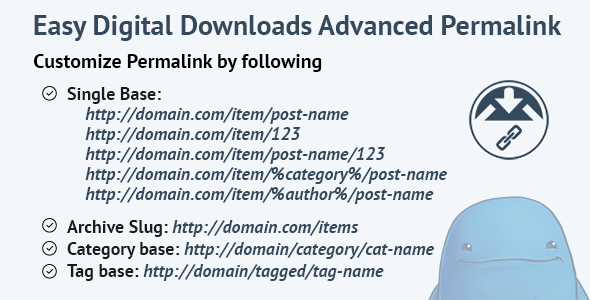
The main feature is the download base, which determines how an individual product page is addressed. The plugin offers six patterns, and the choice has real consequences for how links look in search results, in affiliate campaigns, and in anything printed or shared offline.
- Post name only — the download slug sits at the site root, producing a short URL with no product-type segment.
- Post name with prefix — a custom base such as “item” precedes the slug, keeping products visually grouped under one path.
- Post ID — a numeric URL, stable even if a product title changes.
- Post name and ID — combines the readable slug with the numeric identifier.
- Category based — inserts the product category into the path before the slug.
- Author based — inserts the author name into the path, which matters for multi-vendor stores.
The practical value here is that a store selling digital goods can present URLs that read like a normal content site rather than a plugin-generated path. A category-based structure, for instance, gives every product URL a topical segment that reinforces what the page is about, which is a reasonable thing to want for organic search. An ID-based structure is the safer pick for stores that rename products often, because the numeric URL survives a title change.
Archive, category and tag bases
Beyond single downloads, the plugin lets the store owner rename the downloads archive slug and the base segments for the download_category and download_tag taxonomies. This is the part that most competing approaches ignore. Changing only the single-product URL while leaving archives at their defaults produces an inconsistent site where product pages and their category listings follow different conventions. Being able to set all four together is the plugin’s strongest argument.
No-code configuration in the admin
All of this is handled through the standard permalink settings screen rather than through functions, filters, or hand-written rewrite rules. For a freelancer or agency handing a finished store to a client, that matters: the client can see and adjust the structure later without touching code. The vendor states that a documentation file is included in the download package and that further help is available through the support section, though the listing does not describe the depth of that documentation.
Where EDD Advanced Permalinks Add Ons fits, and where it does not
The clearest fit is an established Easy Digital Downloads store that already has products, categories and tags in place and has decided its current URLs are holding it back. A store owner who wants product pages to sit under a category path, or who wants to drop the default download segment entirely, gets exactly that from one settings screen.
Agencies building EDD stores for clients are a second natural audience. Delivering a store with a deliberate, consistent URL scheme across products, archives and taxonomies is a small quality signal, and doing it through admin settings rather than custom code keeps the handover clean and the site updatable.
Multi-author or multi-vendor EDD setups are a third case, specifically because of the author-based structure. Where products are attributed to different contributors, putting the author in the path gives each contributor a coherent URL footprint.
The plugin is the wrong choice in several situations. A brand-new store with no products and no traffic has nothing to gain yet, and should set its permalink structure before launch rather than buying an add-on to fix it afterwards. Anyone running a store on a platform other than Easy Digital Downloads gets nothing from it, since it is built specifically around EDD’s post types and taxonomies. And a store that is already happy with its URLs, or that has heavily promoted its existing links, should think carefully: changing permalink structures on a live site with indexed URLs and external backlinks requires redirect planning that this plugin does not appear to handle. The vendor does not state that redirects are created automatically, so that work falls to the store owner or to a separate redirection plugin.
Strengths and limitations of EDD Advanced Permalinks Add Ons
Strengths
- Controls single download URLs, the downloads archive, and both EDD taxonomies from one screen, which is more complete than handling only product slugs.
- Six single-download structures cover the common real-world preferences, including category-based and author-based paths.
- Configuration lives in the native permalink settings, so no template editing or custom rewrite code is needed.
- Actively compatibility-checked against WordPress and Easy Digital Downloads releases through 2021, per the changelog.
- Low price relative to the time saved writing and debugging rewrite rules by hand.
Limitations
- The changelog’s most recent entry is dated 09 February 2021. Buyers should confirm current compatibility with recent WordPress and EDD versions before relying on it, because the listing provides no evidence of testing beyond that point.
- The vendor does not state that old URLs are redirected to new ones. On a live store with indexed pages, that gap has to be closed with additional tooling.
- No sales count is disclosed, so there is no purchase history or user feedback to use as a signal of reliability.
- The feature set is limited to permalink segments. It does not address SEO metadata, canonical tags, sitemaps, or structured data, all of which sit outside its scope.
- Documentation is described only as a file inside the download package, with no stated depth, format, or public knowledge base.
How EDD Advanced Permalinks Add Ons compares with the alternatives
There are three broad ways to change EDD URLs, and the comparison is really about which one fits a given store.
The first is doing nothing and accepting EDD’s defaults. That is free and requires no maintenance, but it leaves the store with the plugin’s standard segments and no ability to shape product paths. For a small store with no SEO ambitions beyond the basics, this is often fine.
The second is custom code: filters and rewrite rules added to a child theme or a site-specific plugin. This is the most flexible option and can handle edge cases no settings screen anticipates, but it requires developer time, must be retested after every EDD update, and is invisible to a client who later takes over the site. For an agency billing hourly, the cost of building and maintaining that code quickly exceeds a $19 add-on.
The third is a general-purpose permalink or SEO plugin. Those tools typically focus on WordPress posts and pages, and support for Easy Digital Downloads’ custom post type and taxonomies varies. A store owner may find that a broad plugin handles the download post type but not the download_category and download_tag bases, which is precisely the gap EDD Advanced Permalinks Add Ons is built to fill.
Against all three, this plugin’s position is narrow but defensible: it is the option that covers all four EDD URL segments through a settings screen, at a low one-off cost, with the trade-off of an ageing maintenance record and no built-in redirect handling.
Frequently Asked Questions
What does EDD Advanced Permalinks Add Ons do?
It changes the URL structure Easy Digital Downloads uses for single download pages, the downloads archive, and the download_category and download_tag taxonomies. Store owners pick from preset structures or set custom base slugs in the WordPress permalink settings, without writing rewrite rules or editing theme files.
Does changing EDD permalinks break existing links?
It can, and the vendor does not state that redirects are created automatically. Any change to a live store’s URL structure leaves previously indexed pages and external backlinks pointing at old addresses. Store owners should set up 301 redirects from the old patterns to the new ones before or immediately after making the change.
Is EDD Advanced Permalinks Add Ons compatible with the current Easy Digital Downloads version?
That is not confirmed by the listing. The changelog’s latest entry is dated 09 February 2021, when compatibility was checked against then-current WordPress and EDD releases. Buyers should verify compatibility with their installed versions before purchase, ideally on a staging site, since no later testing is documented.
Can the download URL include the product category?
Yes. One of the six available single-download structures inserts the product category into the path ahead of the download slug. This gives each product URL a topical segment, and the plugin also lets the category base itself be renamed, so the full category path can be shaped to preference.
Verdict on EDD Advanced Permalinks Add Ons
This add-on is worth buying for existing Easy Digital Downloads store owners who have decided their current URLs are inadequate and who want a consistent scheme across products, archives, categories and tags without commissioning custom code. It is also a sensible small purchase for agencies that want a client-editable permalink setup rather than bespoke rewrite rules. It is not for new stores that can simply choose a structure at launch, for stores on other e-commerce platforms, or for anyone who needs automatic redirects and current-version compatibility guarantees, since the EDD Advanced Permalinks Add Ons listing does not provide either. At $19 the risk is low, but the stale changelog and absent sales history mean buyers should test on staging before committing a live store to it.