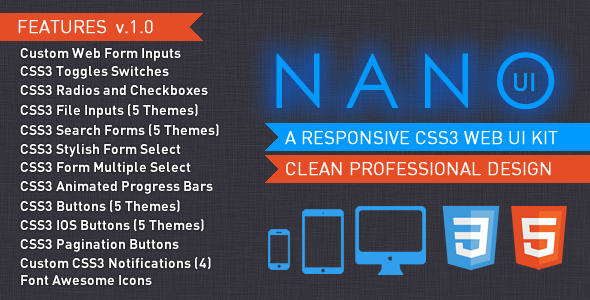
Building a modern, responsive web interface from scratch often feels like reinventing the wheel. You need consistency across forms, buttons, toggles, and navigation—without spending hours debugging media queries and cross-browser quirks. The NANO UI CSS3 Web Elements UI Kit addresses this exact friction point. Built entirely with Pure HTML5 and CSS3, this kit delivers a library of ready-to-use interface components designed for developers and designers who demand speed, style, and zero bloat.
Whether you are prototyping a dashboard, building a SaaS landing page, or crafting a complex web application, NANO UI provides a flexible, responsive foundation. What sets it apart is its commitment to purity: no JavaScript dependencies, no image sprites, and no need to wrestle with endless media queries. The kit works seamlessly across modern browsers while providing graceful fallback support for older browsers like Internet Explorer 8. This balance of cutting-edge CSS3 features and backward compatibility makes it a uniquely practical tool for professional projects.
Key Features
- Flexible and Responsive Layouts – Every component scales fluidly. The grid and elements adapt to any screen size without requiring a single media query on your end, saving significant development time on mobile-first projects.
- Pure CSS3 Design – No Images Required – All buttons, checkboxes, radios, progress bars, and toggles are rendered using CSS3. This eliminates image requests, reduces page load times, and makes theming infinitely easier.
- Smooth CSS3 Animations – Enhance user experience with subtle, smooth transitions on toggle switches, input focus states, and animated progress bars. These micro-interactions add a professional polish without heavy JavaScript libraries.
- Professional Clean Design Aesthetic – The visual language is modern, minimal, and clutter-free. It fits naturally into both corporate dashboards and creative portfolios, offering a neutral starting point you can brand easily.
- Cross-Browser Support with IE8 Fallback – Reach a wider audience. While the core experience shines in modern browsers, NANO UI includes thoughtful fallbacks that ensure functionality remains intact even on legacy browsers like Internet Explorer 8.
- Multiple Color Themes – Instantly switch the visual tone of your UI. Pre-built color themes allow you to match brand guidelines or experiment with different moods without touching the core markup.
- Easy Implementation and Customization – The HTML structure is clean and semantic. Overriding default styles is straightforward, making it simple to integrate into existing projects or extend with your own custom CSS.
- Well-Coded and Documented – The code follows best practices for HTML5 and CSS3. Clear documentation accompanies the files, ensuring you can get started quickly and troubleshoot effectively.
Who Is This For? Use Cases
NANO UI is not a one-size-fits-all theme builder. It is a precision tool for specific user profiles. Understanding who benefits most helps you decide if this kit aligns with your workflow.
Front-End Developers Building Custom Web Apps
If you build internal tools, management dashboards, or CRM interfaces, you need consistent form elements and navigation controls. NANO UI provides a complete set of styled inputs, buttons, and dropdowns that integrate directly into your custom markup. You avoid the overhead of a massive CSS framework like Bootstrap while still getting a polished, responsive UI. The CSS3 animated toggle switches and multi-select form inputs are particularly valuable for settings panels and configuration pages.
Web Designers Prototyping Responsive Layouts
Speed matters during the prototyping phase. With NANO UI, a designer can mock up a fully functional form or navigation system in minutes. The five button themes and clean notification styles allow you to test different visual approaches without writing custom CSS from scratch. Because the kit requires no JavaScript, you can focus purely on the layout and user flow during wireframing.
Developers Maintaining Legacy Browser Support
A surprising number of enterprise environments still rely on Internet Explorer 8 for internal applications. NANO UI stands out because it explicitly supports this challenge. You can deploy modern UI patterns that degrade gracefully. The fallback support for IE8 means your application remains functional and visually coherent for all users, while those on modern browsers enjoy the full CSS3 experience.
Freelancers and Agencies Delivering Fast Turnarounds
When a client needs a professional-looking admin panel or a custom form-heavy landing page on a tight deadline, reusing a well-crafted UI kit saves hours. NANO UI acts as a starting boilerplate for the UI layer. The Font Awesome Icons integration adds further flexibility, allowing you to enhance buttons and navigation with recognizable iconography without performance hits.
Technical Details & Compatibility
Understanding the technical foundation of NANO UI ensures you can confidently integrate it into your stack. The kit is built using HTML5 for semantic structure and CSS3 for all styling and animations. It operates entirely without JavaScript libraries such as jQuery, making it lightweight and framework-agnostic. You can use it with React, Vue, Angular, or plain static HTML.
Browser compatibility is a strong selling point. The kit is fully tested across modern browsers including Chrome, Firefox, Safari, Opera, and Edge. Its unique differentiator is the inclusion of fallback support for Internet Explorer 8. While CSS3 animations and gradients will not render in IE8, the core functionality of forms, buttons, and navigation remains intact and usable.
The kit comes with multiple pre-built color themes, allowing you to switch the entire palette via a simple class change on a parent element. Documentation covers how to create custom themes. The file structure is organized, separating base styles from theme-specific rules, making customization straightforward even for developers with intermediate CSS skills.
Pros and Cons
A balanced look at the kit’s strengths and limitations helps set realistic expectations.
Pros
- Zero JavaScript Dependencies – Reduces page load and avoids conflicts with existing scripts in your project.
- No Media Queries Required – The responsive design is handled internally, saving you development time and preventing layout breakages.
- Lightweight Performance – Because everything is pure CSS and no image files are needed for UI elements, your pages load faster.
- Exceptional Cross-Browser Support – Works on modern browsers while offering functional fallback for IE8, a rare combination in modern UI kits.
- High Flexibility – The modular structure allows you to pick and choose components, integrating them into existing designs without forcing a complete overhaul.
- Professional Aesthetic Out of the Box – You get a clean, modern look immediately, reducing the need for extensive visual fine-tuning.
Cons
- Limited Complexity in Components – This is not a full application framework. You will not find complex widgets like data tables, modals with dynamic behavior, or date pickers.
- No JavaScript Enhancements – If you need interactive components that rely on JavaScript for logic (e.g., form validation prompts beyond styling), you must build that layer yourself.
- CSS3 Animations Are Not Configurable via UI – Animations are applied via CSS classes, meaning you edit stylesheets rather than using a visual tool to adjust timing or easing.
- IE8 Support Is Functional, Not Aesthetic – While forms and buttons work, they will lack rounded corners, gradients, shadows, and animations. The experience is utilitarian, not beautiful, on very old browsers.
Frequently Asked Questions
Is NANO UI compatible with WordPress or WooCommerce?
Yes, it can be integrated. NANO UI is a collection of front-end components built with HTML5 and CSS3. You can copy the relevant HTML markup and CSS classes into your WordPress theme files, custom post types, or page builder modules. Because it does not depend on JavaScript, it avoids common conflicts with WordPress plugins. For WooCommerce, you would need to manually apply the classes to the checkout and product form fields, which is a straightforward process for developers comfortable editing template files.
Does the UI kit include any JavaScript files or plugins?
No. NANO UI is completely free of JavaScript dependencies. All interactive behavior—such as animated toggle switches, input focus effects, and progress bar animations—is achieved purely through CSS3. This is a deliberate design choice to keep the kit lightweight, fast, and compatible with any JavaScript framework you are already using. You are free to add your own JavaScript for form validation, AJAX submissions, or dynamic content updates without worrying about namespace conflicts.
Can I customize the color themes easily, or do I need to be an expert in CSS?
Customizing themes is designed to be straightforward. The kit uses a clear naming convention for CSS classes and separates theme-specific values into dedicated stylesheets. Basic color modifications can be made by changing a few CSS variables or color property values. For significant overhauls, a working knowledge of CSS3 is recommended. The included documentation provides examples and guidance on creating new themes, making it accessible to intermediate developers while still offering depth for advanced customization.
Final Verdict
The NANO UI CSS3 Web Elements UI Kit fills a specific and valuable niche in the WordPress and web development ecosystem. It delivers a polished, responsive set of form elements and UI controls without the overhead of a large framework or the fragility of image-based assets. For developers who regularly build custom admin panels, internal tools, or form-heavy landing pages, this kit provides a reliable foundation that speeds up the workflow.
The author has invested in clean coding standards and thorough documentation, which reduces the learning curve significantly. The inclusion of IE8 fallback support makes it particularly valuable for enterprise projects where legacy compatibility is non-negotiable. While it will not replace a full page builder or a component library like React Bootstrap, it excels as a precision tool for specific tasks.
If you value lightweight performance, pixel-perfect control over your markup, and a professional finish without the weight of JavaScript, this kit is a smart investment. It saves hours of repetitive work styling forms and toggles, allowing you to focus on the unique logic and functionality of your project. Try the NANO UI CSS3 Web Elements UI Kit for your next interface project and experience the efficiency of pure HTML5 and CSS3 done right.