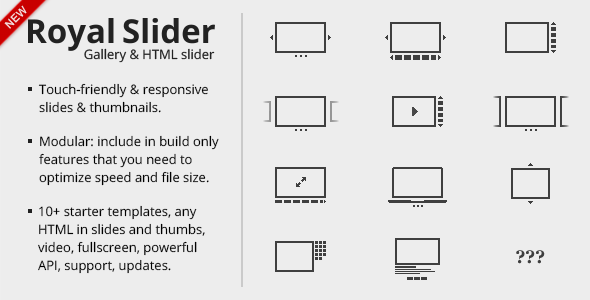
When you need a slider that performs flawlessly on every device—from a widescreen desktop monitor to a smartphone held in portrait mode—the RoyalSlider – Touch-Enabled jQuery Image Gallery by GalleryForge stands out as a mature, battle-tested solution. With over 34,000 sales on CodeCanyon and a reputation for stability, this plugin is designed for developers and agencies who demand touch support, responsive layouts, and smooth CSS3 transitions without the bloat of unnecessary effects. Whether you are building a photography portfolio, an eCommerce product gallery, or a full-screen video slideshow, RoyalSlider delivers a professional-grade experience that prioritizes performance and accessibility.
Key Features
- Touch Navigation Support – Fully compatible with iOS, Android 2.3+, IE10/11, Blackberry, and any browser supporting touch or pointer events. Users can swipe through slides naturally on mobile devices.
- Hardware-Accelerated CSS3 Transitions – All animations use smooth CSS3 transitions with graceful fallbacks for older browsers, ensuring buttery-smooth movement even on lower-end hardware.
- Smart Lazy Loading – Preloads nearby images in the background so slides appear instantly. You can configure how many images to buffer, or disable lazy loading entirely.
- Full-Screen Mode with Native HTML5 Support – Perfect for high-resolution photography galleries where you want viewers to immerse themselves in the image.
- YouTube & Vimeo Video Integration – Embed videos directly inside slides with automatic playback controls.
- Multiple Navigation Options – Choose from thumbnails, tabs, or bullets. Thumbnails can be positioned vertically or horizontally and are touch-scrollable.
- Deep-Linking – Link directly to a specific slide via URL, which is excellent for SEO and sharing individual gallery items.
- Animated HTML Captions – Add custom effects like fade, move top, or move right to captions. Each caption can have its own speed, transition, and easing.
- Modular Architecture – Exclude unused parts from the main JavaScript file to optimize page load speed.
- Memory Management – Only a few slides are kept in the display list at once, preventing memory leaks on long galleries.
- Compatible with Lightbox Scripts – Works seamlessly with Magnific Popup and other lightbox plugins for hybrid slider-lightbox experiences.
- SEO Optimized – Semantic HTML markup makes images indexable by search engines. Captions can use any heading tag (h1, h2, p) for proper content hierarchy.
- Photoshop (.psd) Skin Files Included – Customize the look of your slider using the provided source files.
- Extended HTML Documentation – Comprehensive guides covering implementation, options, and customization.
Who Is This For? Use Cases
Web Developers Building Responsive Portfolios
If you are a front-end developer creating a portfolio site for a photographer, designer, or artist, RoyalSlider gives you the flexibility to display high-resolution images with touch-friendly navigation. The full-screen mode and deep-linking features allow you to create an immersive browsing experience that works on tablets and phones.
eCommerce Store Owners
Product galleries benefit enormously from RoyalSlider’s ability to handle mixed content—images, videos, and HTML descriptions—all within one slider. The thumbnails navigation lets customers quickly scan product variants, while the responsive design ensures the gallery looks crisp on any screen size.
Agencies and Creative Studios
With over 34,000 sales and adoption by top global brands, RoyalSlider is trusted by agencies that need a reliable, well-documented plugin for client projects. The modular codebase means you can strip out unnecessary features to keep page weight low, and the included PSD skins make branding consistent across projects.
Content Publishers and Bloggers
For news sites or blogs that feature image-heavy articles, RoyalSlider’s auto slideshow with pause-on-hover and lazy loading ensures readers can consume visual content without delays. The ability to place the slider inside a lightbox adds a polished touch for long-form photo essays.
Technical Details & Compatibility
RoyalSlider is built on jQuery and uses HTML5 with CSS3 transitions for all animations (with JavaScript fallbacks for older browsers). It is compatible with Internet Explorer 7 through 11, Chrome, Firefox, Safari, and Opera. Touch navigation works on all major mobile operating systems, including iOS, Android 2.3+, Windows Phone (IE10/11), and Blackberry. The plugin supports responsive layouts out of the box, with starter templates that adapt down to mobile viewports. Version 9.5.9 includes the latest stability improvements and is available as a standalone jQuery plugin or as a WordPress plugin. All updates are free forever after purchase.
Pros and Cons
Pros
- Exceptional mobile performance – Touch swipe is physics-based and feels natural on any device.
- Lightweight and modular – You can exclude unused features to reduce JavaScript file size.
- SEO-friendly markup – Semantic HTML helps search engines index your images and captions.
- Comprehensive documentation – Extended HTML guides make implementation straightforward even for intermediate developers.
- Great value at $14 – Considering the feature set and long-term support, this is one of the most cost-effective premium sliders on CodeCanyon.
- Proven reliability – Over 34,000 sales and positive reviews from real buyers like creativeheroes.nl and ahrengot.
Cons
- Limited transition effects – The focus is on smooth performance rather than a large library of fancy transitions. If you need dozens of wacky effects, this may feel restrictive.
- Support does not include customization – The developer provides forum support for implementation questions, but custom installation or design services are not included.
- Images not included – The preview images in the demo are for illustration only and are not part of the purchase.
Frequently Asked Questions
Is RoyalSlider compatible with WooCommerce?
Yes, RoyalSlider works well with WooCommerce product galleries. You can use it to display product images, videos, and HTML descriptions in a single responsive slider. The thumbnails navigation is especially useful for showcasing product variations.
Does RoyalSlider include support and updates?
Yes, all purchases include free lifetime updates and access to the support forum on CodeCanyon. The developer, GalleryForge, actively maintains the plugin and provides assistance for implementation questions. However, support does not cover custom installation or design services.
Can I use RoyalSlider with a lightbox like Magnific Popup?
Absolutely. RoyalSlider is designed to be placed inside lightbox scripts such as Magnific Popup. The developer provides a working example in the documentation, making it easy to create a hybrid slider-lightbox experience for photo galleries.
Final Verdict
RoyalSlider – Touch-Enabled jQuery Image Gallery is a polished, performance-first slider that has earned its reputation with over 34,000 sales and glowing reviews from developers and agencies worldwide. GalleryForge has built a tool that prioritizes smooth touch navigation, responsive design, and SEO-friendly markup over flashy but unnecessary effects. At just $14, it offers exceptional value for anyone who needs a reliable, well-documented slider that works flawlessly on every device. Whether you are building a personal portfolio, an eCommerce store, or a client project, RoyalSlider delivers the stability and flexibility you need. If you are ready to upgrade your website’s image galleries with a slider that just works, this is the plugin to buy.