Key Features
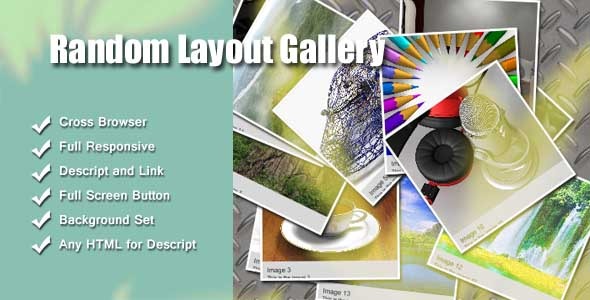
This responsive jQuery image gallery plugin offers a robust set of customization options that put you in complete control of your visual presentation. It is designed to handle everything from a simple portfolio grid to a complex, randomized layout gallery. Below are the core features that make this plugin a versatile tool for any web developer or designer.
- Cross-Browser Compatibility: Works reliably across all major browsers including Chrome, Firefox, Safari, Opera, and legacy browsers like Internet Explorer 7+. This ensures your gallery looks consistent for every visitor, regardless of their browser choice.
- Multiple Instances: You can create and manage several independent galleries on a single page. This is ideal for complex layouts where different sections or categories require their own unique gallery settings.
- Full Responsive Control: The gallery is fully responsive with granular control over both width and height. It adapts seamlessly to different screen sizes without breaking the layout, providing an optimal viewing experience on desktops, tablets, and mobile phones.
- Image Descriptions and Links: Add descriptive text and clickable links for each image. This transforms a simple visual gallery into an interactive component, perfect for directing users to product pages, portfolio items, or external resources.
- Complete Sizing Options: Set the overall gallery dimensions independently, then control the individual image width and height. Additionally, you can define the width and height of the description area, giving you pixel-perfect layout control.
- Background Customization: Adjust the background color, enable or disable a soft background gradient, or set a specific background image. This allows the gallery to blend perfectly with your website’s existing design language.
- Description Styling: Customize the font style, size, and background color of the image descriptions. This ensures your textual information remains legible and visually consistent with your brand guidelines.
- Border Control: Set the width and color of the image borders. This can help define individual images within a random layout or add a polished, framed look to your entire gallery.
- Zoom Range Control: Define the maximum and minimum zoom levels for the lightbox or hover effects. This prevents images from becoming too small or too large, maintaining a high-quality viewing experience.
- Detailed Documentation: Comes with a comprehensive help HTML file that guides you through installation, configuration, and customization. This is crucial for both beginners and experienced developers who need quick reference.
Who Is This For? Use Cases
Creative Portfolio Websites
Photographers, graphic designers, illustrators, and artists need a gallery that highlights their work without overwhelming the page. This plugin’s random layout capability allows you to create a dynamic, engaging portfolio that looks different on each visit, encouraging users to browse longer. The ability to add descriptions and links means you can provide context or direct viewers to your commissioning page or social media profiles directly from the image.
E-commerce Product Showcases
Online stores can use this gallery to display product variations, lifestyle shots, or detailed features. The multi-instance support is a major asset here; you can have one gallery for product thumbnails and another for full-size views, all on the same product page. Setting image dimensions ensures that product photos remain uniform, while the zoom controls allow customers to inspect details without leaving the page.
Real Estate Listings
Real estate agents and property management companies can build interactive property tours. Use the gallery to show interior and exterior shots in a random layout that feels more engaging than a standard grid. The description area can be used for key details like square footage, price, or address, turning the gallery into a information-rich presentation tool.
News and Magazine Sites
Editorial teams can use the plugin to create photo stories or slideshows for breaking news or feature articles. The responsive nature ensures images render correctly on mobile devices, while the background and border controls help match the gallery’s look to the publication’s brand. The ability to add links allows you to embed affiliate links, related articles, or sponsor content directly into the visual story.
Blog and Social Media Integration
Bloggers can embed galleries to break up long text posts and add visual interest. The random layout feature is particularly effective for travel, food, or lifestyle blogs where a uniform grid might feel too rigid. By controlling the description style, you can ensure captions are easily readable on any device, improving user engagement and time spent on the page.
Technical Details & Compatibility
This plugin is built with jQuery, a mature and widely supported JavaScript library, ensuring reliable performance across thousands of websites. It supports all modern and legacy desktop browsers including Chrome, Firefox, Safari, Opera, and Internet Explorer 7 and above. The plugin is fully responsive by design, meaning it uses CSS media queries and flexible units to adjust to the viewport size, making it suitable for mobile-first web development. It supports multiple instances on a single page, allowing for complex multi-gallery configurations without JavaScript conflicts. The plugin includes a detailed HTML help file that covers all configuration options, making it accessible for developers of all skill levels. Based on the feature set and the inclusion of support for older browsers, this plugin is a mature and stable product, likely with a long track record of updates and user feedback.
Pros and Cons
Pros
- Highly Customizable: Offers an extensive range of options for dimensions, colors, borders, backgrounds, and descriptions, giving you almost complete control over the gallery’s appearance.
- Cross-Browser Support: Works on a wide array of browsers, including legacy versions like IE7, which is rare in modern plugins and ensures wide audience reach.
- Multi-Instance Functionality: You can run multiple independent galleries on one page without conflicts, a feature that is essential for complex or multi-section websites.
- Responsive Design: The gallery adapts fluidly to different screen sizes, providing a consistent user experience across all devices.
- Interactive Elements: Supports image descriptions with clickable links, turning a static gallery into a functional navigation and information tool.
- Granular Zoom Control: The ability to set minimum and maximum zoom levels prevents images from looking distorted or awkward during user interaction.
Cons
- jQuery Dependency: Requires the jQuery library to be loaded on the page. While this is standard for many websites, it is an additional dependency for sites using vanilla JavaScript or other frameworks.
- Learning Curve for Non-Developers: The large number of customization options may be overwhelming for users with no coding or configuration experience, despite the included documentation.
- Potential Performance Impact: Using multiple instances with high-resolution images and complex zoom effects may impact page load times on slower servers or devices.
- Limited Built-In Animations: The plugin focuses on layout and appearance control rather than advanced visual effects or transitions, which may be a limitation for users seeking elaborate animation features.
Frequently Asked Questions
Is this plugin compatible with modern frameworks like WordPress or React?
Yes, this jQuery-based gallery plugin can be integrated into WordPress, React, or any other framework that supports jQuery. For WordPress, you would typically call the gallery via a custom shortcode or by enqueuing the script in your theme’s functions.php file. For React, you can include the jQuery library and initialize the gallery within a component’s lifecycle method, ideally using a ref to manage the DOM element. The plugin runs independently of the framework, so it will work as long as jQuery is available on the page.
Can I add or remove images dynamically after the gallery is loaded?
Yes, the plugin supports dynamic interaction. You can modify the image list in your underlying HTML or data source and then re-initialize the gallery function. For instance, after an AJAX call returns new image URLs, you can re-run the gallery initialization on the target container. The plugin will pick up the new image elements and render them according to your current settings. This makes it suitable for infinite scroll or filter-by-category use cases where the gallery content changes without a full page reload.
Does the plugin include any built-in lightbox or fancybox features?
Based on the documented features, this plugin focuses on the gallery layout, sizing, and display control rather than providing a dedicated lightbox or modal viewer. It allows you to set zoom controls and add links to images, which can be used to open full-size images in a new tab or link to an existing lightbox plugin. If you need a full lightbox experience (e.g., image overlay with navigation arrows), you would need to integrate a separate lightbox library or script with the gallery, using the link and description fields to manage the trigger.
Final Verdict
This responsive jQuery image gallery plugin is a solid, feature-rich solution for developers and designers who need flexible, customizable galleries that work reliably across all devices and browsers. Its strength lies in its extensive control over layout, dimensions, colors, and descriptions, allowing you to create a tailored visual experience that integrates seamlessly with your brand. The ability to run multiple instances on a single page is a significant advantage for complex projects like e-commerce stores, real estate sites, or multi-category portfolios. While it does require jQuery and may have a slight learning curve for beginners, the included detailed documentation reduces setup friction. The cross-browser support, including older versions of Internet Explorer, speaks to the plugin’s maturity and reliability. If you value pixel-perfect control, responsive behavior, and the ability to add context-rich descriptions to your images, this gallery plugin provides the toolkit you need. It is a practical, well-rounded choice for elevating your visual content and improving user engagement. See the live preview to confirm it meets your specific layout requirements, then download and start building your gallery today.