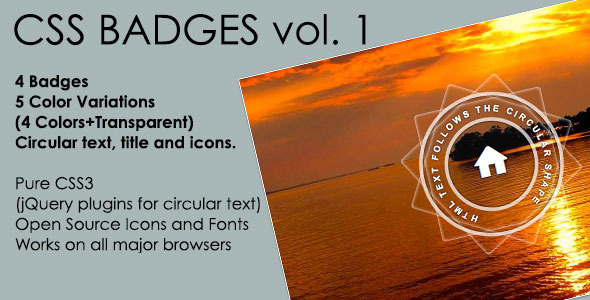
For web developers and visual designers aiming to elevate the aesthetic of portfolio showcases or promotional galleries, the search for a badge system that feels both premium and technically lightweight is ongoing. Enter a meticulously crafted asset that bridges the gap between minimalist design and striking visual flair: the Photo Overlay Badges: 12 Point Star & Circle kit. This isn’t just a set of decorative elements; it’s a functional toolkit designed to add a layer of professional polish to any image-driven project. Built on a foundation of pure CSS3 with a subtle touch of jQuery for dynamic circular text, this pack offers five distinct color variants—including a versatile transparent option—and four distinct badge shapes. Whether you are curating an online photography portfolio, developing a real estate listing website, or designing badges for an awards interface, this solution provides a clean, responsive, and highly customizable overlay system that enhances user engagement without bloating your codebase.
Key Features
- Five Distinct Color Palettes with Transparent Option: The kit includes predefined styles for Red, Orange, Blue, and Green, plus a highly sought-after Transparent variant. The transparent option allows the background image to bleed through seamlessly, making it perfect for minimalist designs where the badge should feel like a natural part of the photograph rather than a sticker placed on top.
- Four Unique Badge Variations: You are not locked into one aesthetic. The pack provides a classic 12-point star for a traditional hero badge, a 12-point star – rounded for a softer, more approachable feel, a 12-point star – outlined for a modern, thin-line vector look, and a clean Circle for universal application. This variety allows you to match the badge style to the specific mood of your project.
- Photo Overlay Layout (600×400px): Each badge is engineered to sit perfectly within a fixed 600×400 pixel container. This specific aspect ratio is optimized for standard thumbnail grids, hero images, and social media cards, ensuring consistent placement across your entire gallery or product listings without manual tweaking for each image.
- Pure CSS3 & Lightweight jQuery: The visual core of the badges relies entirely on CSS3 for transformations, gradients, and hover states, ensuring fast rendering and minimal server load. The only dependency is a very light jQuery script used exclusively for rendering the circular text along the badge path, providing a polished, dynamic effect without heavy animation libraries.
- Comprehensive PDF Instructions: Included with the download is a detailed PDF manual that guides you through installation, color customization, and badge placement. This ensures that even developers with intermediate CSS skills can implement the system efficiently.
- Dedicated Author Support: Backed by the author luca8link, support is available via the contact form on the CodeCanyon profile page. This direct line to the creator ensures that specific technical questions or customization requests can be addressed quickly.
Who Is This For? Use Cases
This asset is designed for creatives and developers who need a visual edge without reinventing the wheel. It serves a broad spectrum of digital applications, from high-end portfolio sites to dynamic e-commerce badges.
Photographers and Visual Artists
For photographers building a WordPress portfolio, the challenge is often how to mark a “Featured” or “Award Winning” image without distracting from the art itself. The Transparent badge variant is invaluable here. You can overlay a subtle, semi-transparent star or circle in the corner of the image to denote a “Best in Show” or “Editor’s Choice” award. The circular text jQuery effect can be used to display the year of the award or the name of the competition, wrapping elegantly around the badge shape, adding a sophisticated editorial quality to the layout.
UI/UX Designers and Front-End Developers
When designing UI kits or mockups in tools like Figma or Adobe XD, you often need scalable, code-based elements that can be translated into a live build. This badge kit serves as a ready-made component. Developers can use the CSS3 variables to quickly rebrand the colors to match a client’s palette or adjust the outline thickness. The fixed 600×400px overlay layout is ideal for thumbnail grids in digital asset management systems, where consistency is critical for a professional user experience.
E-Commerce Store Owners (WooCommerce Integration)
While the kit is not a plugin specifically built for WooCommerce, it can be easily integrated into product catalog themes. Use the Red 12-point star as a “Best Seller” tag, the Green circle for “In Stock,” or the Orange outlined star for a “Limited Edition” label. Because the assets are pure HTML/CSS, they can be inserted into template files (like content-product.php) or via a custom shortcode, giving you total control over placement on product images.
Event and Awards Sites
For conference websites, film festivals, or sports event pages, you need a visual hierarchy for winners and nominees. The 12-point star – rounded works exceptionally well as a “Gold,” “Silver,” and “Bronze” indicator when combined with the included color variants. The circular text can be easily customized to show the event date or category name, making it a dynamic way to highlight competition results without needing a complex backend system.
Technical Details & Compatibility
This badge kit is engineered for modern web standards. It relies exclusively on CSS3 for shape rendering, transitions, and hover effects, supported by a minimal jQuery script (only for the circular text path functionality). The asset is compatible with all modern browsers including Chrome, Firefox, Safari, and Edge. It does not require any third-party image libraries or heavy JavaScript frameworks, making it an excellent choice for performance-optimized sites. The layout is designed for a fixed 600×400px container, ensuring pixel-perfect alignment in standard grid systems. While the download does not include a specific version number, the use of current CSS3 standards and recent jQuery methods indicates it is optimized for modern WordPress and static site environments (PHP 7.0+). The PDF manual provides clear instructions for adapting the code to various content management systems.
Pros and Cons
Pros
- Lightweight performance: Pure CSS3 means no heavy image files or external dependencies.
- High visual versatility: Four badge shapes and five colors (including transparent) offer massive design flexibility.
- Clean source code: The HTML structure is semantic and easy to customize, making it ideal for developers who want to tweak values.
- Professional documentation: The PDF guide is thorough, reducing the learning curve for beginners.
- Direct author support: Access to the creator via the CodeCanyon profile provides reliable technical backup.
Cons
- Fixed container size: The 600×400px layout is not fluid by default. You may need to add your own CSS media queries to make it fully responsive on mobile screens.
- jQuery dependency for text: While minimal, the circular text feature does require jQuery, which may be redundant for projects using vanilla JS or modern frameworks like React.
- Not a click-and-install plugin: This is a code-based asset, not a WordPress plugin. Users without basic HTML/CSS editing skills may find the manual installation process challenging.
- No built-in admin panel: Changing colors or adjusting sizes requires editing the CSS file directly, rather than toggling options in a dashboard interface.
Frequently Asked Questions
Is this badge kit compatible with the latest versions of WordPress and WooCommerce?
Yes, the kit is fully compatible with any CMS or framework that supports standard HTML, CSS3, and jQuery. Since it is a front-end asset, it works seamlessly with WordPress 5.x and 6.x, including WooCommerce. However, it does not come as a plugin; you will need to add the code to your theme’s template files (e.g., via a child theme or a custom shortcode plugin). The PDF instructions provide guidance on integrating the overlays with popular WordPress gallery and portfolio themes.
Can I change the colors of the badges to match my brand?
Absolutely. The colors provided (Red, Orange, Blue, Green, and Transparent) are starting points. Because the kit is built entirely with CSS3, you can modify the hex codes in the stylesheet to match your exact brand guidelines. The outlined variation, in particular, is very easy to recolor by adjusting the border-color property. The transparent variant is also highly customizable, as you can adjust the opacity using the rgba() function to achieve the perfect level of subtlety over your background images.
Does the product include support for mobile devices and Retina displays?
Yes. The badges are rendered using scalable vector shapes via CSS, meaning they look crisp on high-resolution Retina displays. For mobile responsiveness, you will need to add a simple media query to scale the 600×400px container proportionally. The CSS is clean and well-commented, making it straightforward to add rules like max-width: 100%; height: auto; to ensure the badge scales down gracefully on smaller screens without breaking the circular text alignment.
Final Verdict
The Photo Overlay Badges: 12 Point Star & Circle kit delivers exactly what it promises: a clean, efficient, and visually impressive way to annotate images. It bypasses the need for clunky image-based badges or heavy JavaScript libraries, instead relying on the power of CSS3 to deliver a smooth, professional result. The inclusion of the transparent variant and the dynamic circular text feature sets it apart from simpler badge solutions, offering a depth of customization that creative professionals will appreciate. Author luca8link has a solid reputation on CodeCanyon for providing well-documented, functional assets, and the direct support channel ensures you are not left in the dark with implementation issues. For designers and developers looking to instill their projects with an immediate sense of authority and polish—whether for an awards gallery, a storefront, or a personal portfolio—this badge kit is a smart, cost-effective investment. Stop spending hours trying to build and align your own overlays; get the complete, ready-to-deploy solution now and let your images speak with a badge of quality. Click the link to add this versatile pack to your creative toolkit.