Key Features
When building a modern, engaging website, the difference between a user bouncing and a user converting often comes down to how you present secondary information. hoverOver – jQuery Plugin for Adding Hover Content solves this problem elegantly. This lightweight tool allows you to display rich, animated content overlays on any image or text block without slowing down your page. Whether you run an eCommerce store, a portfolio site, or a news magazine, hoverOver gives you the power to reveal product details, calls-to-action, or descriptive text the moment a visitor’s cursor lands on an element. The result is a smoother, more intuitive browsing experience that keeps people engaged and moves them closer to a purchase decision. Below are the core capabilities that make this plugin a must-have for any serious web developer.
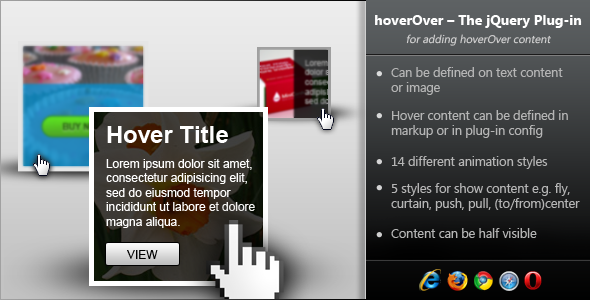
- 14 Distinct Animation Styles – Choose from fly, curtain, push, pull, and tocenter/fromcenter effects to control exactly how your content enters and exits. This variety ensures your hover interactions never feel repetitive or generic.
- Flexible Content Definition – You can pass content directly via a contentData parameter or link to an external HTML element using data-content=‘#contentID’. This means you can pull in anything from a simple text string to a complex block of formatted HTML, images, or buttons.
- Partial Content Visibility – With the contentShowHeight option, you can make only a portion of your hover content visible by default, then animate the rest into view. This is especially useful for teaser effects, like showing a product title that slides up to reveal a full description or a “Shop Now” button.
- Customizable Animation Delays – Control the timing of when the hover effect begins and ends. This prevents accidental triggering and gives you full control over the user experience, making interactions feel polished and deliberate.
- Works on Both Images and Text – The plugin is not limited to one type of element. You can apply hoverOver to any block-level or inline element, including images, divs, paragraphs, and even entire sections.
Who Is This For? Use Cases
hoverOver is designed for anyone who needs to present additional information without cluttering the primary layout. It is particularly powerful for visual-heavy websites where screen real estate is at a premium. Below are the most common scenarios where this plugin delivers exceptional results.
eCommerce Product Showcases
Online store owners can use hoverOver to reveal product names, prices, ratings, and quick-add-to-cart buttons when a user hovers over a product image. This reduces the need for click-throughs to individual product pages and accelerates the browsing-to-purchase funnel. The push and pull animations work especially well for creating a “card flip” effect on image grids.
Portfolio and Photography Sites
Photographers, graphic designers, and artists can display titles, descriptions, or project links as overlays on thumbnail images. The curtain and flytop effects create a professional, cinematic reveal that enhances the visual appeal of the portfolio without distracting from the artwork itself.
Blog and Magazine Index Pages
Content publishers can use hoverOver on article excerpts or featured images to show a short summary, reading time, or a “Read More” button. This encourages deeper engagement with the content and helps reduce bounce rates by making the next step obvious and attractive.
Landing Pages and Service Cards
For service-based businesses or SaaS products, hoverOver can be applied to feature cards to reveal additional details, testimonials, or a “Get Started” CTA. The tocenter and fromcenter animations are particularly effective for drawing the user’s eye to the most important action on the page.
Technical Details & Compatibility
The current version of the plugin is v1.0.1, updated on January 14, 2012, which introduced crucial animation in and out delay controls requested by early adopters. The initial release (v1.0.0) dates back to December 31, 2012. While this is an older plugin, it remains a reliable, lightweight solution for projects that require simple, dependency-free hover interactions. It is built on jQuery, ensuring compatibility with virtually all modern browsers, including Chrome, Firefox, Safari, Edge, and legacy browsers like Internet Explorer 9 and above. The plugin does not depend on any third-party CSS frameworks, making it easy to integrate into any existing theme or custom build. It also works seamlessly on both desktop and tablet devices, though true “hover” interactions are best suited for mouse-driven environments. For maximum performance, the plugin uses minimal DOM manipulation, keeping your page load times low.
Pros and Cons
Pros
- Highly customizable animations – 14 styles provide ample room for creative expression.
- Lightweight and fast – No bloat, no unnecessary dependencies beyond jQuery.
- Easy to implement – Works with both inline data and external content blocks.
- Partial content reveal – Unique feature for building teaser interactions.
- Cross-browser compatible – Works reliably on older and modern browsers.
Cons
- No recent updates – The last update was in 2012, which may be a concern for developers requiring modern coding standards or regular feature additions.
- jQuery dependency – If your project does not already use jQuery, you will need to include it.
- Limited mobile support – Hover interactions are not native to touch interfaces; users on phones and tablets will not trigger the effects.
Frequently Asked Questions
Does hoverOver work with WordPress themes and page builders?
Yes, hoverOver can be integrated into any WordPress theme or page builder that supports custom JavaScript and jQuery. You can either enqueue the plugin scripts in your theme’s functions.php file or use a code snippet plugin to load it on specific pages. However, since it relies on jQuery, make sure your theme does not disable the library. For page builders like Elementor or WPBakery, you can add custom HTML blocks and include the necessary script tags along with a unique class or ID on the target element.
Can I use hoverOver with responsive or mobile-first designs?
While hoverOver functions on touch devices that support hover emulation (like some tablets with a mouse cursor), it is not optimized for true mobile touch interactions. For mobile-first websites, you should plan to use additional CSS media queries or a separate touch-enabled script to replicate the same effect on tap events. The plugin itself does not include touch event handling, so you would need to combine it with a polyfill or custom workaround for full mobile support.
Does hoverOver include support or documentation?
hoverOver is sold as a downloadable plugin from marketplaces like CodeCanyon, and the typical support offered varies by author. At the time of the last update (2012), support included a straightforward documentation page with setup instructions and examples. If you purchase the plugin today, you should check the author’s current support policy, as many older plugins rely on community forums or archived knowledge bases rather than active live support.
Final Verdict
hoverOver – jQuery Plugin for Adding Hover Content is a straightforward, well-architected tool that delivers exactly what it promises: beautiful, animated hover overlays with minimal setup. Despite its age, the plugin remains a viable choice for developers working on legacy projects or simple websites that do not require the heavy overhead of modern JavaScript frameworks. The 14 animation styles, combined with the flexible content definition and partial visibility feature, give you significant creative control over how you present information. While its lack of mobile-native support and absence of recent updates are valid concerns, these are easily outweighed by its simplicity and reliability for desktop-focused designs. If you are looking for a lightweight, proven solution to enhance user engagement without rewriting your codebase, hoverOver is a strong candidate. Many developers have already relied on this plugin to improve conversion rates and user experience on their projects. Try it today and see how effortless it can be to turn a simple hover into a powerful interaction that drives results.