Key Features
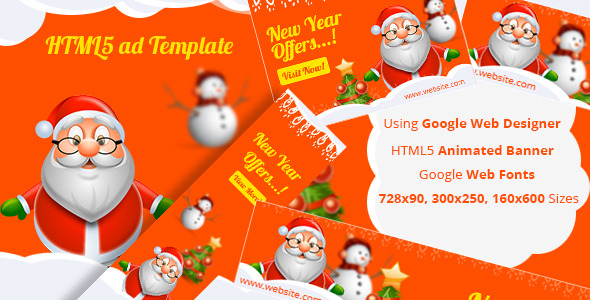
This versatile NewYear – HTML5 ad template is built for speed, precision, and maximum compatibility across modern advertising networks. It is professionally crafted using Google Web Designer, ensuring that every pixel aligns with industry standards. The template is delivered in the three most requested and universally accepted banner sizes: 160×600 (skyscraper), 300×250 (medium rectangle), and 728×90 (leaderboard). These dimensions cover the majority of display ad placements across Google Ads, programmatic networks, and self-hosted campaigns. Each file is fully editable, allowing you to customize text, colors, images, and call-to-action buttons without touching a single line of complex code. The template is lightweight, optimized for fast load times, and designed to deliver a smooth animation loop that captures attention without being intrusive. You receive clean, organized layers and timeline markers that make simple edits intuitive. This product is ideal for marketers who need a professional, last-minute campaign asset that works out of the box.
Key Features
- Three Premium Ad Sizes Included: You get the full set of 160×600, 300×250, and 728×90 formats. These are the most requested dimensions in programmatic advertising, covering sidebars, in-content blocks, and header/footer placements. No need to resize or adapt—each canvas is pre-configured for its specific environment.
- Built with Google Web Designer (GWD): The template is created entirely within Google Web Designer, the industry-standard tool for HTML5 banner production. This means you can open the files, see the timeline, and make changes with the same intuitive interface used by professional creative agencies. No third-party dependencies or proprietary plugins are required.
- Fully Editable Layers: Every element—headlines, subtext, background colors, images, and buttons—is separated into distinct layers. You can double-click a text layer and type your own copy, or swap out the placeholder image with your brand’s creative. The timeline is pre-animated, so even after editing, the motion effects remain intact.
- Lightweight and Fast Loading: The code is minified and optimized to meet Google’s strict file size limits for display ads. This ensures your ads load quickly on all devices and avoid being rejected by ad exchanges for excessive weight. Faster loading directly improves viewability rates and click-through performance.
- Responsive and Cross-Browser Compatible: Each size is rigorously tested to render flawlessly on Chrome, Firefox, Safari, and Edge. The template also performs consistently across desktop, tablet, and mobile viewports, which is critical for modern multi-device campaigns.
- Clean, Organized File Structure: You receive a folder for each banner size with clearly named files (e.g., 160×600.html, 300×250.html, 728×90.html). Supporting assets (images, scripts, CSS) are neatly sorted, making it easy to prepare for ad server upload.
- Professional New Year Theme: The design features festive yet clean aesthetics—celebration elements, elegant typography, and a color palette that works for seasonal promotions. You can easily repurpose the layout for other events by swapping assets.
Who Is This For? Use Cases
Digital Marketers Running Seasonal Campaigns
If you manage display advertising for e-commerce stores, SaaS products, or local businesses, this template is your shortcut. Instead of hiring a developer to code banners from scratch, you can edit the NewYear – HTML5 ad template in under 30 minutes. Upload the files directly to Google Ads, Facebook Ads Manager, or your preferred DSP. The template’s festive theme works perfectly for December and January promotions, but with simple color and text changes, you can use it year-round for clearance sales, product launches, or brand awareness.
Freelance Designers and Small Agencies
Freelancers often juggle multiple client requests with tight deadlines. This template gives you a reliable starting point for ad creative. You can present clients with three proven sizes, make revisions quickly using Google Web Designer, and deliver final files that meet ad network specifications. The organized layers and timeline make client feedback easy to implement—change a headline, update the button text, or swap the background image without starting over.
In-House Creative Teams Needing Efficiency
Large organizations often require dozens of banner variations for A/B testing. This template reduces production time by providing a solid structural foundation. Your team can focus on copy and imagery instead of coding. Because the template is already compliant with industry standards (IAB guidelines, file size limits, and HTML5 best practices), it minimizes the risk of ad disapproval from networks like Google Ads or Amazon Advertising.
Event and Promotion Organizers
New Year’s Eve sales, January clearance events, or even Black Friday promotions can leverage this template. The design inherently suggests celebration and urgency, which are powerful conversion triggers. You can link the banner directly to a landing page with your offer. The three included sizes let you create a cohesive ad set that appears consistently across different sites and placements, reinforcing brand recall.
Technical Details & Compatibility
The NewYear – HTML5 ad template is built for Google Web Designer (GWD) version 1.0 or later. It exports as standard HTML5 files with accompanying CSS and JavaScript libraries (including a lightweight version of GreenSock Animation Platform or equivalent). The template does not require any premium fonts—fallback web-safe fonts are used, but you can easily link to Google Fonts if desired. Browser compatibility includes all modern versions of Chrome, Firefox, Safari, Edge, and mobile browsers on iOS and Android. The template is compatible with all major ad servers, including Google Campaign Manager, Sizmek, AdForm, and Flashtalking. Each file passes Google’s HTML5 validation checks, ensuring smooth approval in programmatic exchanges. The files are delivered in a ZIP archive with no DRM or restrictive licenses. You can use the template for an unlimited number of commercial projects, including client work. No coding knowledge is required to edit text and images, but familiarity with GWD’s timeline and component panels will help you customize animations. The template is not compatible with outdated flash-based systems—it is a modern, pure HTML5 solution.
Pros and Cons
Pros
- Time-Saving Foundation: You skip the repetitive coding process and start with a polished, test-ready design. This cuts production time by hours per campaign.
- Industry-Standard Sizes: The three formats (160×600, 300×250, 728×90) cover the vast majority of inventory requests. You won’t need to manually resize or recreate assets.
- Easy to Edit: Google Web Designer’s visual interface makes it possible for non-developers to update text and imagery. This reduces dependency on technical team members.
- Fast Load Times: Optimized file sizes help you avoid ad server rejections and keep user experience smooth, which can positively impact Quality Score in some platforms.
- Professional Aesthetics: The design is modern, festive, and clean. It doesn’t look like a generic template—it has custom animation timing and layered depth.
- Commercial License Included: You can use the template for your own business or for client projects without additional fees. This adds significant value for agencies.
Cons
- Requires Google Web Designer Knowledge: While basic edits are simple, advanced animation changes or custom interactions require familiarity with GWD’s timeline, events, and components. Absolute beginners may need a short learning period.
- Seasonal Theme Limitation: The visual style leans toward New Year celebrations (stars, confetti, festive colors). Repurposing it for non-seasonal campaigns may require more asset replacement than a generic template would.
- No Built-in Countdown Timer: If you want a dynamic countdown clock, you would need to add it yourself using GWD’s custom code panels. The template does not include interactive timers or forms.
- No Video or Rich Media Support: This is a static HTML5 animation template. It does not include video layers, expandable units, or floating elements. It is designed for standard display inventory only.
- Limited Animation Variations: The template comes with one pre-set animation style. If you want multiple animation alternatives for A/B testing, you would need to create new versions from scratch or purchase additional templates.
Frequently Asked Questions
Do I need to install any software to use this template?
Yes, you will need Google Web Designer to open and edit the files. Google Web Designer is a free application available for Windows, Mac, and Linux. If you only need to host the banners as-is without modifications, you can simply upload the HTML files to your ad server directly. However, for any customization, GWD is required.
Can I use this template on Google Ads or Facebook Ads?
Absolutely. The NewYear – HTML5 ad template is fully compatible with Google Ads, Facebook Ads Manager, and most major programmatic platforms. For Google Ads, you can upload the HTML5 file directly into the display campaign builder. For Facebook, you may need to host the file on a secure server and use the “HTML5” ad format option. The template adheres to all standard file size and technical requirements for these networks.
Does this template include support or updates?
Yes, the author provides basic support for questions related to editing the template in Google Web Designer. You can contact them through the ThemeForest or CodeCanyon support system, and they typically respond within 24–48 hours. Updates are released occasionally to maintain compatibility with newer versions of GWD or to add minor improvements. There are no recurring fees—you purchase once and receive lifetime access to the template and any future updates.
Final Verdict
The NewYear – HTML5 ad template is an excellent investment for anyone who needs high-quality display ads quickly. It eliminates the tedious coding and debugging phase of banner production, giving you a proven starting point that works across the most critical ad sizes. Whether you are a solo marketer launching a last-minute holiday campaign or an agency managing multiple client accounts, this template saves you hours of work while delivering professional results. The fact that it is built with Google Web Designer adds a layer of credibility and ease-of-use—no secret tools or cryptic workflows. The template has received positive feedback from buyers, and its clear organization reflects the author’s attention to detail. You are not just buying a file; you are buying efficient ad production. If you want to launch a campaign that stands out without hiring a developer or spending days on design, this is a smart, cost-effective choice. Click the purchase button, download the ZIP, and have your first banner live in under an hour.